Operation42
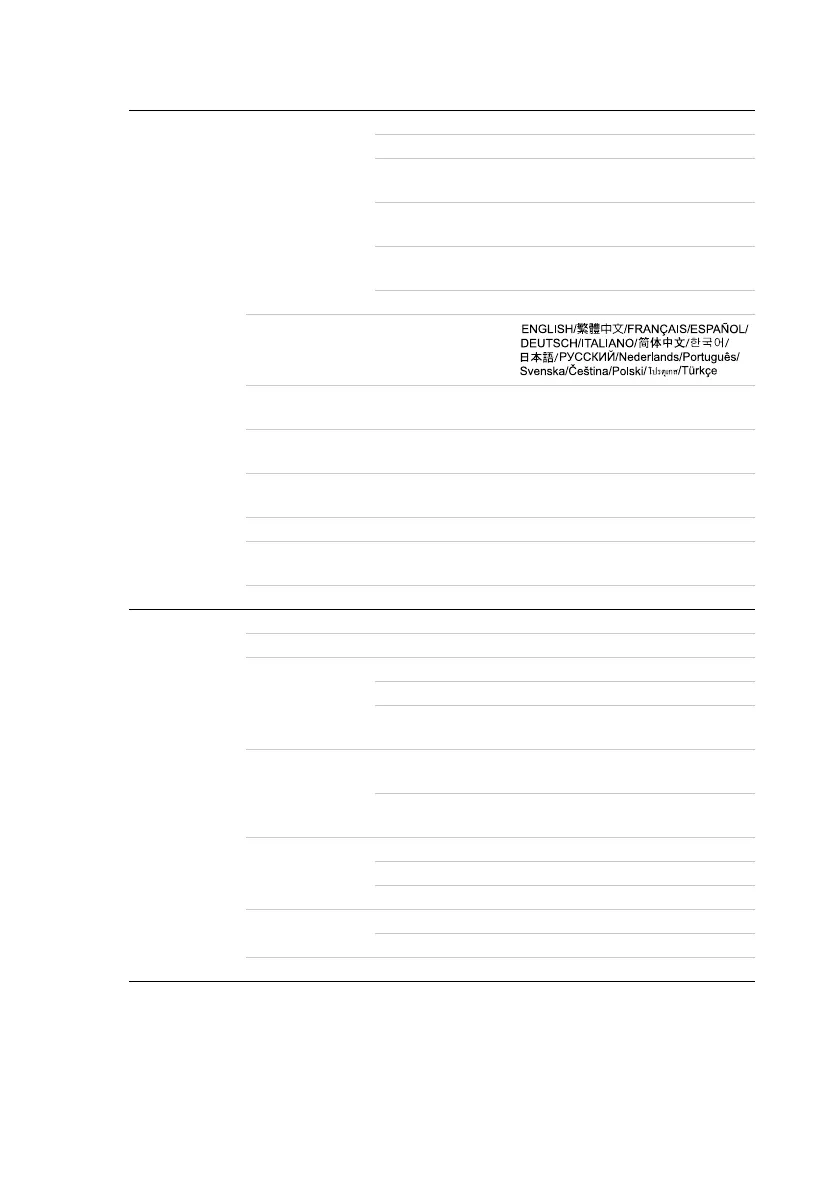
SYSTEM
SETUP:
Basic
Presentation
Timer
Timer period 1~240 minutes
Timer display Always/1 min/2 min/3 min/Never
Timer position
Bottom-right/Top-right/Bottom-
left/Top-left
Timer counting
direction
Count down/Count up
Timer audible
reminder
On/Off
On/Off
Language
Projector Position
Front table/Rear table/Rear
ceiling/Front ceiling
Auto Power Off
Disable/5 min/10 min/15 min/20
min/25 min/30 min
Blank Timer
Disable/5 min/10 min/15 min/20
min/25 min/30 min
Panel Key Lock On/Off
Timer Controller
Disable/30 min/1 hr/2 hr/3 hr/4
hr/8 hr/12 hr
Splash Screen Black/Blue/BenQ
SYSTEM
SETUP:
Advanced
Quick Cooling Off/On
High Altitude Mode Off/On
Audio Settings
Mute Off/On
Volume
Power on/off ring
tone
Off/On
Menu Settings
Menu display time
5 sec/10 sec/15 sec/20 sec/25
sec/30 sec
Menu position
Center/Top-left/Top-right/Bottom-
right/Bottom-left
Lamp Settings
Lamp mode Normal/Economic
Reset lamp timer
Equivalent lamp hour
Security Settings
Change password
Power on lock On/Off
Reset All Settings



 To Next Page