EasyManua.ls Logo

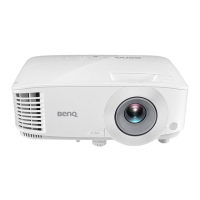
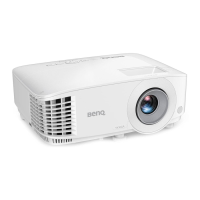
BenQ MX520 - User Manual

BenQ MX520
59 pages
Print Icon
To Next Page IconTo Next Page
Loading...
MX520/MX703
Digital Projector
User Manual
Downloaded From projector-manual.com BenQ Manuals

Table of Contents

Other manuals for BenQ MX520

Questions and Answers

  • C
    Christina GillJul 26, 2025
    How to fix a BenQ MX520 that does not turn on?
    • J
      Jordan BruceJul 26, 2025
      If your BenQ Projector is not turning on, check the following: - Ensure the power cord is securely plugged into both the projector's AC power jack and the power outlet. Also, verify that the power outlet switch is turned on, if applicable. - If you've recently turned the projector off, wait until the cooling down process is complete before attempting to turn it on again.
  • L
    Leslie DavisJul 30, 2025
    Why my BenQ MX520 does not turn on?
    • D
      Daniel RamseyJul 30, 2025
      If your BenQ Projector is not turning on, it could be due to the following reasons: * There's no power from the power cord. Make sure the power cord is plugged into the AC power jack on the projector and into a working power outlet. If the power outlet has a switch, ensure it is switched on. * You're attempting to turn the projector on again during the cooling process. Wait until the cooling down process has completed.
  • C
    Cynthia StephensAug 3, 2025
    How to fix a BenQ MX520 remote control that is not working?
    • R
      Rachel GreenAug 3, 2025
      If the remote control for your BenQ Projector isn't working, consider these possible causes: * The battery is out of power. Replace the battery with new ones. * There is an obstacle between the remote control and the projector. Remove the obstacle. * You are too far away from the projector. Move closer, standing within 8 meters (26 feet) of the projector.
  • K
    kevin59Aug 7, 2025
    How to fix a blurred image on a BenQ Projector?
    • R
      Ronald LyonsAug 8, 2025
      If the image from your BenQ Projector appears blurred, here are a few things to check: * The projection lens is not correctly focused. Adjust the focus of the lens using the focus ring. * The projector and the screen are not aligned properly. Adjust the projection angle and direction, as well as the height of the projector if necessary. * The lens cover is still closed. Open the lens cover.
  • N
    Nancy BarberAug 12, 2025
    What to do if my BenQ MX520 has no picture?
    • J
      jessica05Aug 12, 2025
      If your BenQ Projector shows no picture, there might be several reasons. First, ensure that your video source is turned on and properly connected. Second, verify the connection between the projector and the input signal device. Third, select the correct input signal using the SOURCE key on the projector or remote. Finally, make sure the lens cover is open.
  • J
    Jake LewisAug 16, 2025
    Why is my BenQ Projector remote control not working?
    • Z
      Zachary RobertsonAug 16, 2025
      If the remote control for your BenQ Projector isn't working, try these steps: First, replace the batteries with new ones. Second, make sure there is nothing blocking the path between the remote and the projector. Third, ensure you are within 8 meters (26 feet) of the projector.
  • J
    Jason RodriguezAug 20, 2025
    Why is the image on my BenQ MX520 blurred?
    • C
      coxchristopherAug 20, 2025
      If your BenQ Projector image is blurred: - Adjust the focus of the lens using the focus ring. - Adjust the projection angle, direction, and height of the projector to properly align it with the screen. - Ensure the lens cover is open.

Summary

Important Safety Instructions

General Safety Practices

Essential safety advice for operation, power, and environment.

Operational, Environmental, and Physical Safety

Covers lamp, electrical, environment, placement, physical, liquid, and ceiling mount safety.

Positioning Your Projector

Installation Locations and Setup

Details four installation options and system setup for projector placement.

Image Size and Projection Dimensions

Guides users on achieving desired image size, distance, and provides dimension charts.

Operation

Maintenance

Lamp Management and Replacement

Covers lamp life, replacement timing, the replacement process, and resetting the timer.

Troubleshooting

Common Operational Issues and Solutions

Covers projector not turning on, no picture, blurred image, remote control, and password errors.

BenQ MX520 Specifications

General IconGeneral
Projection distance- m
Vertical scan range23 - 120 Hz
Horizontal scan range15 - 102 kHz
Projection technologyDLP
Contrast ratio (typical)13000:1
Screen size compatibility40 - 300 \
Projector native resolutionXGA (1024x768)
RS-232 ports1
Focal length range21 - 23.1 mm
Aperture range (F-F)2.56 - 2.8
Lamp power210 W
Light source typeLamp
Service life of light source4500 h
Service life of light source (economic mode)6000 h
3DYes
Full HDNo
Analog signal format systemNTSC, PAL, SECAM
Supported graphics resolutions1024 x 768 (XGA), 1600 x 1200 (UXGA), 640 x 480 (VGA)
RMS rated power2 W
USB connector typeMini-USB B
Serial interface typeRS-232
USB 2.0 ports quantity-
VGA (D-Sub) ports quantity3
Component video (YPbPr/YCbCr) in0
Noise level33 dB
Noise level (economic mode)28 dB
On Screen Display (OSD) languagesARA, BUL, CHI (SIMPL), CHI (TR), CZE, DAN, DEU, DUT, ENG, ESP, FIN, FRE, GRE, HUN, ITA, JPN, KOR, NOR, POL, POR, RUM, RUS, SWE, THA, TUR
PlacementDesktop
Product typeStandard throw projector
Product colorBlack
Power sourceAC
AC input voltage100 - 240 V
AC input frequency50 - 60 Hz
Power consumption (standby)0.5 W
Power consumption (typical)293 W
Cables includedVGA
Weight and Dimensions IconWeight and Dimensions
Depth232.6 mm
Width287.3 mm
Height114.4 mm
Weight2400 g

Related product manuals