Maintenance28
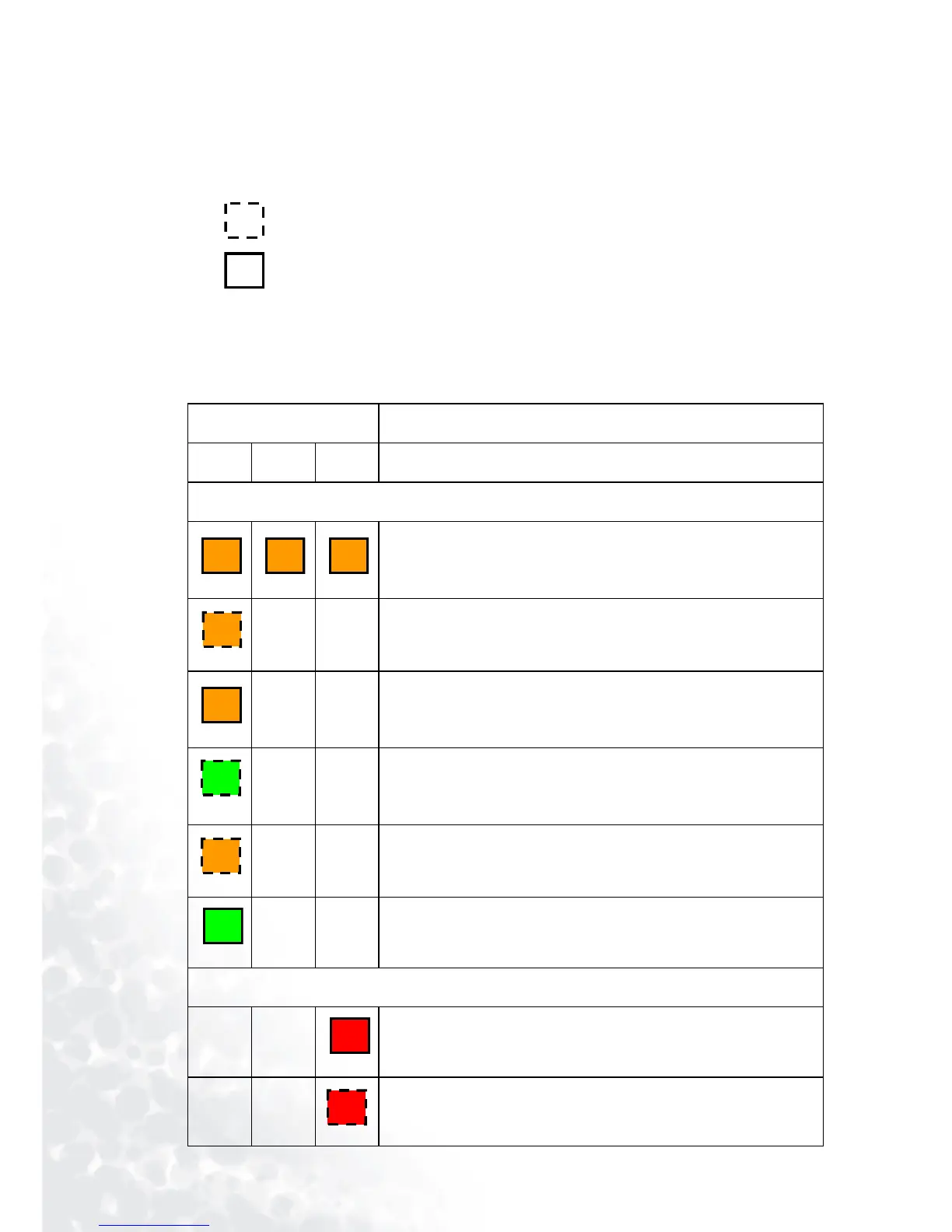
LED Indicator Status & Illustration
llustration
1. - : LED OFF
2. : LED blinking
3. : LED solid ON
4.
O : LED lights up orange.
5.
R : LED lights up red.
6.
G : LED lights up green.
LED Status & Description
Power Temp Lamp
Power events
Power switch on
--
Power-up cooling. Projector cooling system will auto-cool for
110 seconds when power was abnormally shutdown without
cooling and power on again within hours.
--
Stand-by
--
Lamp LED is blinking during powering up.
--
Power-down cooling for 110 seconds after power has been
turned off.
--
Normal operation
Lamp events
--
Lamp spoil, it is warning you that lamp usage has exceeded
3000 hours. Replace the projection lamp with a new one
immediately.
--
Lamp error, the lamp is not properly attached or lamp
damaged. Please contact your dealer.
O O O
O
O
G
O
G
R
R


 To Next Page