24 How to adjust your monitor
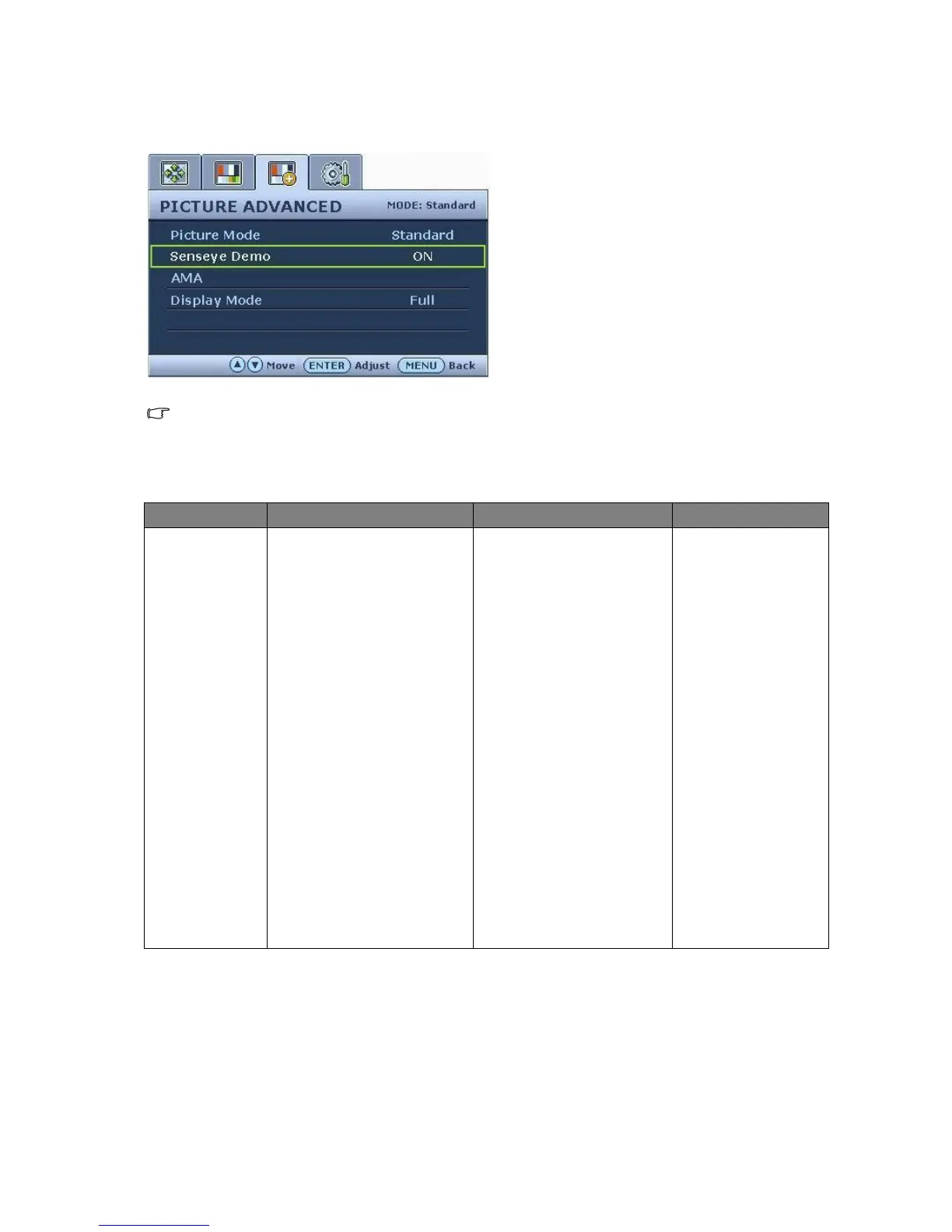
Picture Advanced menu
Display Mode is only available for wide-screen
models.
1. Press the MENU key to display the main
menu.
2. Press the t or u keys to select
PICTURE ADVANCED and then press the
ENTER key to enter the menu.
3. Press the t or u keys to move the
highlight to a menu item and then press
the ENTER key to select that item.
4. Press the t or u keys to make
adjustments or selections.
5. To return to the previous menu, press the
MENU button.
Item Function Operation Range
Picture Mode
Selects a picture mode that
best suits the type of
images shown on the
screen.
• Standard - for basic PC
application.
• Movie - for viewing
videos.
• Dynamics - for viewing
landscape-specific videos
and playing games.
• Photo - for viewing still
images.
• Action Game - for play-
ing action games.
• Racing Game - for play-
ing fast paced racing
games.
Press the t or u keys
to change the settings.
• Standard
• Movie
• Dynamics
• Photo
• Action Game
• Racing Game



 To Next Page