6
operating instructions TC75
Brennkurve verändern
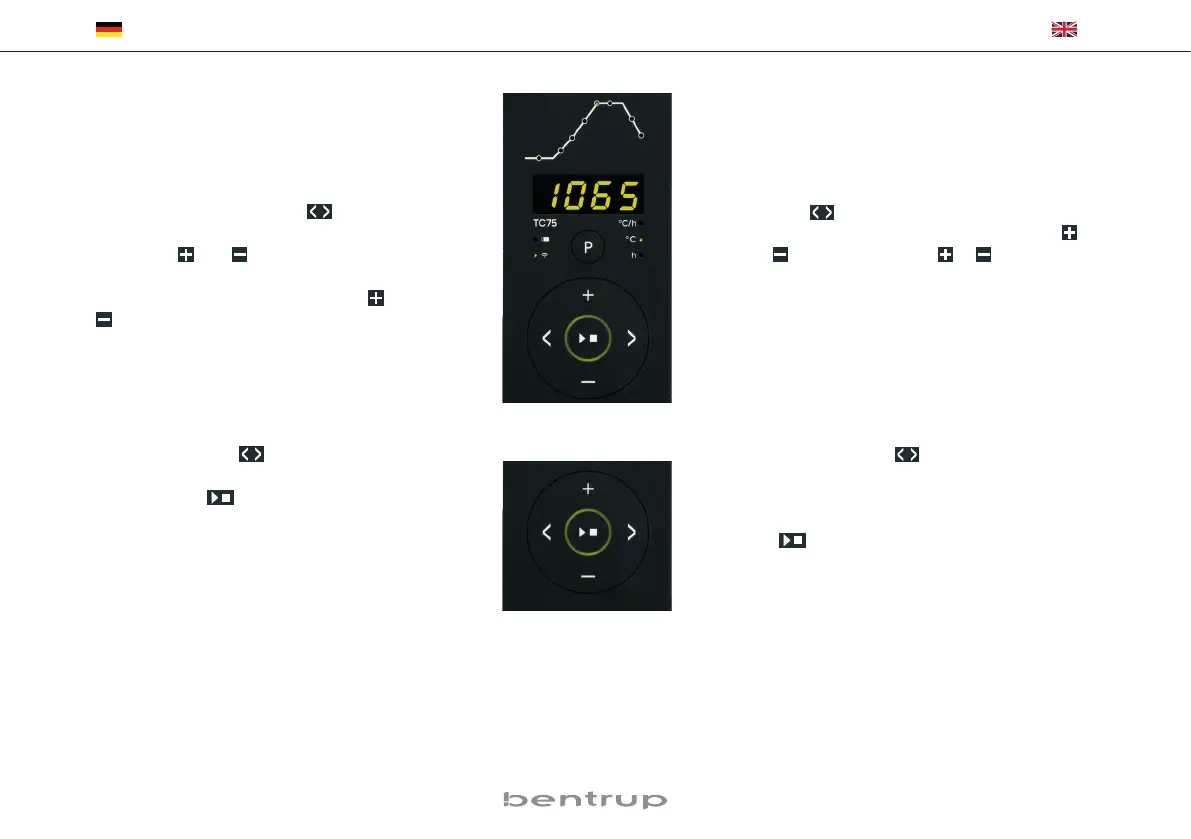
Die 6 Brennprogramme des TC75 können Sie auf
Ihre Anwendung anpassen. Um beispielsweise die
Endtemperatur von Programm Nr. 4 auf 1065 °C
zu ändern, wählen Sie über die Programmtaste
Programm Nr. 4 aus. Über die
Tasten wäh-
len Sie das entsprechende Segment aus. Durch
Drücken der bzw. Taste können Sie den an-
zeigten Wert auf z. B. 1065 °C ändern (Bild A). Für
größere Werte änderungen halten Sie die bzw.
Taste gedrückt.
Adjusting a Firing Curve
You can adapt the 6 firing curves of the TC75 to
your application. For example, to change the end
temperature of programme no. 4 to 1065 °C,
select programme no. 4 using the programme key.
Use the keys to select the relevant segment.
To change the temperature to 1065 °C use the
or key (fig. A). Hold the or key pressed
for rapid major changes of the value.
(A)
(B)
Über die Pfeiltasten
können Sie die weiteren
Ab schnitte der Brennkurve einsehen und ggf. ver-
ändern. Mit der Taste kann das Programm
jederzeit gestartet werden (Bild B).
Die Änderungen der Programme bleiben auch
nach dem Ausschalten erhalten. Beachten Sie da-
her, dass die in dieser Anleitung abgebildete Pro-
grammtabelle nicht mehr aktuell ist, wenn Sie die
Werte auf Ihre Bedürfnisse angepaßt haben.
Use the arrow keys
to navigate through the
segments of the firing curve. All displayed pro-
gramme values can be changed if needed. You can
commence the programme at any time by pressing
the key (fig. B).
All changes of the programmes are saved after
power off. Therefore note that the programme
table shown in the beginning of this chapter is no
longer current once you have adapted the firing
curve to your application.


 To Next Page
 Loading...