25000
rpm
1 2 3
3
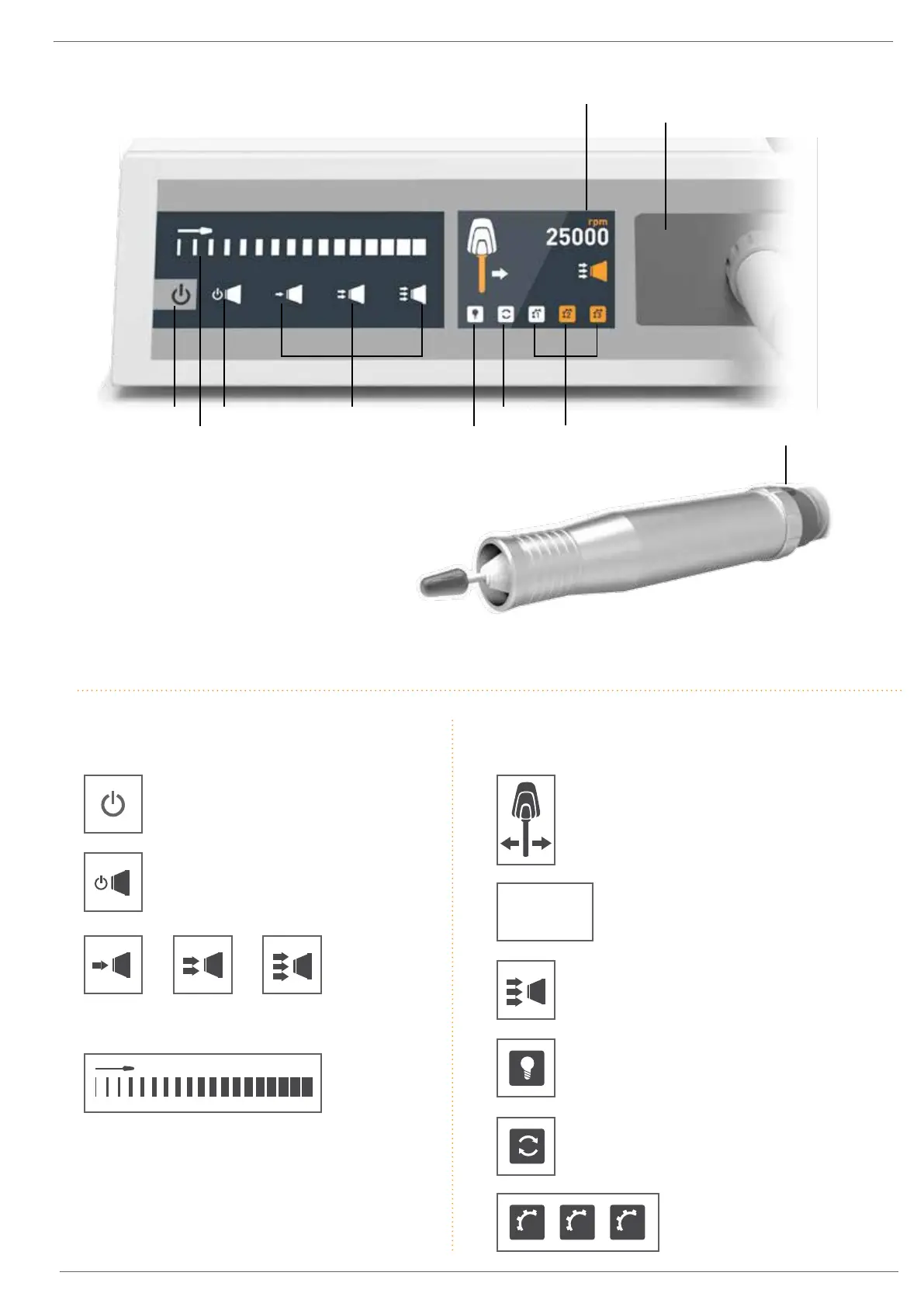
1. Start/Stop Button
2. Burr Speed Control Slider
3. Suction Stop/Stand-by Button
4. Vacuum Level Switches
5. External LED Light Switch
(not available in Australia)
6. Burr Rotation Switch
7. Memory Buttons
8. Burr Speed Indicator
9. Dustbag Compartment
(behind vacuum hose face plate)
10. Handpiece On/Off Switch
Main Features & Controls
8.
9.
10.
1. 3. 4.
5. 7.
6.
2.
Touch Pad Button Functions
Start/Stop Button
Starts/Stops selected burr speed and
direction, and vacuum suction.
Suction Stop/Stand-by Button
Stops suction and activates Stand-by
Mode. Hold button for 4 seconds to
activate Stand-by Mode.
Suction Level Buttons
Selects Low, Medium or High vacuum suction.
Burr Speed Control Slider
Slide finger across to adjust Burr Speed
(5,000rpm-25,00rpm).
Touch Display Functions
Burr Direction & Size Indicator
Displays current Burr Direction and suitable
burr size for selected Burr Speed.
5,000-10,000 rpm Large Burr
10,000-20,000 rpm Medium Burr
20,000-25,000 rpm Small Burr
Burr Speed Indicator
Displays currently selected Burr Speed.
Suction Strength Indicator
Displays currently selected Vacuum
Strength (Low, Medium or High).
External LED Light Switch
(not available in Australia)
Burr Direction Button
Switches Burr Direction
clockwise/anti-clockwise.
Memory Buttons
Press to select saved preferred
settings. Refer to Pg 4 for instructions
on how to programme memory slots.








 To Next Page