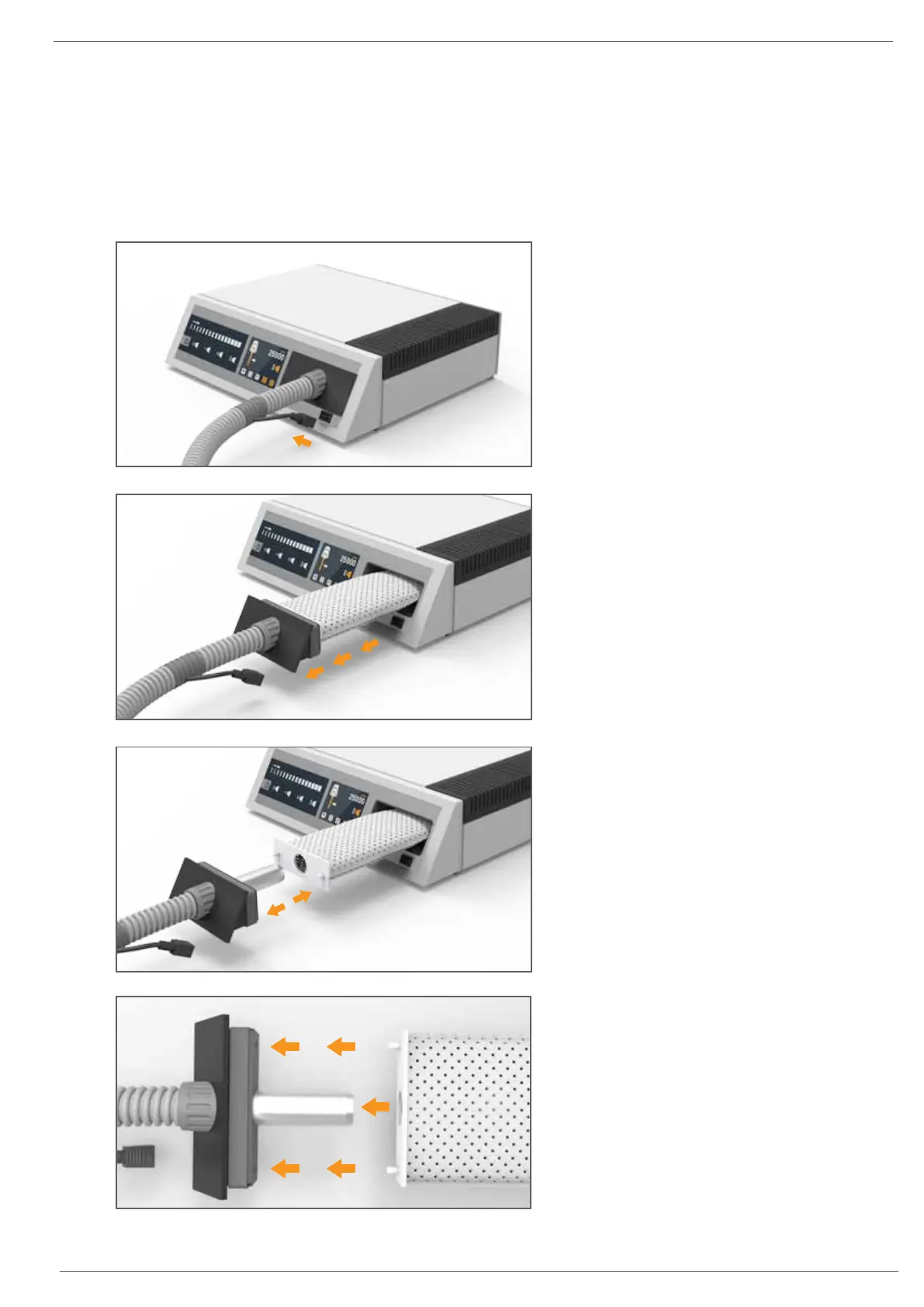
When the Dustbag Symbol appears on the Touch Screen, the Dustbag should be replaced.
To do this:
1. Switch the unit OFF by pressing the Power On/Off Rocker Switch at the rear of the Main Control Unit.
Changing the Dustbag
5
5. Slide the new Dustbag onto the alloy Vacuum
Hose Exit Pipe. Ensure the two male pins of the
Dustbag connect into the female ports at the
rear of the Vacuum Hose Face Plate. This will
reduce the chances of the Dustbag coming
loose while the drill is in operation.
6. Finally, insert the now connected Dustbag into
the Dustbag Compartment and firmly press the
Vacuum Hose Face Plate back into the Main
Control Unit.
2. Pull the Handpiece Power Socket out from the
Main Control Unit. DO NOT REMOVE VACUUM
HOSE FACE PLATE UNTIL THE HANDPIECE POWER
SOCKET HAS BEEN REMOVED.
3. Gently pull the Vacuum Hose Face Plate (No.9)
out of the Dustbag Compartment
(the Dustbag should come out with it).
4. Remove the Dustbag from the alloy Vacuum
Hose Exit Pipe by pulling it free. Dispose of the
full Dustbag.








 To Next Page