HYDRONIC UNIT
17
procedure, repeat all the steps for the
remaining time choice - from 1 to 5
(weekdays), from 6 to 7 (weekends) or
day by day (1,2,3,4,5,6,7).
Press OK and/or close the flap.
Allocating time periods to
temperatures
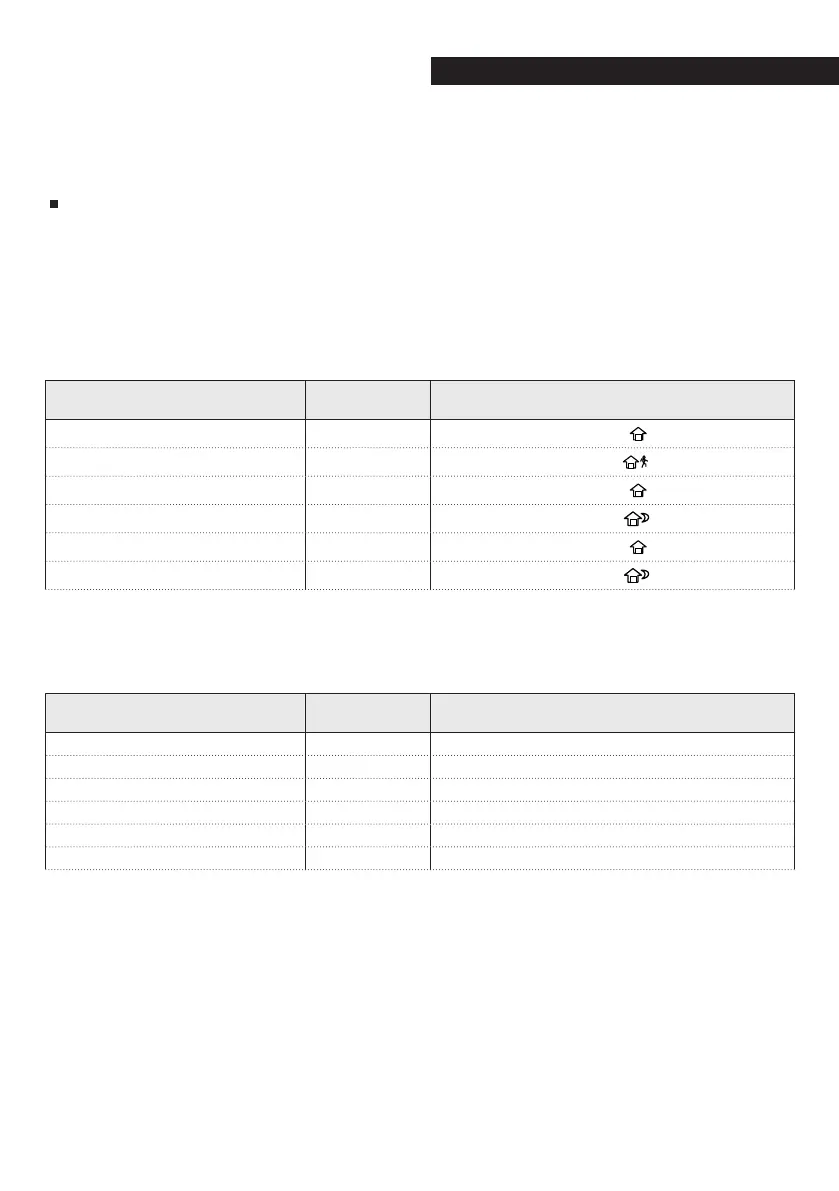
Below is an example of how a program-
ming would look using the factory-set
default periods and the Touch ‘N’ Go
options.
Default period start time
Period
number
Default options
Touch ‘N’ Go for each period
6:00 AM 1
Home (
)
8:00 AM 2
Away (
)
5:00 PM 3
Home (
)
10:00 PM 4
Sleep (
)
11:00 PM 5
Home (
)
00:00 AM 6
Sleep (
)
Note your hourly schedule here accord-
ing to your everyday habits and use this
information according to the instruc-
tions provided below.
Personal period start time
Period
number
Customised options
Touch ‘N’ Go for each period
1
2
3
4
5
6



 To Next Page