Approx. 175 x 50 x 52 mm (L x W x H)
VIII. BATTERIES
1. CHANGING THE BATTERIES
When the battery symbol " " flashes on the display screen, the batteries need to be
changed.
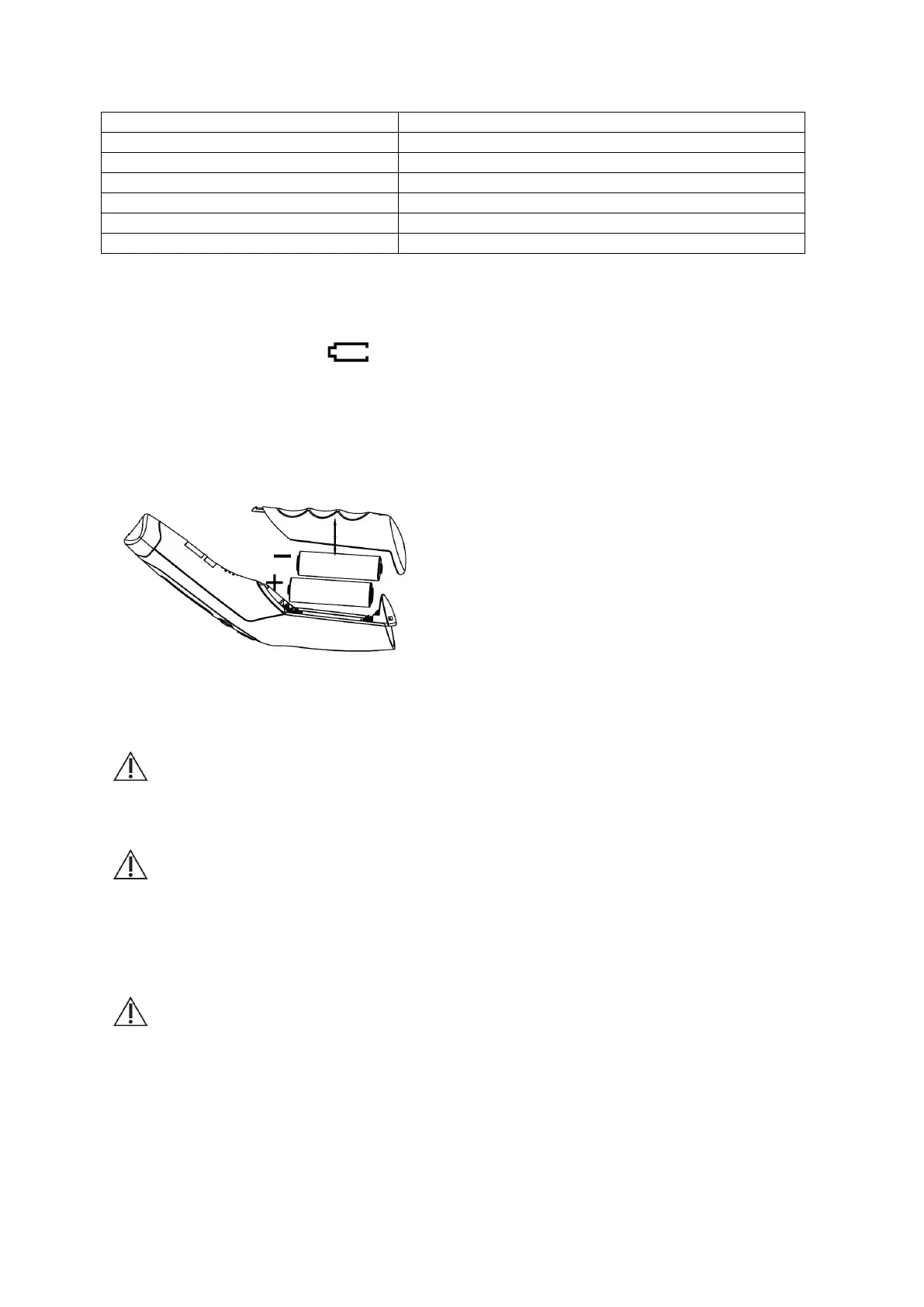
To change the batteries, open the lid on the back of the device (as fig.2) and ensure the
batteries are correctly positioned. Improperly installing the batteries could cause damage to
the device. Do NOT use rechargeable batteries. Use single-use batteries only.
fig.2
2. DISPOSING OF BATTERIES
To protect the environment, dispose of empty batteries at appropriate collection sites
according to national or local regulations. The disposal method is defined in Chapter XV.
Notes on handling batteries
• If your skin or eyes come into contact with battery fluid, rinse the affected area with water
and seek medical assistance.
Choking hazard! Small children may swallow and choke on batteries. Store batteries
out of the reach of small children.
• If a battery has leaked, put on protective gloves and clean the battery compartment with a
dry cloth.
• Protect batteries from excessive heat.
Risk of explosion! Do not throw batteries into a fire.
• Use identical or equivalent battery types only.
• Always replace all batteries at the same time.
• Do not use rechargeable batteries.
• Do not disassemble, split or crush the batteries.
IX. INCLUDED IN DELIVERY


 To Next Page