EasyManua.ls Logo

Bertazzoni REF24RCPIXL - Page 13

Bertazzoni REF24RCPIXL
76 pages
Print Icon
To Next Page IconTo Next Page
To Previous Page IconTo Previous Page
Loading...
13
Date Time
°c / °f Language
9
Month
11
10
7
8
OK
2017
Year
2019
2018
2015
2016
OK
Functions
Settings
4
+
°C
9Day
11
10
7
8
OK
Hour?
12 24
Functions
Settings
4
+
°C
37Min
39
38
35
36
OK
Date Time
°c / °f Language
9Hour
11
10
7
8
OK
EN
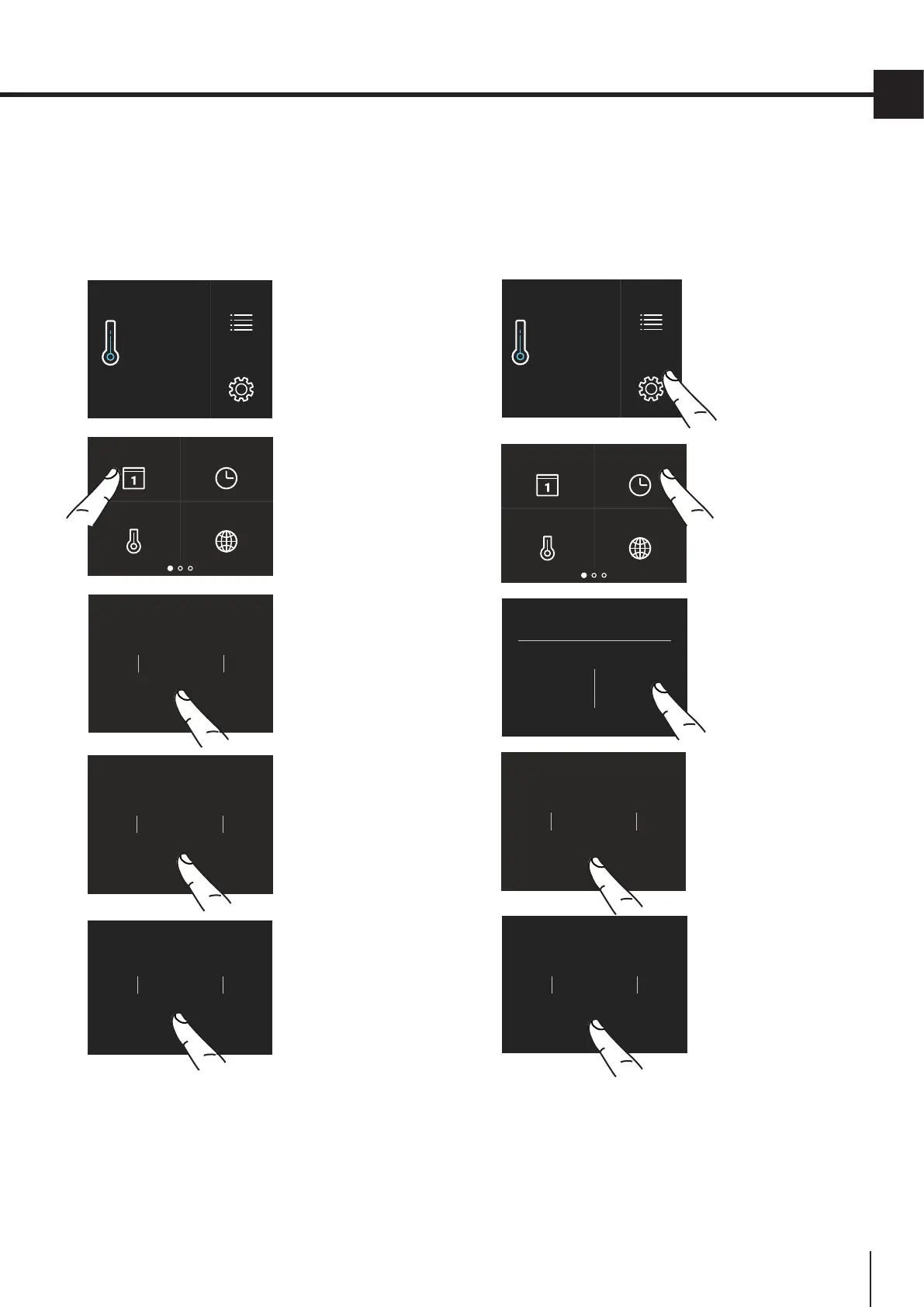
1) Date
The display will show the date in the format
(day:month:year).
By touching the display you can modify the settings.
C) Scroll up or
down until the de-
sired year appears
and press Ok.
D) Scroll up or
down until the
desired month
appears and
press Ok.
B) Touch the Date
icon.
A) Home screen.
Touch the Set-
tings icon.
E) Scroll up or
down until the de-
sires date appears
and press Ok.
C) Touch the desi-
red method which
you want the time
to display: 12 hour
or 24 hours.
B) Touch the Time
icon.
2) Time
The display shows the hours and minutes in the
format hh:mm.
This function selects the display at 12 or 24 h.
A) Home screen.
Touch the Set-
tings icon.
D) Scroll up /
down to set the
hour and then
press Ok.
E) Scroll up / down
to set the minutes
and then press Ok.

Table of Contents

Related product manuals