The Bestguarder HD 12MP Black IR Game Camera (DTC-880V) is a versatile and robust digital game camera designed for various outdoor surveillance and monitoring applications. This device is a patent product, offering high-definition imaging and infrared capabilities for both day and night use.
Function Description
The primary function of the Bestguarder DTC-880V is to capture high-quality pictures (up to 12 megapixels) or video clips when motion is detected within its region of interest (ROI). This detection is facilitated by a highly sensitive Passive Infrared (PIR) motion sensor. The camera is equipped with 940nm invisible infrared dark LEDs, enabling it to capture clear black and white pictures or videos during nighttime without emitting a visible red glow, making it suitable for discreet security and scouting purposes.
Beyond motion-triggered capture, the camera also features a time-lapse function, allowing it to capture images or video clips at specified time intervals, regardless of motion detection. This is particularly useful for monitoring slow-changing events or for general surveillance over extended periods. The device is designed for outdoor use, being water and snow repellent, and can also function as a portable digital camera, allowing manual picture or video capture via the ENTER button on its operation panel.
The camera operates in three basic modes:
- OFF mode: To power down the camera.
- TEST mode: For setting operational parameters, previewing the scene on the LCD screen, testing PIR detection, and manual capturing.
- ON mode: For surveillance, where the camera works according to its programmed settings.
Usage Features
The DTC-880V offers a wide range of features to enhance its usability and adaptability across different scenarios:
- Versatile Application: It can be used for tracing animal trails and habits, wildlife observation, monitoring plant growth, ecological research, traffic/surrounding surveillance, camping, and exploring caves. Its discreet infrared capabilities make it ideal for security and surveillance applications, including guarding homes, supermarkets, warehouses, schools, offices, gardens, minefields, buildings, and depots. It can operate autonomously for weeks or months, automatically saving event records in digital format, and can also serve as a hidden camera for media, guards, and law enforcement.
- Power Options: The camera can be powered by eight AA alkaline batteries, providing a standby time of approximately six months. Alternatively, it can be connected to an external 12V DC power source via a barrel plug cable, compatible with 110-240V AC adapters, solar panels, or 12V power banks/storage batteries (sold separately).
- Storage: It supports SD cards up to 32GB (Class 10 recommended) for storing captured photos and videos.
- User Interface: The camera features a 2.0-inch color view screen for easy setup and preview. An intuitive menu system allows users to customize various parameters.
- Operational Modes:
- Photo Mode: Captures still images with adjustable resolutions (12MP, 8MP, 5MP, 2MP) and multi-shot burst options (1-9 images).
- Video Mode: Records high-definition video clips (Full HD 1920x1080 or HD 1280x720) with adjustable lengths (5-90 seconds) and optional audio recording.
- Time Lapse Mode: Captures photos at preset intervals (1 second to 24 hours), suitable for monitoring long-term events. This mode is photo-only and does not detect motion.
- Hybrid Mode: Captures both a photo and a video clip upon detection.
- Motion Detection Mode (Video Only): Specifically designed for capturing video of cold-blooded animals during daytime with sufficient ambient light. It detects light movement and has an effective capture distance of up to 3 meters. This mode is not recommended for night use or environments with insufficient light.
- Customizable Settings:
- PIR Interval: Adjustable from 1 second to 60 minutes, defining the delay before the PIR sensor reactivates after a trigger.
- Timer Setting: Allows the camera to operate only during specified hours of the day (e.g., 06:00 to 18:00), conserving power and focusing on relevant periods.
- Time Stamp: Enables stamping date, time, pressure, temperature, moon phase, and camera name onto pictures and videos.
- Temperature Unit: Choose between Fahrenheit or Celsius for temperature display.
- Camera Name: Assign a 4-digit name for easy identification.
- Security Enable: Set a password (0-9 digits) to protect the camera from unauthorized access.
- GPS Functionality: Manually enter latitude and longitude coordinates (N/S and E/W) to imprint location data on images and videos, aiding in strategic game tracking.
- TV Out Type: Select PAL or NTSC for video output to a TV.
- Power Management: Choose between "Normal" and "Real-time Away" settings. "Real-time Away" is used for connecting to a TV for live monitoring.
- Language Support: Offers multiple languages including English, German, Russian, French, Czech, Swedish, and Japanese.
- Viewing Files: Files can be viewed directly on the camera's LCD screen in TEST mode, on a TV via the provided AV cable, or on a computer using an SD card reader or by connecting the camera via USB (MSDC mode).
Maintenance Features
The Bestguarder DTC-880V incorporates several features and recommendations for proper maintenance and longevity:
- SD Card Management: It is recommended to format the SD card using the camera itself upon first use. Users should ensure the SD card is Class 10 and avoid inserting or removing it when the power switch is in the ON position.
- Battery Care: Use good quality AA batteries and remove them if the camera will not be used for an extended period. The camera will automatically shut down after 30 seconds of inactivity in TEST mode to conserve power. Even in OFF mode, a small amount of power is consumed, so battery removal for long-term storage is advised.
- Firmware Upgrade: The camera supports firmware upgrades using an SD card, allowing for future improvements and bug fixes. Instructions for this process are provided, emphasizing the need for a formatted SD card and specific file placement.
- Environmental Considerations: Keep the camera away from hot and heat sources, air conditioning vents, and strong lighting to prevent false triggers and extend its lifespan.
- Installation Guidelines:
- Mount the camera 0.5-2 meters high, pointed slightly downward.
- Face the camera north or south to avoid false triggers and overexposed images from direct sunlight (east/west).
- When covering a trail, position the camera to face down or up the trail.
- Clear branches and debris from the camera's front to prevent blocking the lens or PIR sensor, which can cause false triggers, especially on windy or hot days.
- Adjust trigger sensitivity based on the size, movement speed, and distance of the target object or animal to minimize false triggers.
- Ensure correct battery polarity and that the Class 10 SD card is inserted before setup.
- Verify that the time and date are set correctly.
- Protection: The manual suggests using a hand-made cover on top of the camera to protect it from direct sunshine, further enhancing its durability.
- Self-Repair Warning: Users are explicitly warned not to attempt to fix the camera themselves, as it is a precision electronic device and opening or removing covers may cause damage and void the warranty. Unauthorized service will also void the warranty.

 Need help?
 General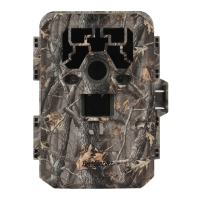

 To Next Page