Need help?
Do you have a question about the Bestisan Aha ST08 and is the answer not in the manual?
Essential safety measures for operating the soundbar, including handling and environment.
Information and warnings related to FCC regulations for the device.
Specific warnings concerning liquid exposure, heat, and placement of objects.
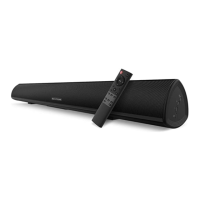
List of items included in the package, such as the soundbar, remote, and cables.
Details on the LED indicator and control buttons on the soundbar's front and top panels.
Description of the various input/output ports located on the bottom panel of the soundbar.
Instructions on how to connect the soundbar to an electrical outlet using the provided power adapter.
Steps to connect the soundbar to a TV using a digital optical cable.
Steps to connect the soundbar to a TV using an RCA to 3.5mm audio cable.
Guide to setting the TV's audio output to PCM for optimal sound.
Connect external devices via RCA to 3.5mm cable for audio input.
Connect external devices via optical cable for digital audio input.
How to connect a USB device for music playback and firmware updates.
Steps to connect a Bluetooth device to the soundbar for wireless audio streaming.
Advice on improving Bluetooth signal range and reducing audio interruptions.
Explanation of each button and its function on the soundbar's remote control.
Step-by-step guide on how to mount the soundbar on a wall using the provided template and hardware.
Solutions for buzzing, humming, no sound, or echo issues.
Troubleshooting steps for Bluetooth connection failures and other connectivity issues.
Steps to resolve problems with the remote control not working.


 To Next Page
 General