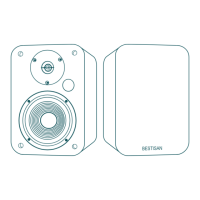
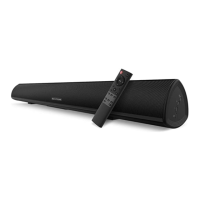
The BESTISAN SR02 Bookshelf Speaker is a high-quality audio device designed to deliver rich and clear sound for various listening environments. This user manual provides comprehensive instructions for setting up, operating, and maintaining the speakers, ensuring an optimal audio experience.
Function Description
The SR02 Bookshelf Speaker functions as an audio output device, capable of playing sound from multiple sources. It features both active and passive speaker components, working in tandem to produce a balanced and immersive soundstage. The active speaker houses the primary controls and input ports, while the passive speaker connects to the active unit to extend the stereo sound. The speaker is designed for home use, providing an enhanced audio experience for music, movies, and other media.
Usage Features
The SR02 Bookshelf Speaker offers versatile connectivity options and user-friendly controls, making it adaptable to various audio setups.
Connectivity:
- Wired Inputs: The speaker includes two Line In input ports (Line In 1 and Line In 2), allowing connection to devices such as TVs, computers, CD players, and other audio sources using 3.5mm-RCA or RCA-RCA audio cables.
- Wireless Connectivity: Bluetooth capability enables seamless wireless streaming from smartphones, tablets, and other Bluetooth-enabled devices. This feature provides convenience and reduces cable clutter.
- Speaker Connection: The active and passive speakers are connected using a dedicated speaker connecting cable, ensuring proper audio signal transmission between the units.
Controls:
- Master Volume Control / Input Selection: A multi-functional dial on the active speaker serves as both the master volume control and an input selector. Pressing the dial allows users to cycle through available audio sources: Line In 1, Line In 2, and Bluetooth.
- Bass Dial: A dedicated bass dial allows users to adjust the bass level, enabling customization of the sound profile to suit personal preferences or room acoustics.
- LED Indicator: An LED indicator provides visual feedback on the current input mode and standby status:
- Light Blue: Line In 1
- Orange: Line In 2
- Blue: Bluetooth
- Red: Standby
Setup and Operation:
- Initial Setup: Connecting the speakers involves linking the active and passive units with the provided speaker cable, ensuring the silver wire connects to the black port and the red line connects to the red port. This one-to-one correspondence is crucial for optimal sound quality. After connecting the speakers, the device is powered on by connecting it to a power source, and the indicator light will illuminate.
- Line In Usage: To use a wired input, press the master volume control to select either Line In 1 (Light Blue indicator) or Line In 2 (Orange indicator). Then, connect your audio source to the corresponding input port using an appropriate audio cable. Adjust the volume on both your device and the speaker for the desired listening level.
- Bluetooth Usage: To activate Bluetooth mode, press the master volume control until the LED indicator turns blue. On your mobile device (phone, tablet, etc.), search for "BESTISAN SR02" in the Bluetooth settings and pair with it. Once paired, you can stream audio wirelessly. To disconnect Bluetooth, quickly double-tap the master volume control.
- Bluetooth Compatibility: The speaker supports ADP and AVRCP profiles, ensuring full Bluetooth functionality with compatible mobile devices. Users should be aware that Bluetooth connectivity and compatibility may vary depending on the software versions of different source devices.
Maintenance Features
Proper maintenance ensures the longevity and optimal performance of the SR02 Bookshelf Speaker.
General Care:
- Cleaning: The apparatus should only be cleaned with a dry cloth. Avoid using liquid cleaners or abrasive materials that could damage the finish or internal components.
- Placement: When placing the unit on lacquered or natural finish furniture, it is recommended to protect the furniture with a cloth or other protective material to prevent scratches or damage.
- Ventilation: Ensure that ventilation openings are not blocked to prevent overheating. Install the speakers according to the manufacturer's instructions, away from heat sources such as radiators, heat registers, stoves, or other heat-producing apparatus.
- Power Cord Protection: Protect the power cord from being walked on or pinched, especially at plugs, convenient receptacles, and where it exits the apparatus.
- Accessory Use: Only use attachments and accessories specified by the manufacturer to ensure compatibility and safety.
- Stability: When using a cart, stand, tripod, bracket, or table, ensure it is specified by the manufacturer or sold with the apparatus. Exercise caution when moving the cart/apparatus combination to avoid tip-over injuries.
Safety Precautions:
- Moisture Exposure: The apparatus should not be exposed to dripping or splashing liquids. Objects filled with liquids, such as vases, should not be placed on the apparatus.
- Power Disconnection: Unplug the apparatus during lightning storms or when it will be unused for long periods.
- Servicing: Refer all servicing to qualified service personnel. Servicing is required if the apparatus is damaged in any way, including a damaged power-supply cord or plug, liquid spills, objects falling into the apparatus, exposure to rain or moisture, or if the apparatus does not operate normally or has been dropped.
- Polarized/Grounding Plug: Do not defeat the safety purpose of the polarized or grounding-type plug. If the provided plug does not fit into your outlet, consult an electrician for replacement of the obsolete outlet.
- FCC Compliance: Users are warned that changes or modifications not expressly approved by the party responsible for compliance could void the user's authority to operate the equipment. The equipment has been tested and found to comply with Class B digital device limits, designed to provide reasonable protection against harmful interference in residential installations. If the equipment causes harmful interference to radio or television reception, users are encouraged to try to correct the interference by reorienting the receiving antenna, increasing separation between equipment and receiver, connecting the equipment to an outlet on a different circuit, or consulting a dealer or experienced radio/TV technician.
- Double Insulation: The symbol indicating double insulation between hazardous main voltage and user-accessible parts is present, highlighting a safety feature of the product.
Troubleshooting:
The manual includes a troubleshooting section to address common issues:
- No Sound: Check if the power indicator light is ON, turn up the volume, ensure audio cables are firmly connected and the input is correctly set, and verify signal output from the audio source.
- Cannot Connect via Bluetooth: Ensure the speaker is in Bluetooth input mode (blue indicator), disconnect from any other Bluetooth device by pressing and holding the volume dial, verify operation within the 10-meter effective transmission range, and try connecting with another Bluetooth device.
- Speaker Does Not Turn On: Check if mains power is connected and if the wall outlet is switched on.
For further assistance, users can contact BESTISAN customer service at service@bestisan.com.


 To Next Page
 General