EN-18
Internet
Visit Website
To access the internet, you must setup
“wireless & network” in system settings menu.
Select [
] on the main menu to view a
website.
Touch the dialog box on the upper side of
the screen to show keypad. Input the website
address, and touch [Go] to visit it. Drag the
web page to scroll.
E-mail
Select [Email] or other mail software on the
applications menu.
First you must setup an account, or sign into
an existing account. Enter your Email address
and password. Then you can send/receive
E-mails through the unit.
Wi-Fi Settings
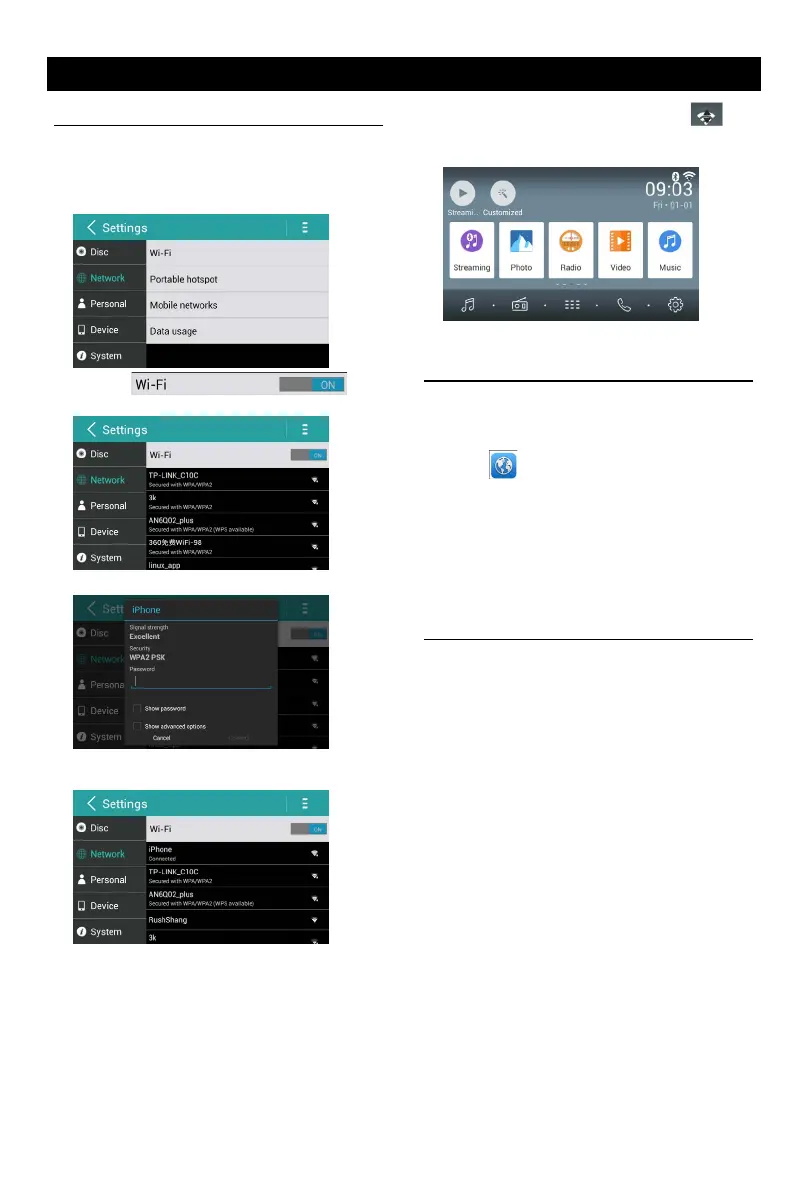
1. Connect the WiFi dongle to the unit. Touch
the [ Settings ] icon on the main menu to
enter setting menu, and turn on Wi-Fi (if
necessary).
2. Touch [ ] to
enter WiFi setting menu.
3. Touch an available WiFi hotspot.
4. Touch [ Password ] and input the password,
touch [Connect] to conrm.
5. After successfully connected, the [ ]
icon appears on the top right corner of the
main menu . Now you can access internet.


 To Next Page