EN-19
Other Mode
Navigation Operations
To navigate by the unit, simply select the
desired navigation application on the main
menu. Then navigate by the touch screen.
AUX Operations
Select [A/V In 1]/[A/V In 2] on the main menu
to visit auxiliary device.
Steering Wheel Control
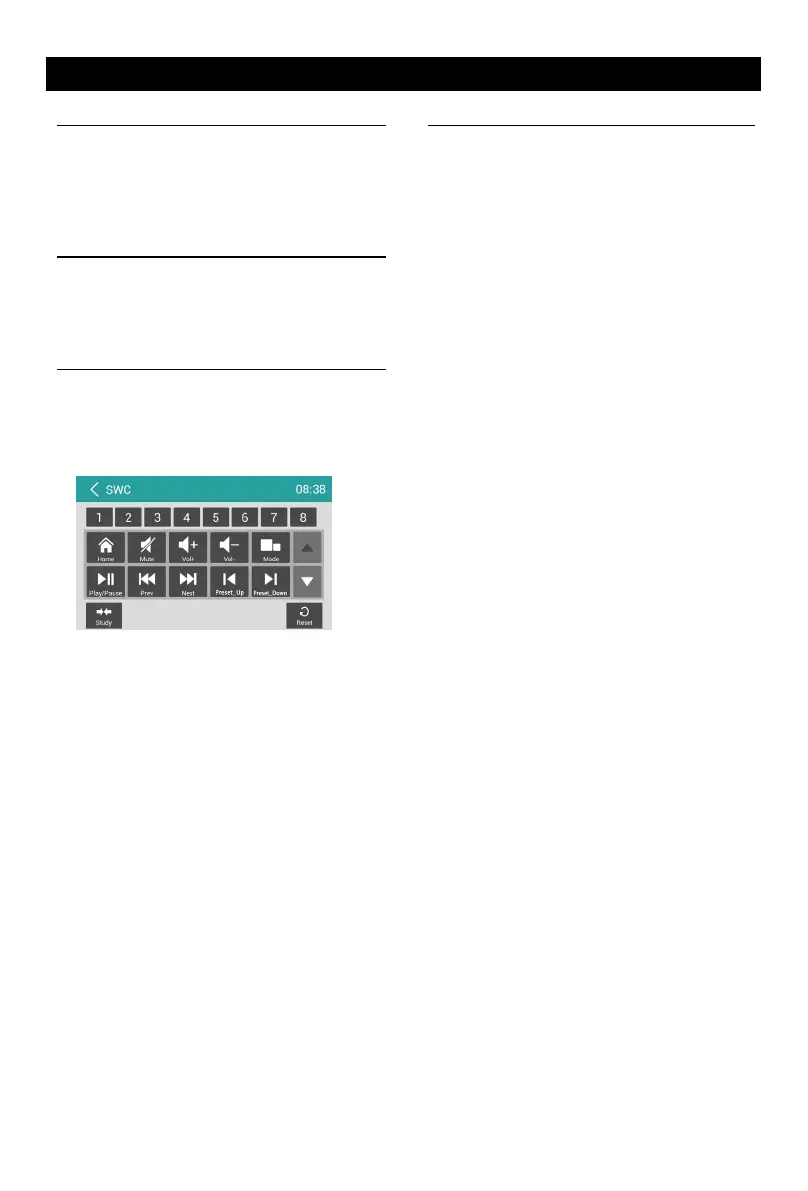
Select [SWC] on the main menu to enter SWC
setting menu.
1. Touch number button to select a SWC
button.
2. Select a function.
3. Press each individual steering wheel control
button for each corresponding function.
4. Touch [Study] to program.
5. Once the nal steering wheel control button
is programmed, the functions are saved
and the programming will end.
6. Touch [ Reset ] to reset the programming.
File Explorer
Select [File Explorer] on the applications
menu to view the les and folders on the SD
card.
The USB files and folders are in the folder
named "external_usb".
You can install applications and edit files/
folders.


 To Next Page