EN-21
System settings
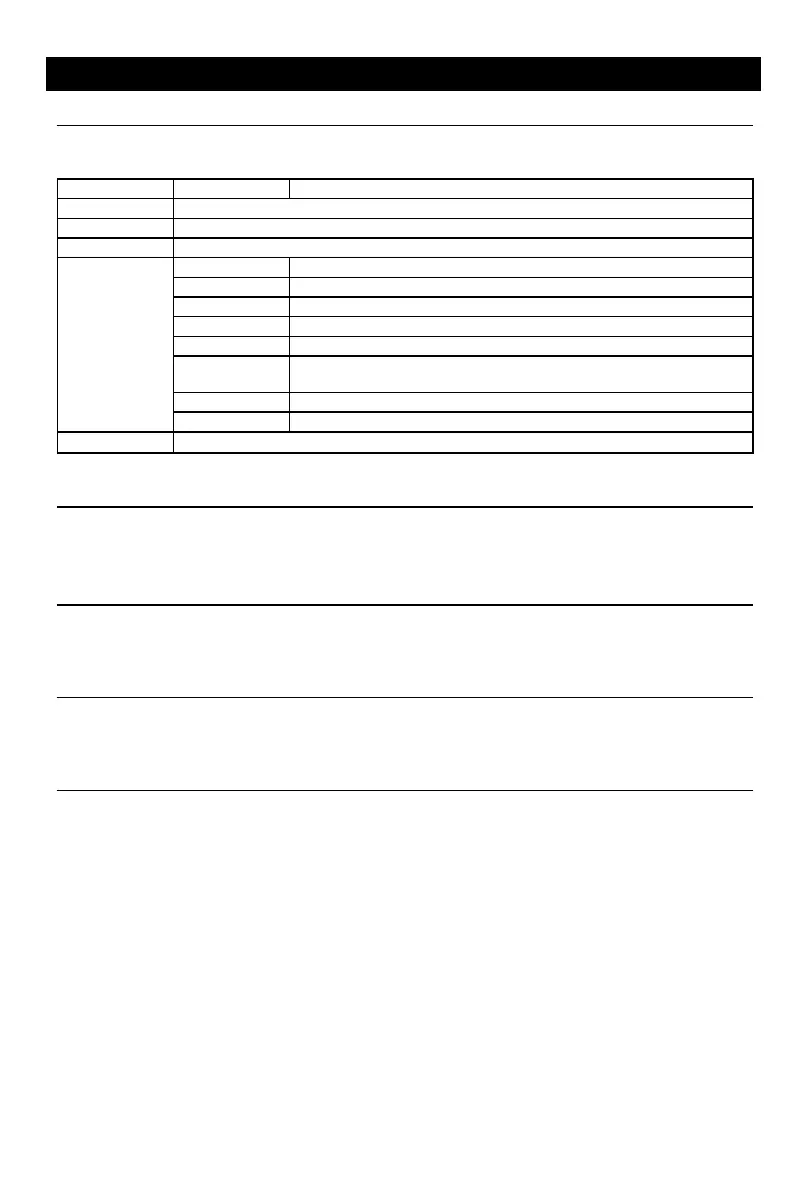
Adjust Disc Rating
1. Touch [Disc].
2. Touch an option repeatedly to select.
Disc rating Options Description
Audio Select DVD audio language. Options available depending on DVD disc.
Subtitle Select DVD subtitle language. Options available depending on DVD disc.
Disk Menu Select DVD menu language. Options available depending on DVD disc.
AgeControl
KID SAF Acceptable for children.
G Acceptable for general viewers.
PG Parental guidance suggested.
PG 13 Unsuitable for children under age 13.
PGR Recommend parents to restrict viewing for children under 17 .
R
Restricted re parental guidance is advised for children under the age of
17 .
NC17 Unsuitable for children under age 17.
ADULT Acceptable for adults only.
Parental Set password to restrict the play of discs. The default password is 000000.
Networks
To setup the wireless conguration, such as Wi-Fi.
* For Wi-Fi settings, refer to “Internet”.
Personal
To setup Location access, Security, Language & input, Factory data reset, All data erase,
Accounts, etc.
Device
To setup Brightness, Storage, Apps.
System settings
Accessibility
To setup accessibility related applications.
You need download a screen reader and establish an account.
Software version
To view software version information.
UUID QR code
To view UUID QR code information.


 To Next Page