EasyManua.ls Logo

Beurer HA80 - User Manual

Beurer HA80
22 pages
Print Icon
To Next Page IconTo Next Page
Loading...
24
ENGLISH
Read these instructions for use carefully and keep them for later use, be
sure to make them accessible to other users and observe the information
they contain.
Dear customer,
Thank you for choosing a product from our range. Our name stands for high-quality, thorough-
ly tested products for applications in the areas of heat, weight, blood pressure, blood glucose,
body temperature, pulse, gentle therapy, beauty, massage and indoor air quality.
With kind regards,
Your Beurer team
Contents
1. Included in delivery ................................. 25
2. Signs and symbols ................................. 25
3. Warnings and safety notes ..................... 27
4. Proper use .............................................. 31
5. Device description .................................. 31
6. Initial use ................................................ 32
7. Usage ..................................................... 34
8. Cleaning and maintenance ..................... 38
9. Accessories and replacement parts ...... 39
10. What if there are problems? ................. 40
11. Disposal ................................................ 42
12. Technical specifications ....................... 43
13. Warranty and service ............................ 44
Question and Answer IconNeed help?

Do you have a question about the Beurer HA80 and is the answer not in the manual?

Overview

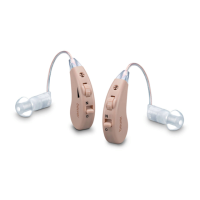
The Beurer HA 80 digital hearing amplifier is designed to help individuals hear better by amplifying sounds and transmitting them to the ear. While it cannot prevent or alleviate organically caused hearing loss, it enhances the clarity and loudness of sounds, making it suitable for various situations such as watching films, conversing with friends, or listening to nature.

Technical Specifications:

  • Max. sound pressure level (OSPL90): 118 dB ± 3 dB
  • Sound amplification: 43 dB ± 5 dB
  • Overall harmonic distortion: ≤ 3% @ 1600 Hz
  • Frequency range: 200~6700 Hz
  • Input noise: ≤32 dB
  • Voltage: 1.5 V
  • Power supply: ≤3 mA
  • Operation period: ≥ 26 hours
  • Operating conditions:
    • Temperature: -10°C ~ +40°C
    • Relative humidity: 30% ~ 75%
    • Atmospheric pressure: 700 ~ 1600 hPa
  • Storage and transportation conditions:
    • Temperature: -10°C ~ +55°C
    • Relative humidity: 10% ~ 90%
    • Atmospheric pressure: 500 ~ 1600 hPa

Usage Features:

The device comes with a comprehensive set of accessories for optimal use and maintenance. The included items are:

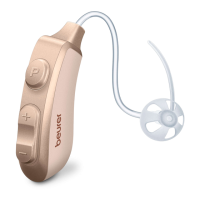
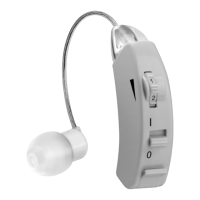
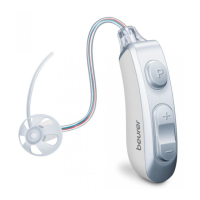
  • 1 x HA 80 digital hearing amplifier (with sound tube for left or right ear)
  • 4 x earplugs (various sizes and designs)
  • 1 x replaceable battery
  • 1 x cleaning brush
  • 1 x drying capsule
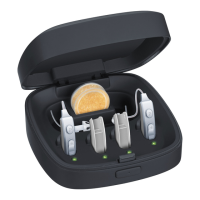
  • 1 x storage box with charging function
  • 1 x instructions for use

Before initial use, users should ensure the packaging is intact, all contents are present, and there is no visible damage to the device or accessories.

Adjusting the Hearing Amplifier:

  1. Ear Side Identification: Hearing tubes are marked with "2B" in red for the right ear and blue for the left ear.
  2. Earplug Attachment: Attach the earplug to the sound tube by pushing it over the grooves until it sits securely.
  3. Placement: Position the hearing amplifier housing behind the ear, ensuring the curved sound tube sits comfortably on the ear (next to glasses arms for glasses wearers).
  4. Earplug Insertion: Carefully insert the earplug into the ear canal, avoiding deep insertion. If uncomfortable, try a different earplug.
  5. Fixing Tube: Place the fixing tube along the outer ear for a tighter fit. It can be cut off if it causes discomfort, as it is not strictly necessary.

Switching On/Off:

To switch the hearing amplifiers on or off, press and hold the program selection button for three seconds until a beep is heard.

Adjusting Volume:

  • Plus button (+): Press briefly to increase volume.
  • Minus button (-): Press briefly to decrease volume. Adjust the volume to a desired level for clear and distinct sound. A single beep indicates volume adjustment, while two beeps signify reaching the highest or lowest possible volume.

Setting Hearing Programs:

Press the program selection button to change the hearing program:

  • P1: Normal mode (1x beep): Suitable for quiet environments (e.g., home, office).
  • P2: Noise reduction mode (2x beep): Suitable for noisy outdoor areas (e.g., on the move, supermarket, restaurant).

Battery Management:

The device uses a replaceable battery. To change the battery, hold the battery firmly with one hand and the upper part of the amplifier with the other, then slide them apart. Slide a fully charged spare battery onto the amplifier. The storage box includes a charging function. Connect the micro-USB cable to the storage box and a mains socket to charge the device and battery. A flashing green light indicates charging, and a steady green light means fully charged. A full charge takes approximately 2 hours. The charging process can be done with the lid open or closed.

Sound Tube Replacement:

Replacement sound tubes are available (red for right, blue for left).

  1. Remove the battery for better grip.
  2. Hold the device in one hand and grip the adapter connecting the sound tube and device with the other.
  3. Turn the adapter anticlockwise while turning the device clockwise.
  4. After a 90° turn, pull the sound tube off upwards, holding the device firmly.
  5. Position the new sound tube and rotate it clockwise with gentle pressure until the arrow on the front aligns with the device buttons.
  6. Check the sound tube is in place before reinserting the battery and switching on the device. Tweezers can assist if the adapter is difficult to remove.

Maintenance Features:

Drying Capsule:

A drying capsule is included to absorb moisture from the hearing amplifier, which comes into contact with sweat during use. Remove the capsule from its packaging and place it in the storage slot. The capsule has a color indicator; it changes from bright orange to white as its drying capacity decreases, signaling the need for replacement. Close the storage box lid for optimal drying performance.

Cleaning:

  • Always keep the hearing amplifier clean.
  • Prevent earplugs and microphones from becoming blocked by foreign matter, as this impairs sound amplification.
  • Clean the hearing amplifier and earplugs with a clean, dry cloth after each use. For heavy soiling, moisten the cloth with a mild soapy solution.
  • Do NOT use abrasive, corrosive, or solvent-based cleaning products.
  • Never submerge the hearing amplifier in water.
  • The supplied cleaning brush is suitable for removing earwax from the earplug.
  • Allow the hearing amplifier to dry completely after cleaning. Store it in the storage box with the drying capsule in a safe, dry, and clean place.

Troubleshooting:

  • No sound: Check if the amplifier is switched on, battery connection, battery charge, and microphone cleanliness. If damaged, contact Customer Services.
  • Weak/faint tone: Increase volume, check battery charge, clean earplug (using cleaning brush and running water), clean microphone. Check battery connection. If the speaker is damaged, contact Customer Services.
  • Whistling sounds: Check earplug fit; if not snug, try a different one. Ensure the microphone is not covered by ear parts or hair. Lower the volume.
  • Charger LEDs off: Check if the amplifier is correctly placed in the recess, USB cable connection, and cleanliness of charging contacts.

Disposal:

Dispose of the device and batteries responsibly according to local regulations for electronic waste (EC Directive – WEEE). Empty, flat rechargeable batteries must be disposed of at designated collection boxes, recycling points, or electronics retailers. Batteries containing lead (Pb), cadmium (Cd), or mercury (Hg) are marked accordingly.

Beurer HA80 Specifications

General IconGeneral
BrandBeurer
ModelHA80
CategoryHearing Aid
LanguageEnglish

Related product manuals