7
Radio mode
To turn on the radio, proceed as follows:
1
. Press the MODE / ENTER button repeatedly until RADIO appears in the LCD Display.
2
. Set the radio volume using the +/- buttons.
3
. Select a memory preset using the ▲ / ▼ buttons.
4
. To search for a station, press and hold the ▲ or ▼ button for three seconds. Briefly press the SET but-
tons ▲ / ▼ to adjust the radio frequency manually in 0.2 MHz increments.
5
. To save a radio station to a preset, press the MODE/ENTER button. The corresponding preset number
(e.g. P1) appears in the LCD Display.
Sleep timer
When using the radio or the Bluetooth speaker, you can also enable a sleep timer, which sets the number
of minutes after which the radio or Bluetooth speaker will shut off.
1
. In radio mode or Bluetooth speaker mode, press the ▲ / ▼ buttons at the same time.
2
. The sleep timer flashes in the LCD Display. Select a desired timer duration using the ALARM button (2,
5, 10, 15, 30, 45, or 60 minutes).
3
. To confirm, press the ▲ / ▼ buttons at the same time.
Lamp function
1
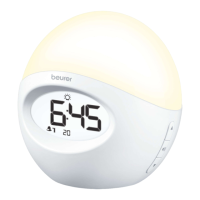
. Using your hand, tap on the side of the Wake-up Light to make it vibrate lightly. The illuminated display
becomes brighter.
2
. Tap on the side of the Wake-up Light again within three seconds. The reading lamp will illuminate.
Mood light function
1
. Using your hand, tap on the side of the Wake-up Light to make it vibrate lightly. The illuminated display
becomes brighter.
2
. Tap on the side of the Wake-up Light again within three seconds. The white light of the reading lamp
will come on.
3
. To activate the mood light with change of color, tap again on the light area.
4
. To have colored light permanently display during the color change, tap again on the light area.
5
. To deactivate the mood light function, tap again on the light area.
7. Troubleshooting
You can find further information and a list of frequently asked questions (FAQs) about this product at
www.beurer.com.
8. Care and Maintenance
• C
lean the device with a dry cloth.
• D
o not use any abrasive cleaning products.
• E
nsure that no water enters the device; otherwise, do not reuse the device until it has fully dried out.
• N
ever immerse the device or power cord in water or other liquids.
•
P
rotect the device from knocks, damp, dust, chemicals, large temperature fluctuations, and nearby sources
of heat (ovens, heaters).
9. Specifications
Illumination Max. approx. 2500 lux (at distance of 6 inches/15 cm)
Lamp LED service life: ~50.000 hours
LED non-replaceable
Light levels Continuously adjustable via app
Mood light Automatic RGB color change; option to set individual color
Wake-up Light function Off, 2, 5, 10, 15, 20, 30, 45, 60 minutes prior to alarm


 To Next Page
 Loading...