Amiron wireless – Headphones
20
Note:
Make sure that you do not cover the opening for the microphone which is located on the
back of the remote control opposite the buttons.
Depending on the smartphone and version of the operating system and/or firmware, there
may be further call control functions which can be controlled by the centre button 5.
It may also be possible to call the personal assistant (e.g. Siri or Google Assistant) with
the centre button 5. For more details, please contact the smartphone manufacturer.
Maintenance – how to find the FCC/IC certification number
• To clean the Amiron wireless use only a soft cloth - either dry or slightly damp.
• Never use cleaners that contain solvents as they damage the surface.
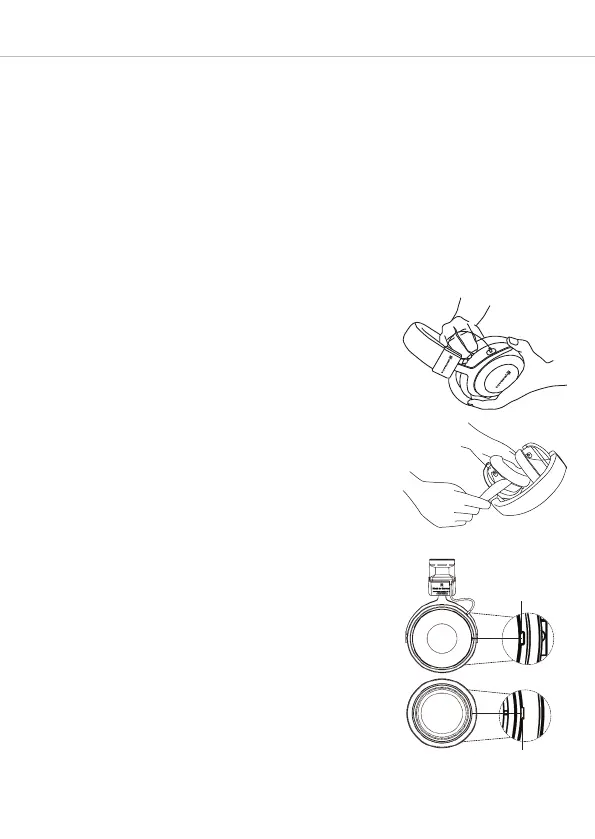
Since the ear pads are subject to natural wear, they
should be replaced from time to time.
You can do this easily yourself:
• Grasp the ear pad at the rim and pull it off the
headphone housing (refer to illustration 1). Please
note that you need a little bit of physical effort.
Alternatively you can use a blunt flat tool to pull it off
(refer to illustration 2). Warning: Be careful to avoid
scratches or other damages or injuries!
• The FCC/IC certification number is found under the
ear pad and black fleece of the left headphone
housing.
• Attach the new ear pad.
Important: The holding tab on the ring of the ear pad
must lock with the notch of the headphone shell.
Refer also for fig. 3.
In the event that other components require replacement,
please contact your local beyerdynamic representative.
Illu. 1
Illu. 2
Illu. 3
Notch
Holding tab












 To Next Page