4
EN
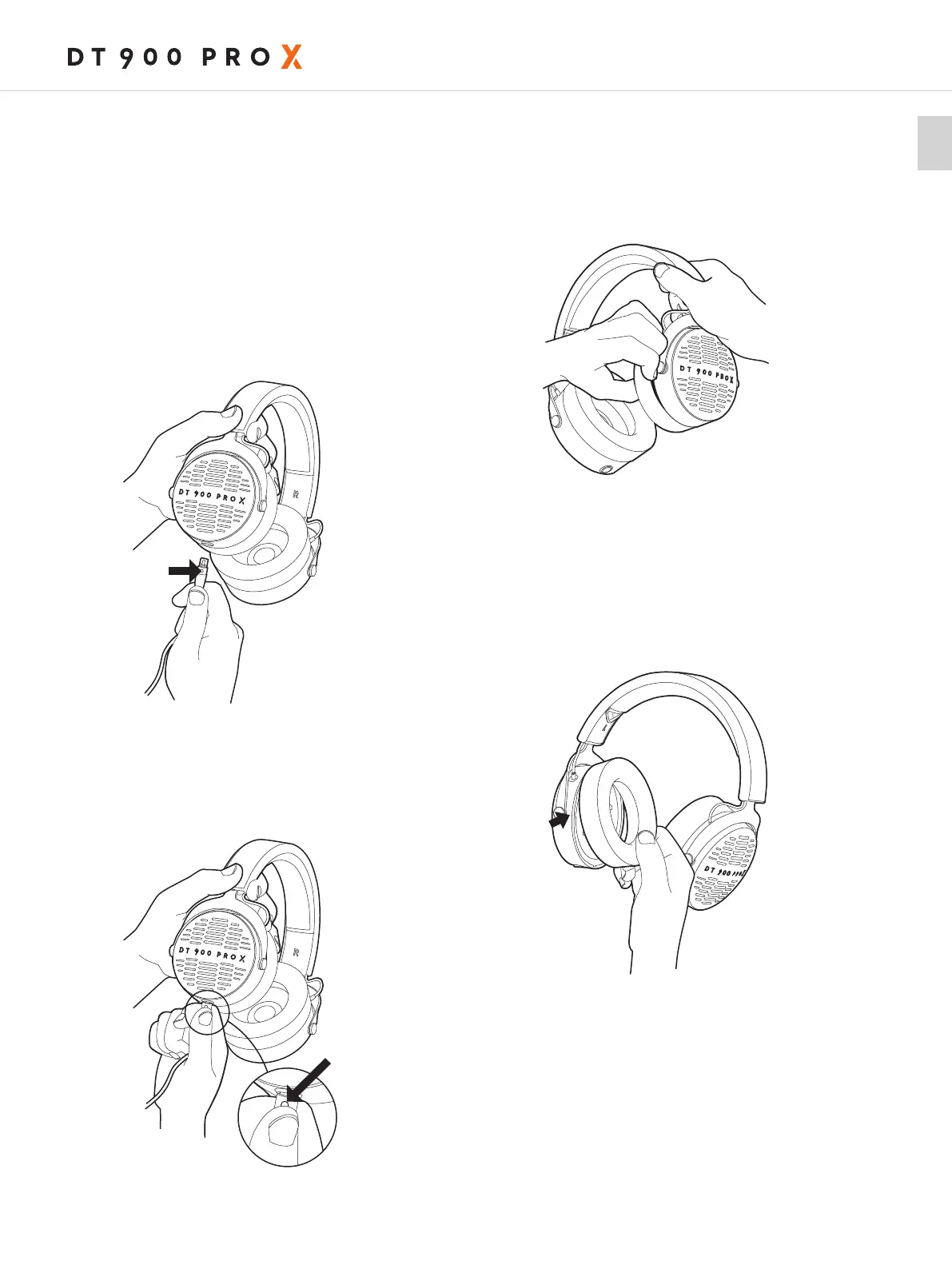
HOW TO CONNECT THE CABLE
The lockable connecting cable is fitted with a 3-pin
mini XLR cable connector to the headphones.
For correct assembly, the small release button of the
cable mu face to the outer site of the headphone.
When connecting the cable, make sure
that the cable connector locks in place of the ear
cup.
Caution:
Connect the jack connector of the headphone
cable to a headphone socket only! If you connect
the headphones to any other jack socket, the head-
phones could be damaged.
When you want to change the cable, please press
the small button for release and simultaneously pull
o the cable connector from the headphone.
HOW TO CHANGE THE EAR PADS
To remove the ear pad, carefully pull apa the gap
between housing and ear pad using your fingeips
or a narrow blunt object.
To attach the ear pad, please make sure that the
snap-in nose of the ear pad sits in the right place.
Then press gently with the palm of your hand
again the ear pad until the ring snaps into place.
release button
release button












 To Next Page