Quinta Update Instructions 07/2018 19
Troubleshooting:
Occasionally, radio interference from other devices may interrupt the wireless update process.
The affected devices will stay in boot loader mode and will not power off automatically. Please
repeat the MU update in this incident and put them closer to the Quinta CU antennas. Please re-
fer to the appendix for more information about the MU signalling code. It might help to use a fixed
frequency for the duration of an MU update.
In some cases it might help to update fewer MUs at one time, e.g. batch of 5 MUs and/or to put
them closer to the antennas of the CU.
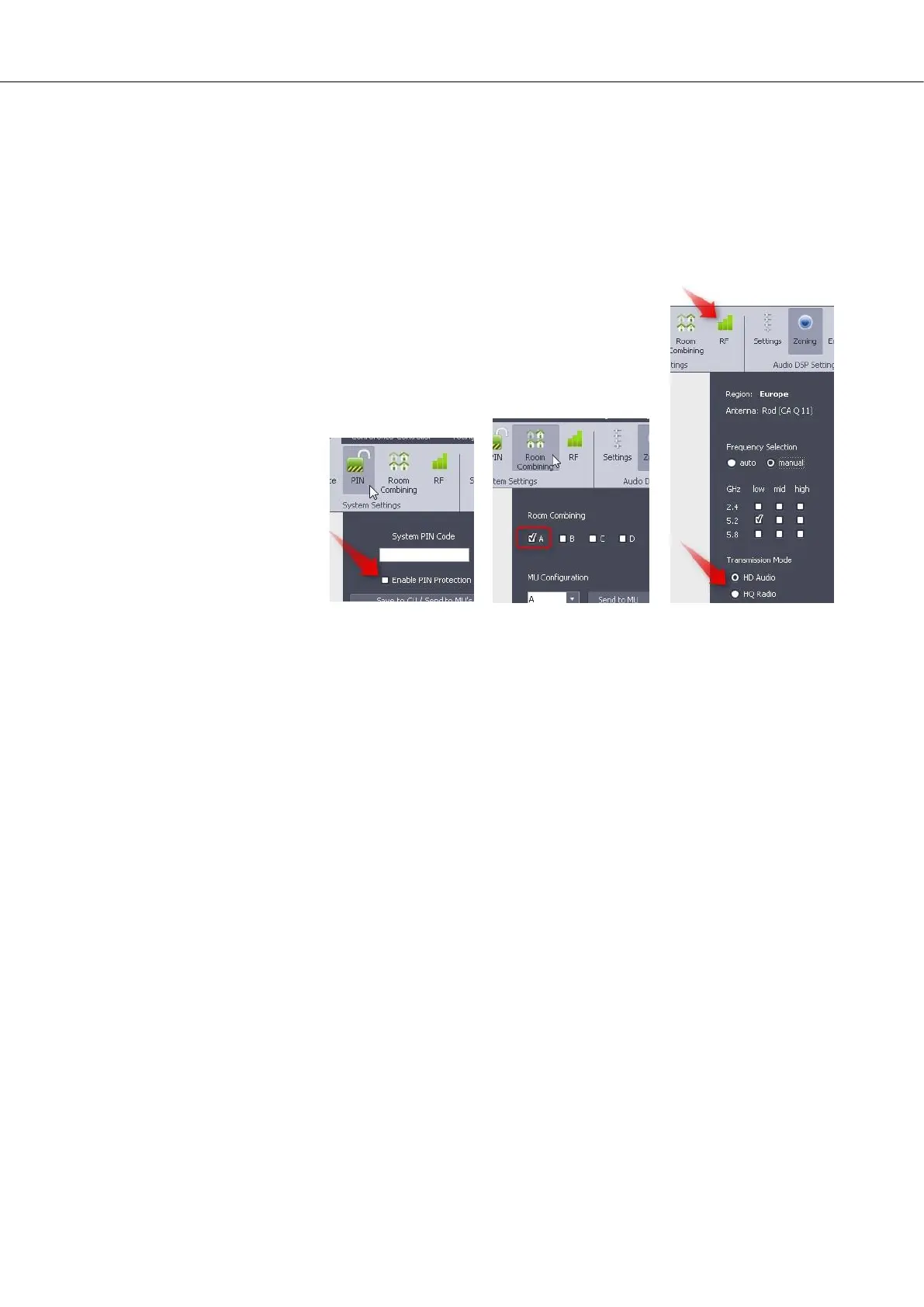
In rare cases, the MU update fails and the MUs seem to stay without
connection to the CU (either flashing red mic button or flashing green
mic button. Please refer to the appendix for more information about the
MU signalling code. In this case, please toggle the HD/HQ selection in
the RF menu. Observe if the signalling code changed (flashing red to
solid white, or flashing green to alternating blinking green). In case the
problem stays, reconfiguring the RoomCombining configuration or the
PIN setup might help.
After the connection is established again, execute the field update procedure again (step a) through c)
above). The MUs will power off on their own after a successful update.


 To Next Page
 Loading...










