Quinta Update Instructions 07/2018 24
15 Appendix
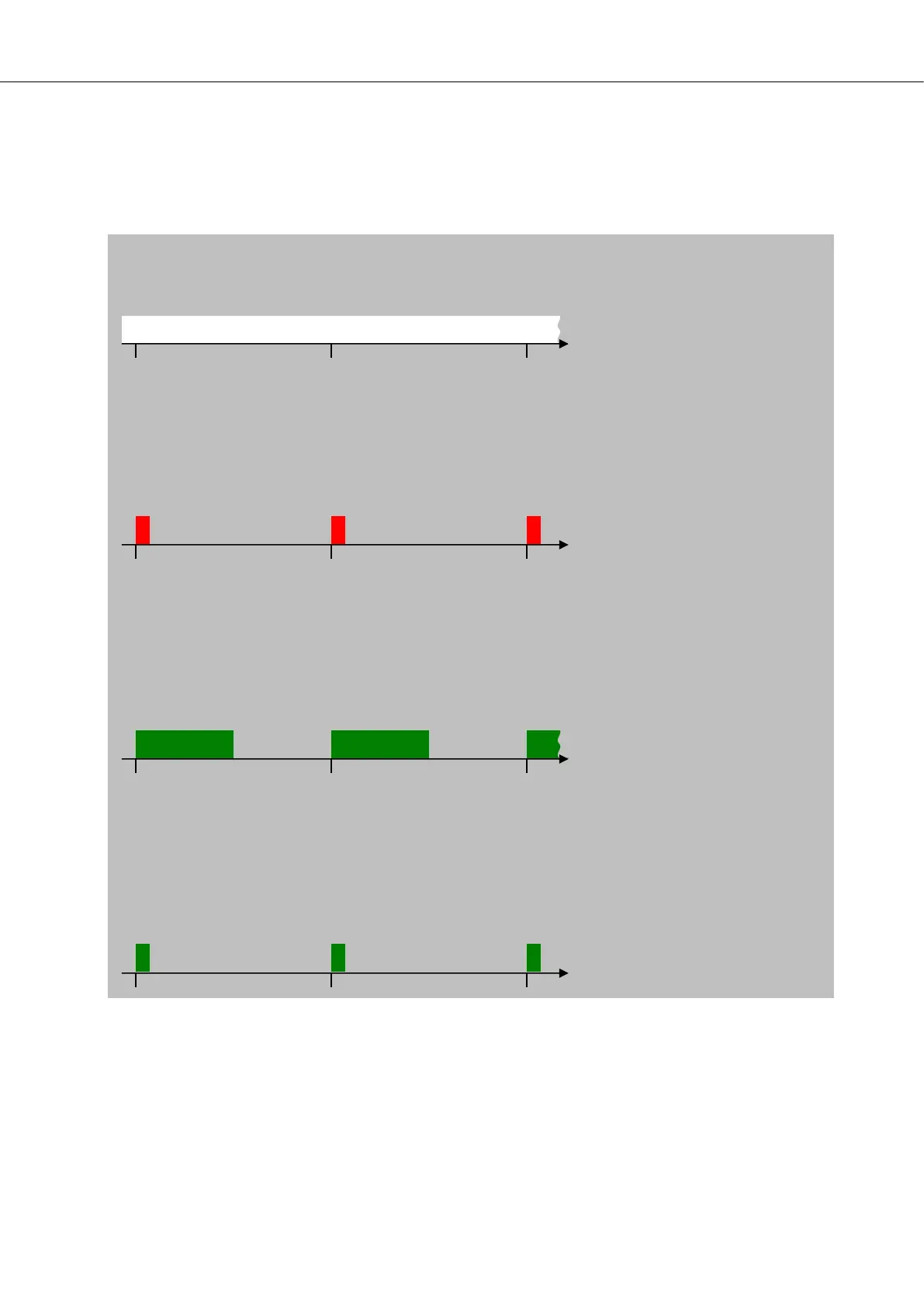
Observe the signalling code of the Quinta MU 21/21v/22/23/23v, MU 31/33, TH or TB microphone units to
determine the firmware mode and link status.
Wireless link (reception) to the Quinta Control Unit ok
Normal operation mode
Microphone button permanently white
No wireless link (no reception) to the Quinta Control Unit
Normal operation mode
Microphone button flashes red (short on-time and long off-time). MU has no connection to CU. Check CU
configuration: RF-Settings, PIN, Room Combining, radio interference, out of rage (too far apart).
Wireless link (reception) to the Quinta Control Unit ok
Boot loader mode
Attention: MUs in boot loader mode cannot be used in meetings and discussions. Please perform a MU
field update.
Microphone button flashes green (on-time and off-time are the same duration).
No wireless link (no reception) to the Quinta Control Unit
Boot loader mode
Attention: MU has no connection to CU. Check CU configuration: RF-Settings, PIN, Room Combining, ra-
dio interference, out of rage (too far apart). After the connection has been established again, please pro-
ceed as described in the section above (Wireless link ok, boot loader mode).













 To Next Page