16/20
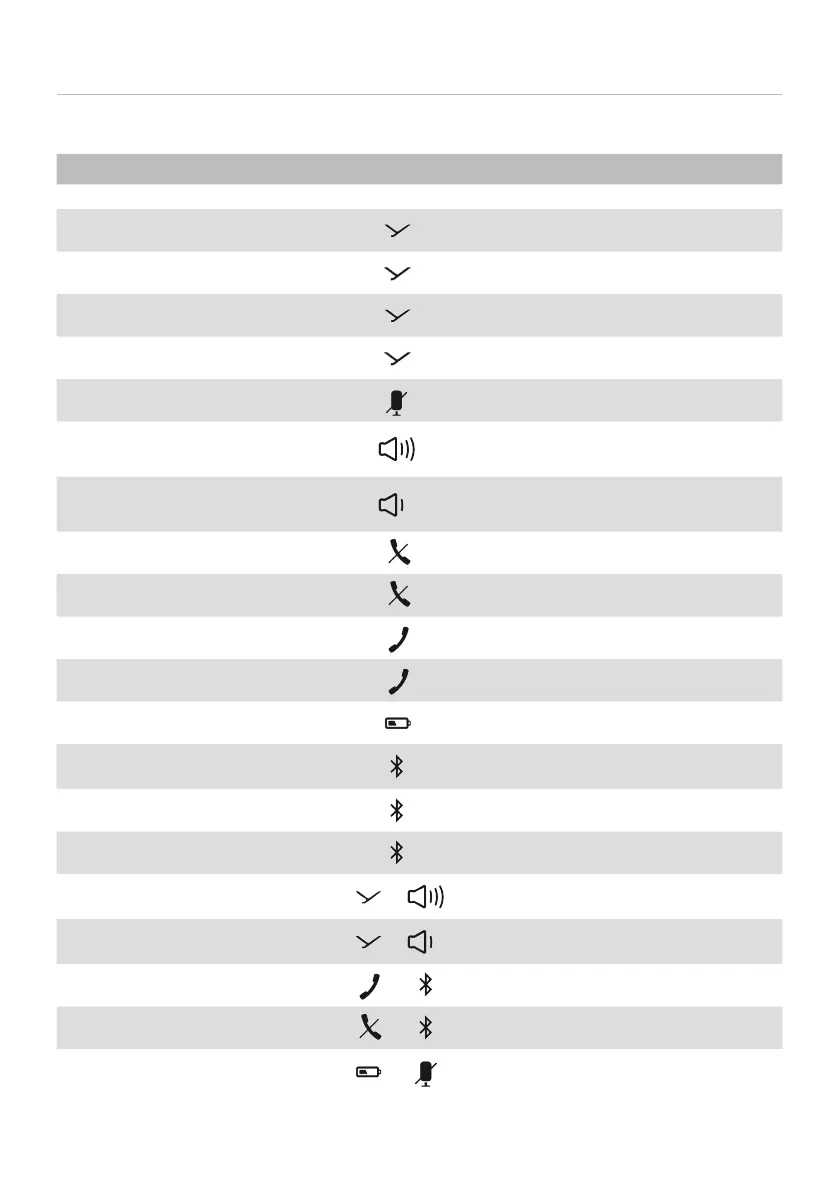
Overview of operating functions
Function Operation
To switch on and o ► Press the on/o button for 1 to 3 sec.
To a/op playback
► Press briefly
Next track
► Briefly press twice
Previous track
► Briefly press three times
To call up the personal assiant
► Press for 1 to 3sec
To mute/unmute
► Press briefly
To increase volume
► Tap to increase in ages
► Hold to increase continuously
To decrease volume
► Tap to decrease in ages
► Hold to decrease continuously
To end a call
► Press briefly
To reject a call
► Press briefly
To answer a call
► Press briefly
To switch calls
► Briefly press twice
To display the battery atus
► Press briefly
Activate/deactivate Bluetooth®
► twice, holding it down the second
time
To pair
► Press for 1 to 3sec
To delete pairing and pairing li
► Press and hold for at lea 10sec
To switch on Sound-Activated
Lighting Mode
+
► Press simultaneously for 1 to 3sec
To to switch o on Sound-Acti-
vated Lighting Mode
+
► Press simultaneously for 1 to 3sec
To switch on Business Mode
+
► Press simultaneously for 1 to 3sec
To switch o Business Mode
+
► Press simultaneously for 1 to 3sec
To activate/deactivate
Stealth Mode
+
► Press simultaneously for 1 to 3sec



 To Next Page