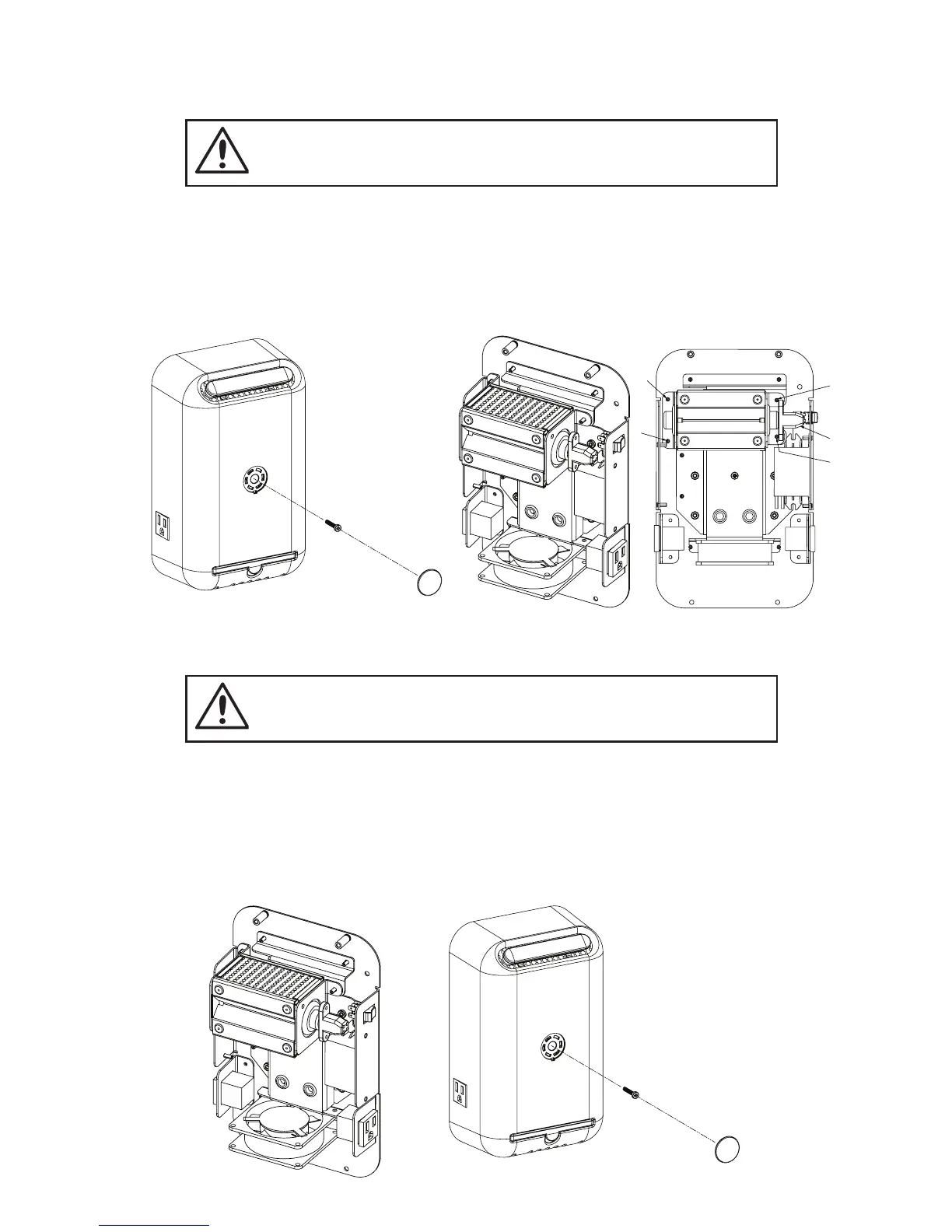
3. Remove ActivePure Cell by lifting it out. Disconnect the bulb power connector from the
bulb end.
1. Replace the ActivePure Cell by reversing steps above.
2. Return cover to unit and put the 4 cover screws back into place.
1. Remove the cover of the AP 500 by removing the 4 cover screws on back.
2. Remove four (4) nuts holding ActivePure Cell in place.
REMOVING THE ACTIVEPURE CELL
REPLACING THE ACTIVEPURE CELL
6
NOTE: For optimal performance, we recommend the replacement of the ActivePure® Cell
every year, even if the UV lamp appears to be operating normally.
CAUTION: Disconnect power at the breaker or fuse panel before
installing unit. AP 500 Power switch should be in the Off position.
CAUTION: Disconnect power at the breaker or fuse panel before
installing unit. AP 500 Power switch should be in the Off position.


 To Next Page