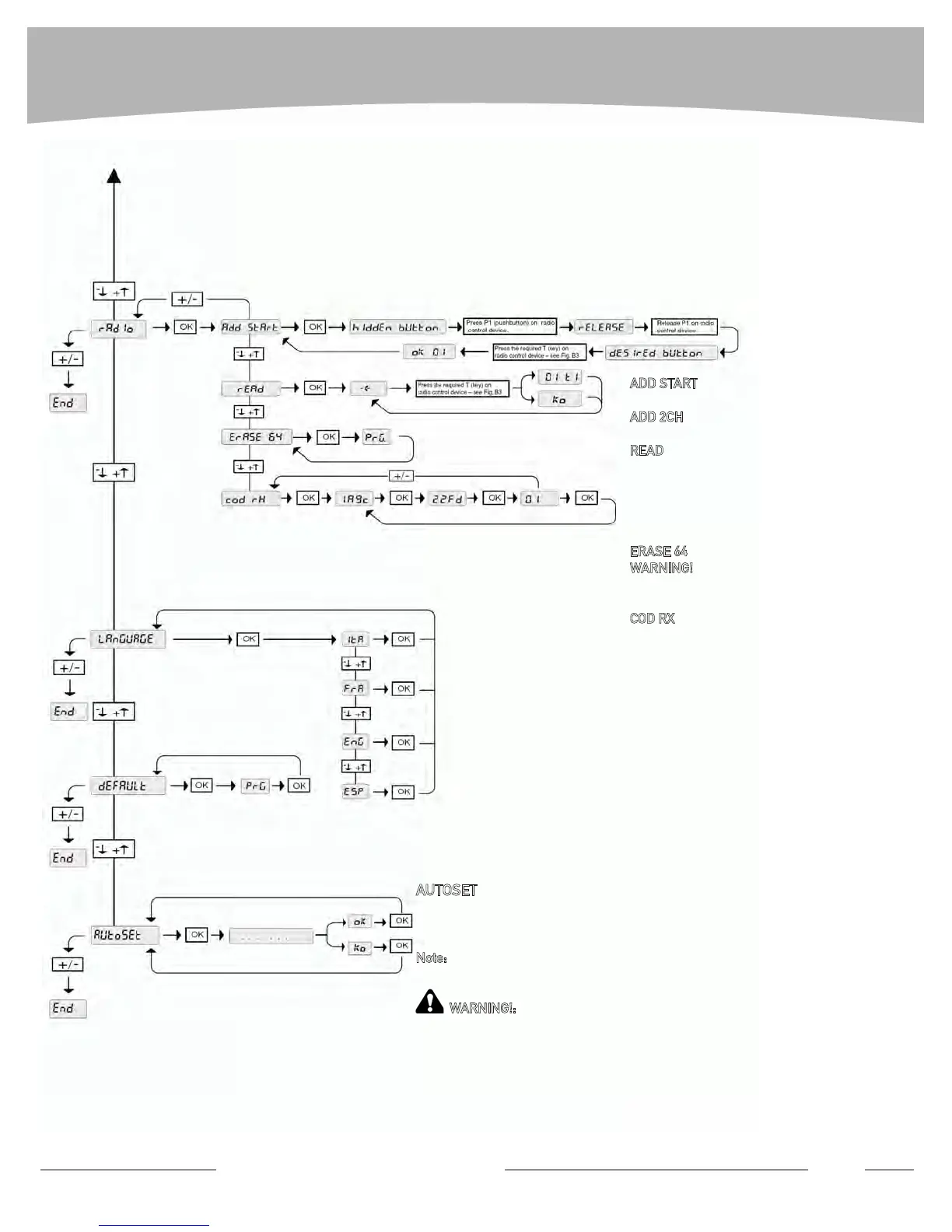
MENU FLOW CHART
Technical Support: 1-877-995-815
5 15
AUTOSET
It automatically sets the motor torque (Motor 1 torque, Motor 2 torque, Motor 1 slow
down torque, Motor 2 slow down torque).
Note:
If slow down is disabled or not reached slow down torque will not be set. After
slow down adjustment Autoset has to be carried out gain.
WARNING!:
obstruction detection is disabled during Autoset. Be sure that no
obstacle is within the working range of the gate while Autoset is being performed.
ADD START
(Program a button of a remote to activate the gate)
ADD 2CH
(No effect)
READ
(Check if a remote is in the memory of the re-
ceiver and display button #)
EX:
02 t1 (remote #2, button #1)
ko (remote not in the memory)
ERASE 64
WARNING!
Removes all remotes devices
from the receiver memory.
COD RX
Displays the receiver code (required only if cloning
remotes is needed)


 To Next Page