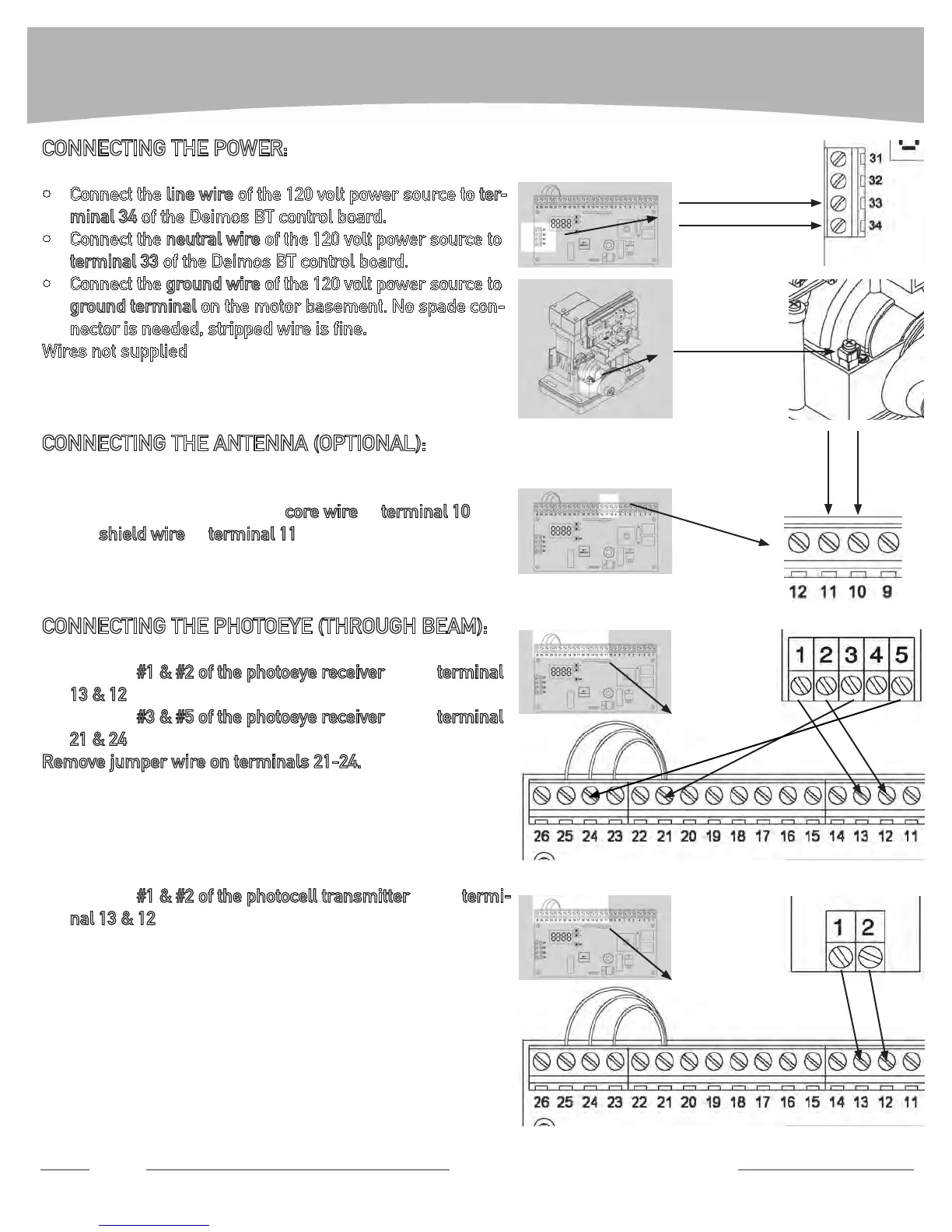
CONNECTING THE POWER:
Connect the • line wire of the 120 volt power source to ter-
minal 34 of the Deimos BT control board.
Connect the • neutral wire of the 120 volt power source to
terminal 33 of the Deimos BT control board.
Connect the • ground wire of the 120 volt power source to
ground terminal on the motor basement. No spade con-
nector is needed, stripped wire is ne.
Wires not supplied
CONNECTING THE ANTENNA (OPTIONAL):
Connect the antenna cable to Deimos BT circuit board. •
Strip cable and connect the
core wire to terminal 10 and
the
shield wire to terminal 11.
CONNECTING THE PHOTOEYE (THROUGH BEAM):
Connect • #1 & #2 of the photoeye receiver to the terminal
13 & 12 of the Deimos BT control board.
Connect • #3 & #5 of the photoeye receiver to the terminal
21 & 24 of the Deimos BT control board.
Remove jumper wire on terminals 21-24.
Wires not supplied.
Connect •
#1 & #2 of the photocell transmitter to the termi-
nal 13 & 12 of the Deimos BT control board.
Wires not supplied.
WIRING INSTRUCTIONS
8
Technical Support: 1-877-995-8155
neutral (white)
line (black)
ground (green)
core
shield


 To Next Page