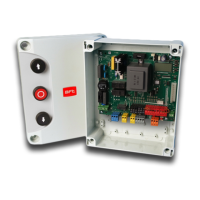
OK
@$R
F7BPP
.P+
*M%'A
OK
+ -
+
OK
OK
-
+
-
+
-
+
-
+
-
+
-
+
-
+
-
+
-
+
-
+
-
+
.P%
[]
OK OK
RA
OK OK
[]
.P%
N?NCPR
OK OK
[]
.P%
NAGCPP
-
+
OK
RA
ON
OFF
[M$$]
.P%
OK
OK
N?QMQ
ON
OFF
[M$$]
.P%
OK
OK
@J'+.?N
ON
OFF
[M$$]
.P%
OK
OK
$MRMA.
ON
OFF
[M$$]
.P%
OK
OK
R#QR.FMR
ON
OFF
[M$$]
.P%
OK
OK
.P#*
ON
OFF
[M$$]
.P%
OK
OK
1AAF
ON
OFF
[M$$]
.P%
OK
OK
K?LRCL@JMOSCM
ON
OFF
[M$$]
.P%
OK
-
+
OK
.PM%PB'M
ON
OFF
[M$$]
.P%
OK
-
+
OK
AMBDGHM
ON
OFF
[M$$]
.P%
OK
-
+
OK OK
[ ]
.P%
RT#*?NCPR
OK OK
[ ]
.P%
RT#*AGCP
-
+
-
+
OK OK
[ ]
.P%
QJMUQNCCB
OK OK
[ ]
.P%
-
+
OK OK
[
RQR?PR
]
.P%
-
+
OK OK
[]
.P%
N?NCPRBCA
-
+
OK OK
[]
.P%
NAGCPPBCA
-
+
-
+
OK
+1R#P
ON
OFF
[M$$]
.P%
OK
-
+
OK
*MM.
ON
OFF
[M$$]
.P%
OK
Fig. A
Presione la tecla OK
ACCESO A LOS MENUS
Versión software central
No de maniobras totales
(expresado en millares)
No de maniobras desde la última
operación de mantenimiento
(expresado en millares)
No de radiomandos memorizados
+
OK
LEGENDA
[
.P%
OK
+-
-
+
/ON
/OFF
Incremento/reducción parámetros o
conmutación ON/OFF
Corrimiento menús
(+ = anterior, - = sucesivo)
Presione la tecla OK (Intro/confirmación)
Valor predefinido
Mensaje ¡OK! (confirmación realización modificación)
Mensaje ¡KO! (error valor o función)
Mensaje "Espera" (introducir valor o función)
Presione simultáneamente las teclas + y -.
La pr e s ión simu l tánea d e l a s tecla s + y -
pe r m i te s a li r d el me nú en e l q ue s e e st á
operando y volver al anterior; si se produce
dentro de los menús principales, se sale de la
programación y se apaga el display.
L a s mo di f i c ac io n e s a po r ta da s q ue da n
configuradas únicamente si, a continuación, se
presiona la tecla OK.
MENU SIGUIENTES
FIG. B
J1
¡ATENCION!
Para modificar
la configuración,
es necesario
cerrar el puente
de conexión J1.
OK
JE
ON
OFF
[M$$]
.P%
OK
-
+
OK
JE
ON
OFF
[M$$]
.P%
OK
8MLC


 To Next Page