MIN 1 - MAX 3
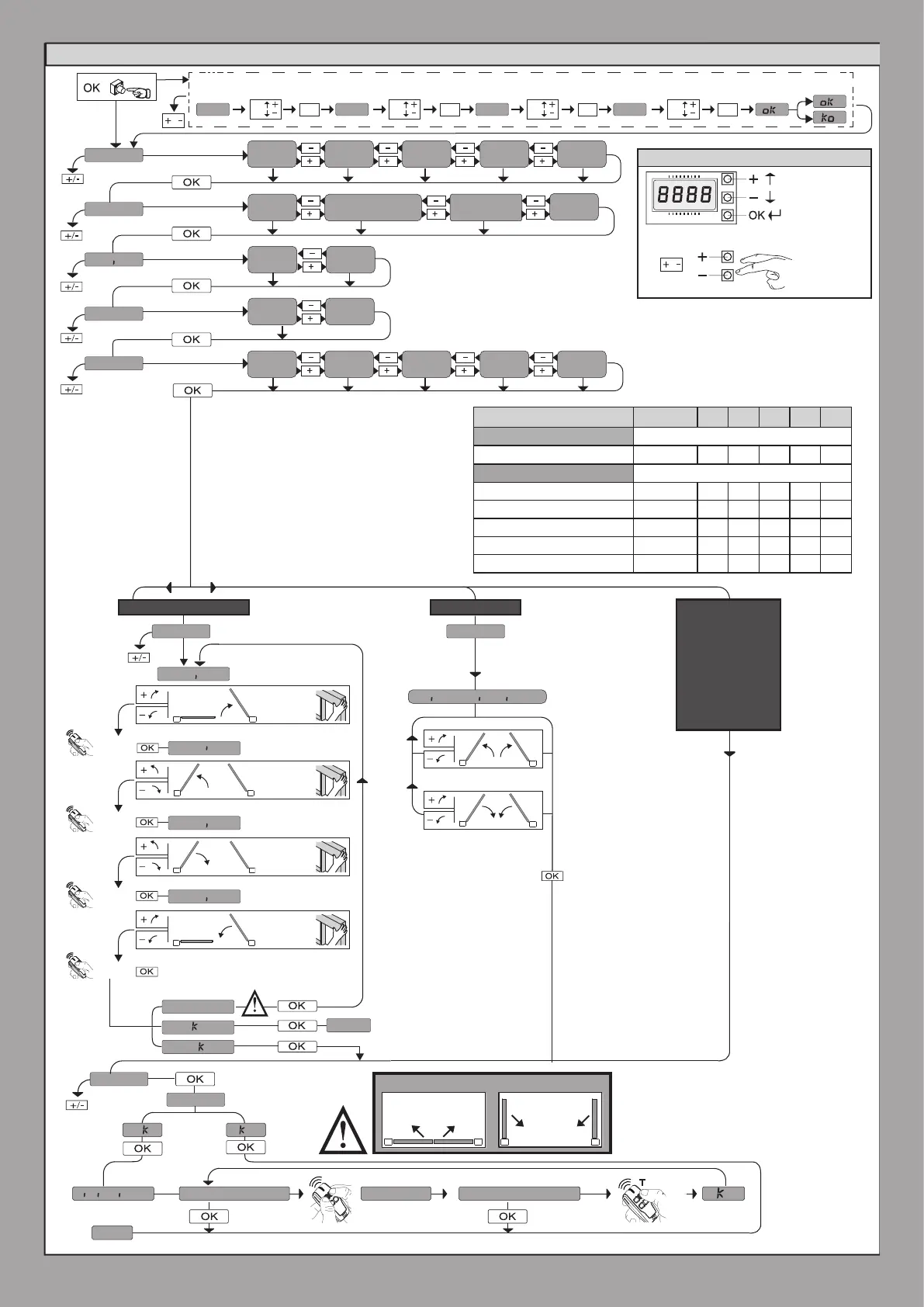
AUTO OPEN
AUTO CLOSE
autoset
O 01
. . . . . .
o
o
end
desidered buttonhidden button releasemem.remotes
preset
Dir
int
ext
lang
.....
x1
eli
phobos bt a
phobos n
2
1
ar Sr Ac Sc ind
ita fra deu eng esp
n. mot.
type
0--- 10--
OK
150-
OK
1520
OK OK
/
P1
P2
P1
P2
P1
P2
P1
P2
/
end
ersu
o
o
l.sw adj l.sw adj
GIUNO ULTRA
opm1
opm2
clm2
clm1
E5 A18 / E5 A12
1
2
1
1
2
2
1
2
1
2
1
2
manual movement
ELI BT
KUSTOS BT A
PHOBOS BT A
PHOBOS N BT
IGEA BT
SUB BT
VIRGO SMART BT A
ELI BT A40 LS
ELI BT A35 LS
ELI BT A40
ELI BT A35
PRESET DEFAULT
ar sr ac sc ind
PARAMETERS
LOGIC
TCA 0 1 0 1 0 0
Step-by-step movement 0 1 0 1 0 0
Pre-alarm 0 0 0 1 1 0
Deadman 0 0 0 0 0 1
Block pulses during opening 0 0 0 1 1 0
SIMPLIFIED MENU
: motor 1 opening
limit switch adjustment
: motor 1/2
opening
limit switch
adjustment
: motor 1/2
closing
limit switch
adjustment
Refer to the
settings on the
adjustment of
the limit switches
found in the
GIUNO ULTRA
motor manual.
or
or
or
or
or
or
or
or
: motor 2 opening
limit switch adjustment
: motor 2 closing
limit switch adjustment
: motor 1 closing
limit switch adjustment
INT: inward opening
EXT: outward opening
ar: automatic operation, residential
sr: semiautomatic operation, residential
ac: automatic operation, commercial
Sc: semiautomatic operation, commercial
Ind: dead man operation
LEGENDA
Scroll up
Scroll own
Conrm/
Switch
on display
Exit menù
Password entry. Request with Protection Level logic set to 1, 2, 3, 4
12 - THALIA
D814123 0AA00_01



 To Next Page