Now you can use Google’s voice-activated speaker to control your Smart Home sockets and
adaptors. With the Google Assistant, you can turn on your lights without pressing a button!
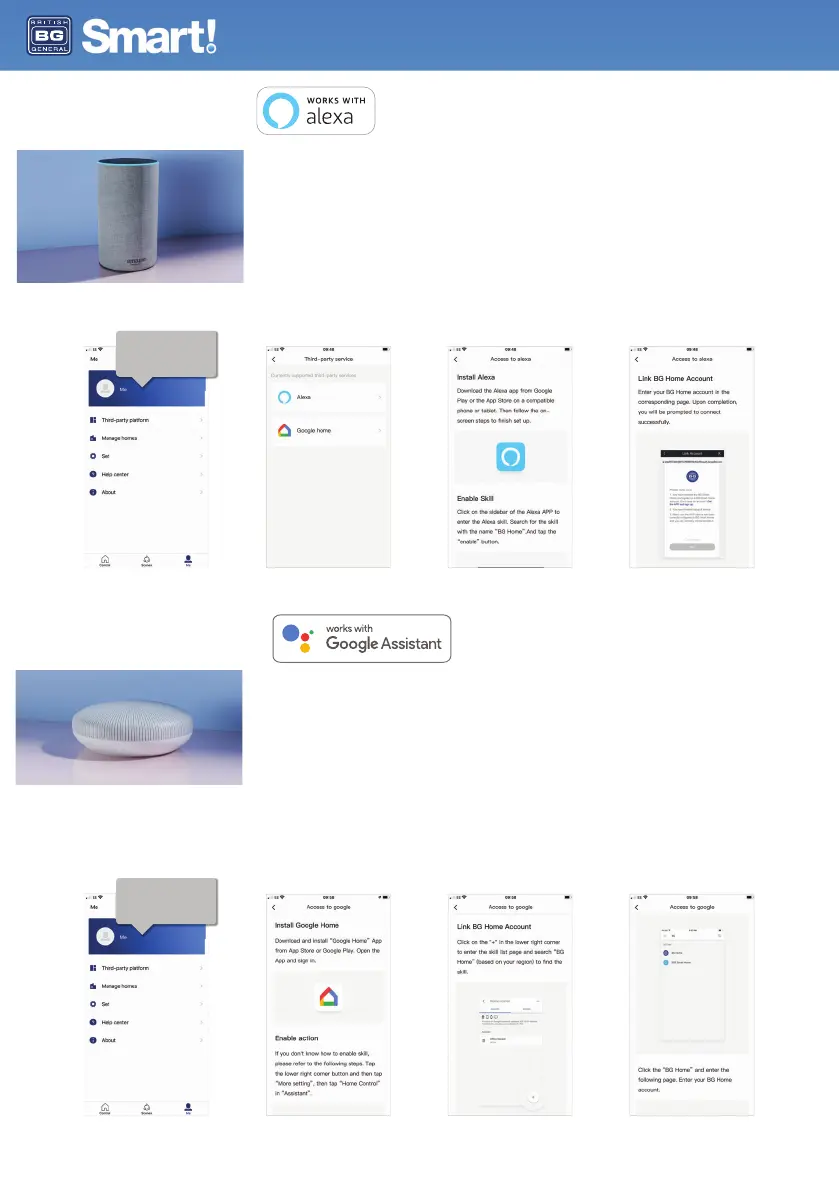
1. Setup
Start by getting the Google Home app and setting up your Google Home if you have not done this
already.
2. Add BG Smart Home Action
In the Google Home app tap the menu icon and select Home Control. Then tap the + button to see a
list of Actions tapping BG Home to select the Action.
3. Link your BG Home Account
Now follow the in-app instructions to link your BG Home App account. Once complete you’ll be able to
say ‘Ok Google, turn my lamp on’.
Installation and User Guide
If you’re new to Echo, it’s a super smart speaker from Amazon that responds to your voice.
Once you’ve bought Amazon Echo and downloaded the BG Home App, you’ll just need to enable....
1. Enable the BG Home App
In your Alexa app, tap Skills in the menu and search for BG Home. Tap Enable.
2. Link Account
Enter your BG Home App username and password and follow the onscreen instructions.
3. Talk to Alexa
Now the fun part. Ask Alexa to control your BG Smart Home device.
In the 'me' section of the App
you can select 'Third-party
platform' so see all supported
integrations and instructions
for linking your account.
In the 'me' section of the App
you can select 'Third-party
platform' so see all supported
integrations and instructions
for linking your account.


 To Next Page