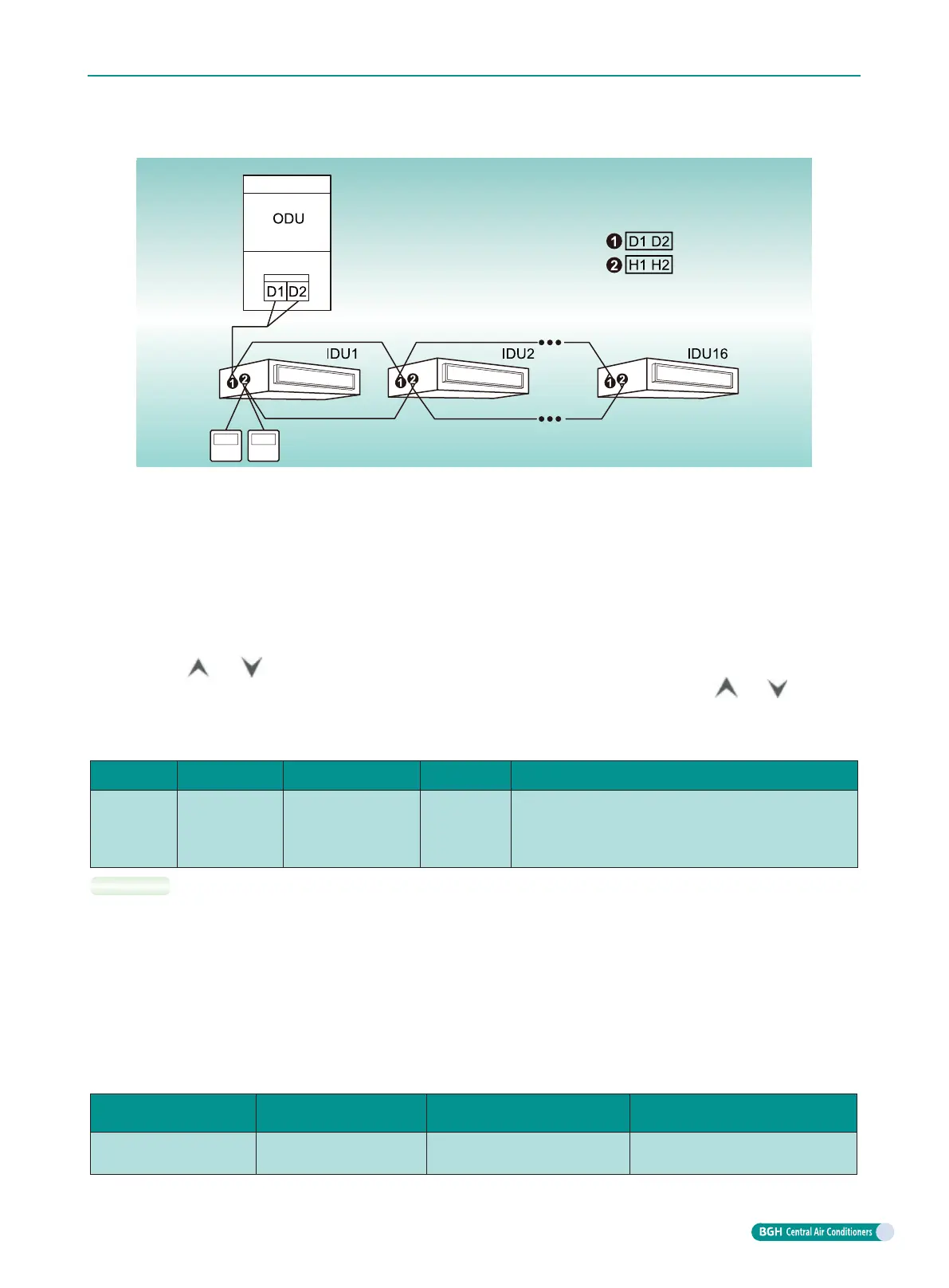
When two wired controllers control several IDUs at the same time, the wired controller can be connected
to either IDU, the connected IDU shall be the IDU of the same series, meanwhile, set one of the wired
controllers and only one as the deputy wired controller. The amount of IDU controller by wired controller
shall not exceed 16 sets, and the connected IDU shall be in the network of the same IDU.
Set deputy wired controller under ON/OFF status:
Long press “Function” button for 5s in the wired controller which needs to be set as the deputy wired
controller, the temperature area will display “C00”, then long press “Function” button for 5s to enter
parameter setting interface for wired controller, at this time, the temperature area will display “P00”
acquiescently.
Press “
”or“ ” butrron to select P13 as the parameter code and “Mode” button to switch to
parameter value setting. At this time, the parameter value will blink, then press “
”or“ ” to select
“02”code. Press “Confirm/Cancel” button to complete the setting.
Press “Confirm/Cancel” button to return to the previous operation, until existing parameter setting.
Parameter setting list for the user is as follow:
Parameter
code
Parameter
name
Parameter range
Defaulted
value
Remark
P13
Address setting
for wired
controller
01
:
Master wired
controller
02
:
Deputy wired
controller
01
When two wired controllers control a(or several) set(s) of
IDU at the same time, the address of two wired controllers
shall be dierent. Apart from setting the wired controller
address, the deputy wired controller can not set unit
parameter.
NOTES:
a. The ex-factory setting for all the wired controller is master wired controller status.
b. Under paramter setting status: fan speed, timer, sleep and swing buttons are invalid, press “ON/
OFF” button to return to the main interface immediately, but it will not execute the startup/shutdown
operation.
c. Under paramter setting status, the signal of remte controller is invalid.
9.3.3 Connection method between duct type IDU and dash receiver
If remote dash receiver is needed for the duct type IDU, it shall be connected through DISP1 and DISP2
in the master board of IDU.
IDU type
Model of remote dash
receiver
Model of connection wire
Corresponding to the interface of
IDU main board
Duct type IDU JS05
Connection wire among plates
(17-core)
DISP1 (connect to 8-core interface)
DISP2 (connect to 9-core interface)
GMV6 DC Inverter VRF Units Technical Sales Guide
131



 To Next Page