EasyManua.ls Logo

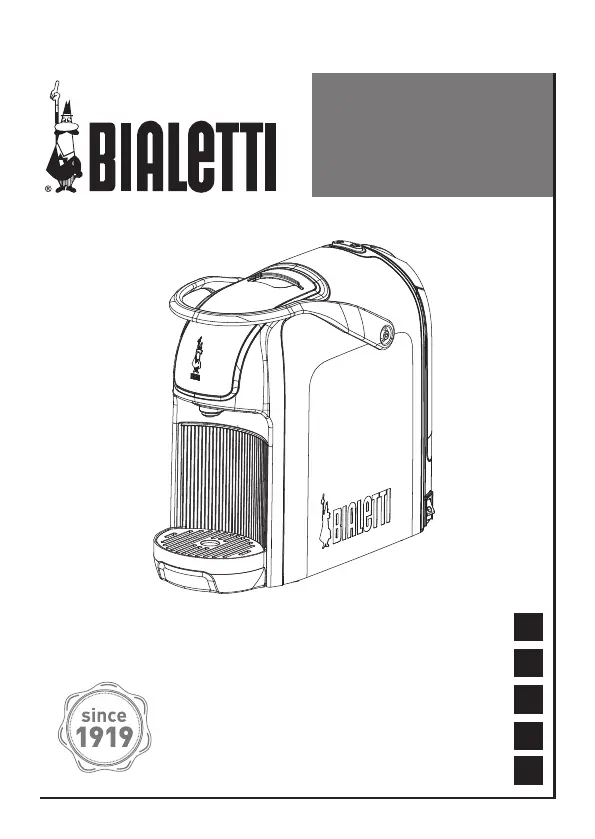
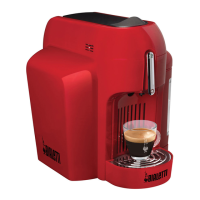
Bialetti BREAK AUTOMATIC - User Manual

Bialetti BREAK AUTOMATIC
136 pages
Go to English
Print Icon
To Next Page IconTo Next Page
Loading...
Istruzioni per l’uso
Instructions for use
Instructions d’emploi
Gebrauchsanleitung
Instructiones de uso
EN
FR
DE
IT
ES
BREAK
AUTOMATIC
CF68

Questions and Answers

Summary

1. Getting Started

Declaration of Conformity

Manufacturer's declaration of compliance with EC directives for domestic appliances.

Regulatory Information

Details on compliance with EU directives for safety and materials.

2. Warnings

Description of Symbols

Explains warning symbols like ATTENTION, HOT SURFACE, and manual reading.

General Warnings and Household Use

Intended for household use; specifies conditions for children's use and supervision.

Use by Persons with Reduced Capabilities

Guidelines for use by individuals with physical, sensory, or mental limitations.

Child Safety Precautions

Mandates supervision for children and keeping the appliance out of reach.

Liquid Immersion & Cord Safety

Prohibits immersion in liquids; requires authorized replacement for damaged power cords.

Hot Surfaces & Proper Usage

Avoid touching hot parts; use the appliance only for its intended purpose.

Indoor Use & Warranty Conditions

Designed for indoor use; warranty void for commercial use or non-compliance.

Packaging & Placement Guidelines

Keep packaging away from children; place on a stable surface away from heat.

Electrical Connection & Adaptors

Check voltage; avoid adaptors/extension cords unless certified and appropriate.

Electrical Safety Measures

Advises RCD use, earthed plug, accessible socket, and avoiding cord pulling.

Handling Precautions (Wet Hands, Feet)

Avoid touching with wet hands or using barefoot for safety.

Cord Handling & Ventilation Safety

Handle cord carefully, do not block vents, and unwind cord fully for use.

Cleaning & Maintenance Safety

Disconnect before cleaning; use manufacturer-approved methods.

Repair, Disposal & Unattended Use

Repairs by authorized centers only; make inoperable if unused; do not leave unattended or use with empty tank.

Operating & Cleaning Precautions

Do not move while operating; initial smell is normal; avoid harsh chemicals/dishwashers.

3. Package Contents

Included Items

Lists items included: coffee machine, manual, leaflet, tester kit (if applicable).

4. Appliance Description

Components and Technical Data

Identifies parts and provides technical specifications like dimensions and capacity.

5. First Use of the Appliance

Initial Setup and Priming

Steps for first use: filling tank, connecting power, switching on, and priming.

6. Coffee Making

Preparing for Coffee Brewing

Check water, power on, insert capsule, close lever, place cup.

Starting Coffee Dispensing

Place cup and start dispensing coffee according to procedures.

Espresso Coffee Making Procedure

How to make an espresso: press button, observe indicators.

Long Coffee Making Procedure

How to make long coffee: press button, observe indicators.

Stopping and Repeating Coffee Making

Coffee dispensing can be stopped; raise lever to insert new capsule.

7. Dispensing Time Setting

Setting Espresso Coffee Dispensing Time

Procedure to set custom dispensing time for espresso coffee.

Setting Long Coffee Dispensing Time

Procedure to set custom dispensing time for long coffee.

Resetting Default Settings

How to reset the appliance dispensing times back to factory defaults.

8. Maintenance

Appliance Cleaning

Instructions for cleaning the appliance body and its removable parts.

Descaling Procedure

Step-by-step guide for descaling the machine to remove limescale.

9. Energy Saving Mode

Appliance Stand-by Function

Details the appliance's energy-saving stand-by function and how to restart it.

10. Troubleshooting

Machine Not Heating Up or Pouring

Solutions for issues like machine not heating or not pouring coffee.

Cold Coffee Issues

Troubleshooting steps for when the coffee is dispensed cold.

Lever and Noise Issues

Resolving problems with the lever not lowering or the machine making excessive noise.

Capsule Falling & Blinking Lights

Solutions for capsules falling out or both indicator lights blinking rapidly.

11. Tips for Good Coffee

Tips for Optimal Coffee Quality

Advice on dispensing water first, warming cups, and using specific cup shapes.

12. Bialetti Capsules

About Bialetti Capsules

Information on Bialetti capsules, their perfect amount, and aluminium material benefits.

Where to Buy Capsules

Details on where to purchase Bialetti capsules: stores, supermarkets, and online.

13. Warranty

Warranty Coverage and Exclusions

Appliance guaranteed for two years. Excludes damages from misuse, negligence, unauthorized repairs.

14. Disposal of the Appliance

Environmental Disposal Guidelines

Instructions for responsible disposal according to EU directives for environmental protection.

Bialetti BREAK AUTOMATIC Specifications

General IconGeneral
BrandBialetti
ModelBREAK AUTOMATIC
CategoryCoffee Maker
LanguageEnglish

Related product manuals