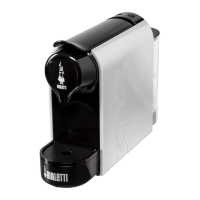
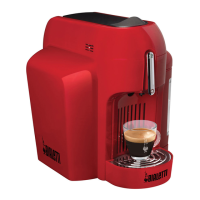
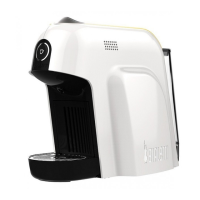
The Bialetti SMART CF65E is an espresso coffee machine designed for household use, exclusively with original Bialetti aluminum capsules. This machine is the result of years of research and passion for coffee, aiming to deliver a bar-quality espresso experience at home.
Function Description:
The Bialetti SMART CF65E is a single-serve espresso coffee machine that uses specially designed Bialetti aluminum capsules. It features an innovative sensor that ensures compatibility only with these aluminum capsules, preventing the use of plastic capsules or dispensing without a capsule. The machine is designed for simple operation, allowing users to brew coffee by pressing a single button. It also includes a cleaning mode for internal circuit maintenance and an energy-saving mode to reduce power consumption during inactivity.
Important Technical Specifications:
- Dimensions (LxDxH): 354x163x266 mm
- Max. capacity of water tank: 0.6 liters
- Voltage (V) / Power (W): See rating plate on the appliance bottom.
- Energy Saving Mode: Activates after 15 minutes of inactivity, reducing power consumption to less than 0.5W.
- Capsule Compatibility: Exclusively with original Bialetti aluminum capsules.
Usage Features:
-
Initial Setup:
- Unplug the machine.
- Remove the water tank (4) and fill it with potable water up to the MAX level.
- Insert the plug (9) into an earthed socket, ensuring the power socket is easily reachable.
- Switch on the machine using the on/off button (2) located on the top back.
- During heating, the boiler status LED (8) will be RED. It turns GREEN when ready for coffee dispensing.
- First Use Cleaning: With the lever (1) lowered, place a suitable cup on the cup rack (6). Activate the cleaning mode by pressing the pour button (8) for 5 seconds. Stop the cleaning mode by pressing the button again when the tank is empty. During this minute-long cleaning cycle, the machine dispenses water intermittently to clean and rinse internal circuits, and the LED blinks green quickly.
-
Coffee Making:
- Before dispensing, check the water level in the tank (4) and ensure the boiler status LED (8) is GREEN.
- Lift the lever (1) completely to open the capsule compartment (3).
- Insert a Bialetti aluminum capsule into the compartment (3). Ensure the capsule is not misshapen; bend the edges back into shape if necessary.
- Close the lever (1) carefully to avoid crushing hands.
- Place a cup onto the cup rack (6).
- Press the pour button (8) to start dispensing coffee.
- Press the pour button (8) again to stop dispensing when the desired coffee level is reached.
- For subsequent coffees, lift the lever (1) to automatically eject the used capsule and insert a new one.
- Important: Never place fingers between mechanisms or inside the capsule compartment.
- Capsule Detection: The machine is equipped with a sensor that only allows the use of aluminum capsules. If a plastic capsule is used, or if no capsule is inserted, the machine will not dispense coffee, and the pour button LED will blink RED for about 3 seconds.
-
Energy Saving Mode:
- The machine automatically enters stand-by mode after 15 minutes of inactivity.
- To reactivate, press the on/off button (2). The machine will start pre-heating (RED pulsating LED) and then indicate readiness (GREEN LED). Pre-heating time varies depending on inactivity, up to 50 seconds after several hours.
Maintenance Features:
-
Appliance Cleaning:
- Always unplug the appliance before cleaning.
- Never immerse the appliance body (1) in water or other liquids, and do not put it in the dishwasher.
- Clean the appliance body with a wet cloth, avoiding abrasive detergents.
- Water Tank (4): Rinse daily. Do not leave water in the tank for more than 5 days. If left longer, change the water and dispense 50ml without a capsule before making coffee.
- Used Capsule Compartment (5): This is removable. Regularly remove and empty it when full (holds 12-15 capsules). Check the level through the sight glass (7). Do not operate the machine with a full compartment to prevent damage.
- Cup Rack (6) and Cup Plate: Wash with water and dishwashing detergent. Do not put these items in the dishwasher. Be careful when emptying the used capsule compartment, as it may contain water and/or coffee remains.
-
Descaling Procedure:
- Descaling is recommended every 300 cups of coffee (or every 3-4 months), or when a constant reduction in coffee flow is observed. The frequency depends on water hardness.
- Do not use vinegar or vinegar-based solutions for descaling.
- Pour a dose of Bialetti descaling solution (or equivalent, non-toxic, suitable for coffee machines) into the water tank (4).
- Fill the tank with cold water up to the MAX level.
- Switch on the machine by pressing the on/off button (2) and wait for the LED to remain steady.
- Ensure no capsule is in the machine; open and close the lever (1) if necessary.
- Place a suitable cup on the cup rack and activate the cleaning mode by pressing the pour button (8) for 5 seconds.
- During this minute-long descaling cycle, the machine dispenses water intermittently, and the LED blinks green quickly.
- Stop the cleaning mode by pressing the pour button (8) again when the water level reaches about half the tank capacity.
- Leave the descaling solution to act for about 15-20 minutes with the machine off.
- Switch on the machine and repeat the dispensing operations until the tank is completely empty. The machine has a safety system that interrupts dispensing automatically after 100 seconds.
- Switch off the machine for about 5 minutes.
- Remove the tank, rinse thoroughly with clean cold water.
- Fill the tank with clean water up to the MAX level and reinsert it.
- Activate the cleaning mode by pressing the pour button (8) for 5 seconds until the tank is completely empty. Repeat this step if necessary to ensure thorough rinsing.
Troubleshooting:
The manual provides solutions for common issues such as:
- Machine not heating up (plug, power button).
- Machine not dispensing coffee (stuck/badly positioned capsule, capsule fallen inside, no water, blocked pipes).
- Cold coffee (insufficient heating, partially clogged thermoblock).
- Machine not dispensing and button blinking red (plastic capsule, no capsule inserted).
- Lever not lowering (stuck/badly positioned capsule, full used capsule container).
- Machine making too much noise (no water in tank).
- Capsule falling from compartment (lever not completely raised).
Tips for a Good Coffee:
- To obtain a thicker and more persistent cream, use cups with an inner ovoid-shape base.
Warranty and Disposal:
- The appliance is guaranteed for two years from the date of delivery against manufacturing defects.
- Warranty does not cover damages from improper use, lack of descaling, incorrect installation, normal wear, or unauthorized repairs.
- The product complies with Directive 20012/19/EU for the disposal of electrical and electronic equipment. It should be disposed of separately from domestic waste at designated collection centers or returned to the retailer when purchasing a new equivalent appliance.

 Need help?
 General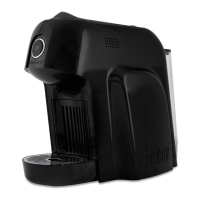

 To Next Page