EasyManua.ls Logo

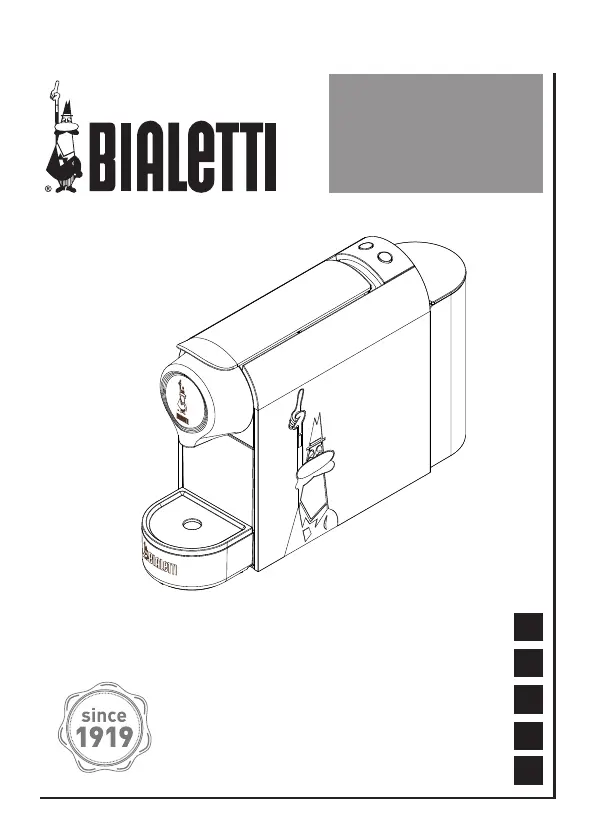
Bialetti GIOIA CF90 - User Manual

Bialetti GIOIA CF90
144 pages
Go to English
Print Icon
To Next Page IconTo Next Page
Loading...
Istruzioni per l’uso
Instructions for use
Instructions d’emploi
Gebrauchsanleitung
Instructiones de uso
GIOIA
CF90
EN
FR
DE
IT
ES

Questions and Answers

  • A
    andre29Aug 3, 2025
    What to do if my Bialetti GIOIA CF90 does not pour coffee?
    • M
      Michael GloverAug 3, 2025
      If your Bialetti Coffee Maker isn't pouring coffee, several issues could be the cause. A capsule might be stuck or badly positioned, so unplug the machine, let it cool, and manually remove the capsule using a tool. A capsule may have fallen into the machine, so check the capsule compartment. Also, ensure the water tank is filled. Lastly, the pipes could be clogged with scale, in which case you should carry out a scale removal cycle.
  • E
    Emma JacksonAug 7, 2025
    Why is my Bialetti Coffee cold?
    • G
      gmorrisonAug 7, 2025
      If your Bialetti Coffee is coming out cold, it could be for a couple of reasons. Make sure the machine has completely heated the water before pouring the coffee by waiting until the green lights of the dispensing buttons are on. Also, the machine might be partly clogged by scale, so try running a scale removal cycle.
  • R
    Robert BradleyAug 11, 2025
    How to fix a Bialetti GIOIA CF90 Coffee Maker that does not heat up?
    • C
      Charles BarronAug 11, 2025
      If your Bialetti Coffee Maker isn't heating up, first, ensure it's properly connected to the mains power. If it is connected, check that the machine is switched on using the on/off button.
  • P
    phillAug 15, 2025
    Why is my Bialetti GIOIA CF90 Coffee Maker making too much noise?
    • R
      Ruth WestAug 15, 2025
      If your Bialetti Coffee Maker is excessively noisy, it might be due to a couple of reasons. First, check if the water tank is empty and fill it if needed. Also, ensure that the machine is placed on a flat and rigid surface to provide stability.
  • R
    Richard Lambert DDSAug 20, 2025
    What to do if it is not possible to lower the lever on my Bialetti GIOIA CF90 Coffee Maker?
    • A
      April SmithAug 20, 2025
      If you can't lower the lever on your Bialetti Coffee Maker, it could be due to a stuck or badly positioned capsule. Unplug the machine, allow it to cool down, and then manually remove the capsule using a tool. Another possibility is that the used capsule compartment is full, so empty it.
  • A
    Angela AdamsAug 25, 2025
    What to do if the capsule falls from its compartment in my Bialetti GIOIA CF90 Coffee Maker?
    • W
      williamsvincentAug 25, 2025
      If the capsule falls from its compartment in your Bialetti Coffee Maker, make sure the lever is completely lowered and opened until it reaches its end point.
  • T
    tonychavezAug 28, 2025
    What to do if my Bialetti GIOIA CF90 Coffee Maker does not dispense and the lights blink red?
    • J
      Jordan KentAug 28, 2025
      If your Bialetti Coffee Maker isn't dispensing and the lights are blinking red, it might be due to a plastic capsule or an empty capsule seat. Remove any plastic capsule and insert a Bialetti aluminum capsule. To clean the machine, start a cleaning cycle, ensuring no capsule is inserted during this process.

Summary

Getting Started

Declaration of Conformity

Manufacturer confirms appliance meets EC directives for domestic use, covering safety and material compliance.

Regulatory Information

Details appliance compliance with EU directives for EMC, low voltage, and material safety standards.

Safety Warnings

Key Safety Symbols Explained

Explains vital safety pictograms such as ATTENTION, WARNING, hot surfaces, and manufacturer recommendations.

General Safety Guidelines

Covers safe installation, general use, maintenance, intended household use, and precautions for children.

User Age and Capability Requirements

Specifies conditions for use by children over 8 and persons with reduced capabilities, emphasizing supervision for safety.

Critical Operational Warnings

Warns against water immersion, damaged cords, touching hot parts, and using incompatible capsules for safe operation.

Usage Environment and Electrical Safety

Covers indoor use, warranty voidance for commercial use, checking appliance condition, packaging hazards, surface requirements, and voltage checks.

Electrical Connection Safety

Stresses using an earthed plug, RCD switch, avoiding cord pulling, and accessible socket placement for electrical safety.

Precautions and Malfunction Handling

Details precautions like avoiding wet hands, bare feet, blocking vents, and instructions for handling breakdowns or decommissioning.

Operational Precautions and Initial Use Notes

Advises against unattended operation, use with empty tank, moving during use, and notes on initial burn smell being normal.

Package Contents

Appliance Overview and Specifications

Key Components and Technical Data

Lists all appliance parts with a key and provides technical specifications like dimensions, power, and capacity.

First Use of the Appliance

Initial Setup and Heating

Guides through filling the water tank, plugging in, and understanding the heating indicator lights before first use.

Initial Cleaning Cycle

Details the specific procedure for running the machine's initial cleaning cycle for optimal performance.

Making Coffee

Brewing Preparation and Capsule Insertion

Instructions on checking water, button status, lifting the lever, and safely inserting the coffee capsule.

Brewing Safety Precautions

Crucial safety advice: avoid fingers in mechanisms and never pull the lever during operation to prevent injury.

Espresso and Long Coffee Preparation

Step-by-step instructions for making espresso and long coffee, including button operations and dispensing notes.

Capsule Ejection and Dispensing Control

Information on automatic capsule ejection, stopping dispensing, the capsule sensor, and dispensing water via cleaning mode.

Setting Coffee Volume

Customizing Espresso Volume

Explains how to set the personal espresso dispensing volume and how to reset to default settings.

Customizing Long Coffee Volume

Details how to set the personal long coffee dispensing volume and reset to default settings.

Maintenance and Cleaning

Cleaning the Appliance and Components

Instructions for cleaning the machine body, rinsing the water tank, and emptying the used capsule collector.

Machine Descaling Process

Guides on when to descale, the recommended frequency, and the correct descaling solution to use.

Detailed Descaling Steps

Provides a comprehensive step-by-step guide for descaling the machine, including running cleaning cycles.

Energy Saving Features

Automatic Stand-by Mode

Explains the automatic stand-by function, its activation, power consumption, and how to resume operation.

Troubleshooting Common Issues

Machine Not Heating or Pouring

Addresses problems like the machine not heating up or not pouring coffee, offering causes and practical solutions.

Lever, Noise, and Coffee Quality Issues

Covers issues with lever operation, excessive noise, capsule falling, and tips for improving coffee cream quality.

Bialetti Coffee Capsules

Capsule Features and Availability

Highlights the unique features of Bialetti capsules and provides information on where and how to purchase them.

Product Guarantee Information

Warranty Details and Coverage

Details the two-year warranty, including coverage, exclusions for misuse, wear and tear, and unauthorized repairs.

Appliance Disposal

Responsible Waste Disposal

Provides instructions for environmentally sound disposal of the appliance according to WEEE directive, directing users to recycling centers.

Bialetti GIOIA CF90 Specifications

General IconGeneral
BrandBialetti
ModelGIOIA CF90
CategoryCoffee Maker
LanguageEnglish

Related product manuals