EasyManua.ls Logo

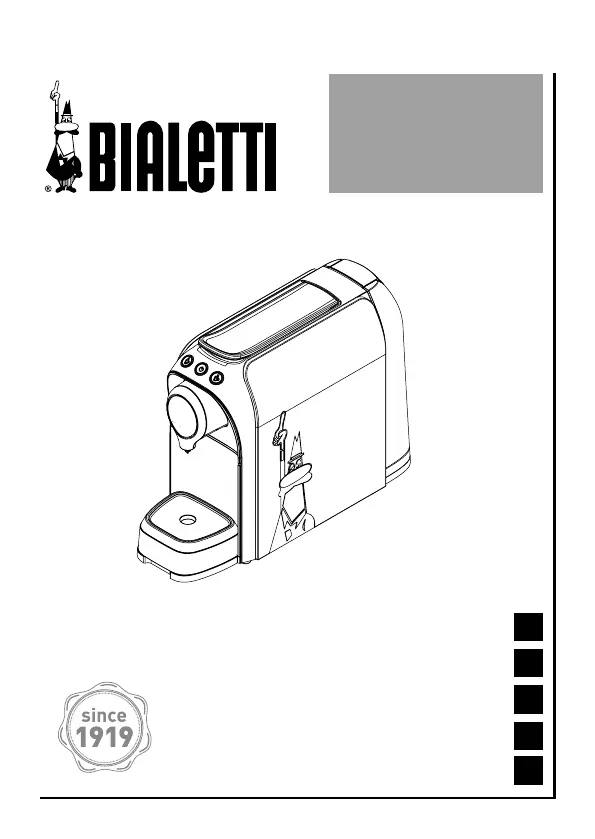
Bialetti SUPER CF69 - User Manual

Bialetti SUPER CF69
150 pages
Go to English
Print Icon
To Next Page IconTo Next Page
Loading...
Istruzioni per l’uso
Instructions for use
Instructions d’emploi
Gebrauchsanleitung
Instructiones de uso
SUPER
CF69
EN
FR
DE
IT
ES

Questions and Answers

  • B
    brianharmonAug 14, 2025
    How to fix a Bialetti Coffee Maker that does not heat up?
    • J
      jennifer87Aug 15, 2025
      If the Bialetti Coffee Maker is not heating up, ensure it is properly connected to the mains power. Also, make sure that the machine is switched on using the On/Off button.
  • L
    linda55Aug 18, 2025
    What to do if my Bialetti SUPER CF69 does not pour coffee?
    • S
      Sandra WrightAug 18, 2025
      If your Bialetti Coffee Maker isn't dispensing coffee, it might be due to several reasons. First, check if the capsule is stuck or poorly positioned; if so, unplug the machine, let it cool, and manually remove the capsule using a tool. Next, ensure a capsule hasn't accidentally fallen into the machine by checking the capsule compartment. Also, make sure the water tank is filled. Lastly, the pipes could be clogged with scale, in which case you should perform a descaling cycle.
  • B
    Brandon SimmonsAug 21, 2025
    Why is the on/off button blinking red on my Bialetti SUPER CF69 Coffee Maker?
    • K
      Kendra ThomasAug 21, 2025
      If the On/off button on your Bialetti Coffee Maker is blinking red, it means that there is no water in the tank. To resolve this, fill the tank and press any button to exit the alarm mode. Then, press the espresso or long buttons to repeat dispensing.
  • S
    sarah12Aug 25, 2025
    Why is the coffee from my Bialetti Coffee Maker cold?
    • D
      David DudleyAug 26, 2025
      If your Bialetti Coffee Maker is dispensing cold coffee, it could be because the machine hasn't fully heated the water. Always wait for the green lights on the dispensing buttons to turn on before dispensing coffee. Alternatively, the machine might be partially clogged by scale, so try performing a descaling cycle.
  • J
    Judy PerezAug 28, 2025
    What to do if it is not possible to lower the lever on my Bialetti Coffee Maker?
    • N
      nichole58Aug 28, 2025
      If you cannot lower the lever on your Bialetti Coffee Maker, it could be because the capsule is stuck or badly positioned. Unplug the machine, let it cool down, and manually remove the capsule using a tool. Another reason might be that the compartment for used capsules is full, so empty the compartment.
  • K
    Kara DavisAug 31, 2025
    What does it mean when the On/Off button light is steady red on my Bialetti SUPER CF69 Coffee Maker?
    • J
      jonesdorisAug 31, 2025
      If the On/off button on your Bialetti Coffee Maker shows a steady red light, the issue might be due to an incorrect temperature or a problem with the NTC sensor. Try switching the machine off and then on again. If the problem persists, contact a Bialetti service center.
  • N
    Nicole BraySep 3, 2025
    Why is the On/off button blinking red/green on my Bialetti SUPER CF69 Coffee Maker?
    • D
      dawn28Sep 3, 2025
      If the On/off button on your Bialetti Coffee Maker is blinking red and green, it indicates that the machine needs a descaling cycle. Carry out a descaling cycle.
  • L
    Lisa WoodwardSep 7, 2025
    Why does the capsule fall from its compartment in my Bialetti Coffee Maker?
    • A
      Amanda RamirezSep 7, 2025
      If the capsule falls from its compartment in your Bialetti Coffee Maker, make sure that the lever is completely raised. Completely lower the lever and open it until it gets to its end point.
  • F
    fmilesSep 12, 2025
    What does it mean when the Bialetti SUPER CF69 does not dispense and both lights blink in red?
    • K
      katrina12Sep 12, 2025
      If your Bialetti Coffee Maker does not dispense and both lights of the pour push buttons blink in red, it could be due to a plastic capsule or an empty capsule seat. Remove the plastic capsule and insert a Bialetti aluminium capsule, then press the pour push buttons for 3 seconds to return to normal dispensing.

Summary

Getting Started

Declaration of conformity

Manufacturer declares appliance compliance with EC directives.

Regulatory information

Appliance complies with specific EU directives and regulations.

Warnings

Description of symbols

Explains safety pictograms and their meanings.

General Warnings

Provides essential safety instructions for appliance use.

Precautions

Lists important precautions for safe operation and maintenance.

Package contents

Description of the appliance

First use of the appliance

Coffee making

Espresso Coffee Making Procedure

Step-by-step guide for brewing an espresso.

Long Coffee Making Procedure

Step-by-step guide for brewing a long coffee.

Setting dispensing quantity

Setting Espresso Coffee Dispensing Quantity

How to adjust the volume of espresso coffee dispensed.

Setting Long Coffee Dispensing Quantity

How to adjust the volume of long coffee dispensed.

Resetting the Default Settings

Instructions to restore factory default coffee dispensing volumes.

Maintenance

Appliance Cleaning

Instructions for cleaning the coffee machine and its parts.

Descaling Alarm

Explains the alarm indicating the need for descaling.

Descaling Procedure

Step-by-step guide for descaling the machine.

Energy saving mode

Troubleshooting

Tips for a good coffee

Bialetti capsules

Guarantee

Disposal of the appliance

Bialetti SUPER CF69 Specifications

General IconGeneral
Product typeEspresso machine
Built-in grinderNo
Capacity in cups1 cups
Coffee input typeCoffee capsule
Coffee maker typeSemi-auto
Appliance placementCountertop
Water tank capacity0.7 L
Maximum operating pressure20 bar
Reservoir for brewed coffeeCup
Number of simultaneous brewing cups1
Auto power offYes
AC input voltage220 - 240 V
AC input frequency50 - 60 Hz
Auto power off after (max)9 min
Cord length0.8 m
Control typeButtons
Product colorBlack, White
Used capsules container capacity8 pc(s)
Weight and Dimensions IconWeight and Dimensions
Depth231 mm
Width120 mm
Height320 mm

Related product manuals