10 USER’S MANUAL
Menu options and personal settings
To enter the menu touch on the panel, then follow the on-screen prompts.
The menu allows you to control temperature settings, water quantity settings, time and date settings, energy saving mode,
restore your BIBO’s factory settings.
Touch
to choose the setting that requires changing, then touch to select the setting you wish to change.
Touching at any time will take you back to the previous setting. Touch and/or
Water temperature settings
Select the temperature (Temp) setting in the menu then follow the screen prompts to set the hot, cold and ambient (mix
water temperatures as follows:
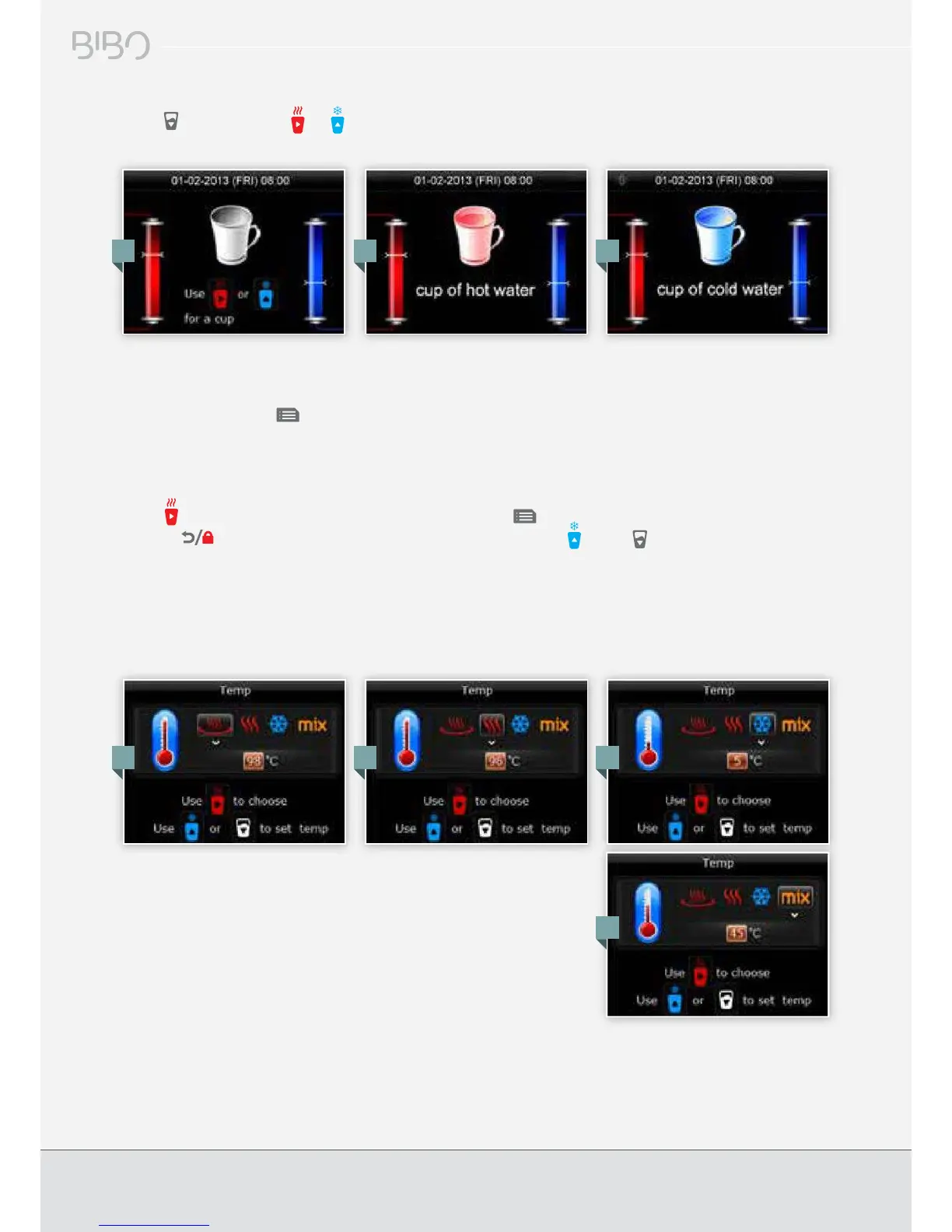
To dispense a measured cup of hot or cold water
Touch then touch either or for a measured cup of hot or cold water. To set the amount of water dispensed,
please see page 11 of this manual.
1. 2. 3.
1. 2. 3.
4.
1. ‘Near Boiling’ water temperature setting
2. ‘Hot’ water temperature setting
3. ‘Cold’ water temperature setting
4. ‘Ambient’ water temperature setting


 To Next Page