EasyManua.ls Logo

Bibo Classic - The touch screen panel

Bibo Classic
24 pages
Print Icon
To Next Page IconTo Next Page
To Previous Page IconTo Previous Page
Loading...
BIBO BRIGHTER WATER 5
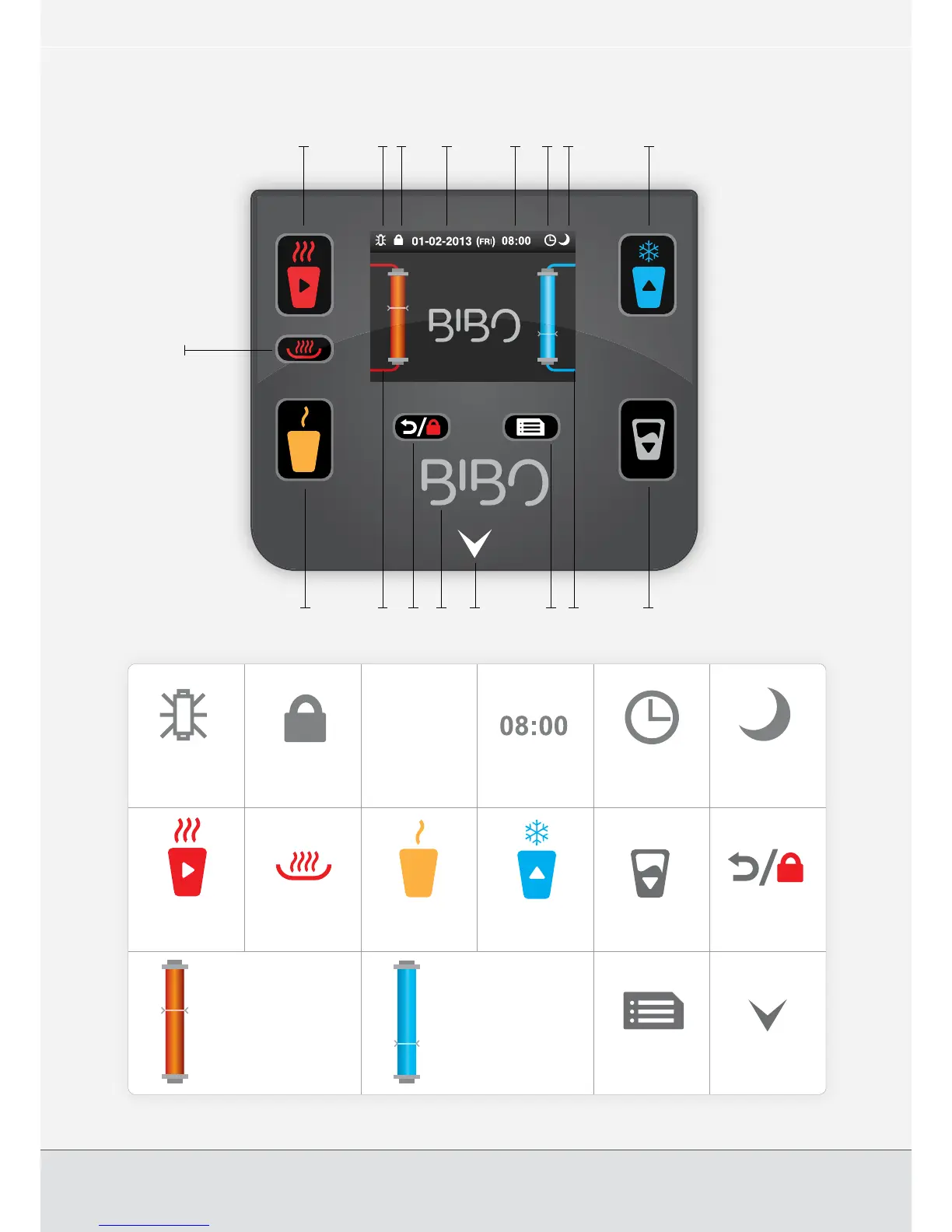
The touch screen panel
01-02-2013
1
13 149
8
12 17 16 1115
7 2 3 4 5 6 10
1 2 3 4 5 6
7 8 9 10 11 12
13 14 15 16
Calendar (Day -
Month - Year)
Ambient (mixed hot
and cold) water key
Menu and set key
Clock
(24 hour)
Cold water key (also
acts as ‘select’ key in
menu mode)
Water outlet
indicator light (red for
hot, blue for cold)
Automatic
on/off icon
A cup of water key
(also acts as ‘select’
key in menu mode)
Power saving
mode icon
Unlock (also acts
as ‘return’ key in menu
mode)
Child lock
status icon
Extra hot water key
Chilling and cold water
temperature bar

status icon
Hot water key (also
acts as ‘select’ key in
menu mode)
Heating and hot water
temperature bar
01-02-2013

Other manuals for Bibo Classic