EasyManua.ls Logo

BIC 960 - Page 22

Default Icon
22 pages
Print Icon
To Previous Page IconTo Previous Page
Loading...
Installation
Instructions
for
the
Optional
D20
and
D22
Dust
Covers
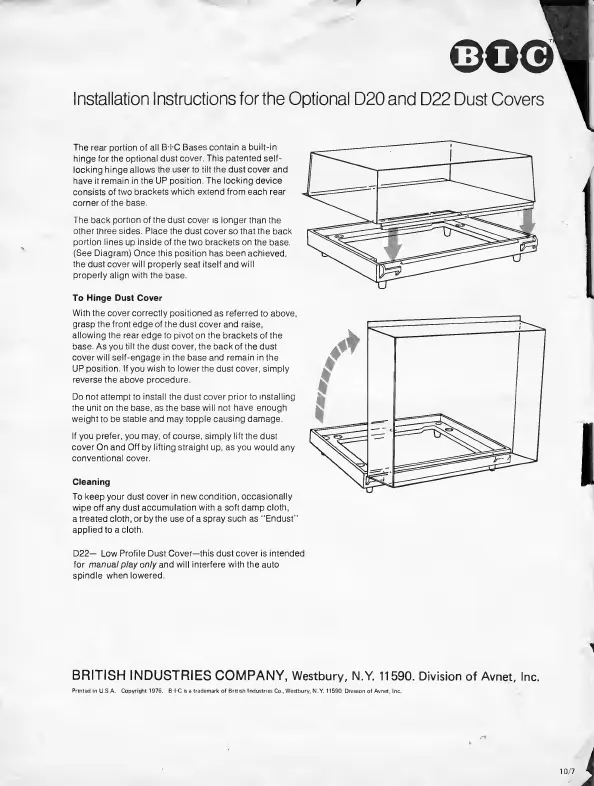
The
rear
portion
of
all
BTC
Bases
contain
a
built-in
hinge
for
the
optional
dust
cover.
This
patented
self¬
locking
hinge
allows
the
user
to
tilt
the
dust
cover
and
have
it
remain
in
the
UP
position.
The
locking
device
consists
of
two
brackets
which
extend
from
each
rear
corner
of
the
base.
The
back
portion
of
the
dust
cover
is
longer
than
the
otherthree
sides.
Place
the
dust
cover
so
that
the
back
portion
lines
up
inside
of
the
two
brackets
on
the
base.
(See
Diagram)
Once
this
position
has
been
achieved,
the
dust
cover
will
properly
seat
itself
and
will
properly
align
with
the
base.
To
Hinge
Dust
Cover
With
the
cover
correctly
positioned
as
referred
to
above,
grasp
the
front
edge
of
the
dust
cover
and
raise,
allowing
the
rear
edge
to
pivot
on
the
brackets
of
the
base.
As
you
tilt
the
dust
cover,
the
back
of
the
dust
cover
will
self-engage
in
the
base
and
remain
in
the
UP
position.
If
you
wish
to
lower
the
dust
cover,
simply
reverse
the
above
procedure.
Do
not
attempt
to
install
the
dust
cover
priorto
installing
the
unit
on
the
base,
as
the
base
will
not
have
enough
weight
to
be
stable
and
may
topple
causing
damage.
If
you
prefer,
you
may,
of
course,
simply
lift
the
dust
cover
On
and
Off
by
lifting
straight
up,
as
you
would
any
conventional
cover.
Cleaning
To
keep
your
dust
cover
in
new
condition,
occasionally
wipe
off
any
dust
accumulation
with
a
soft
damp
cloth,
a
treated
cloth,
or
by
the
use
of
a
spray
such
as
"Endust”
applied
to
a
cloth.
D22—
Low
Profile
Dust
Cover—this
dust
cover
is
intended
for
manual
play
only
and
will
interfere
with
the
auto
spindle
when
lowered.
BRITISH
INDUSTRIES
COMPANY,
Westbury,
N.Y.
11590.
Division
of
Avnet,
Inc.
10/7'

Related product manuals