Battery and charging
Instructions on the bike operation
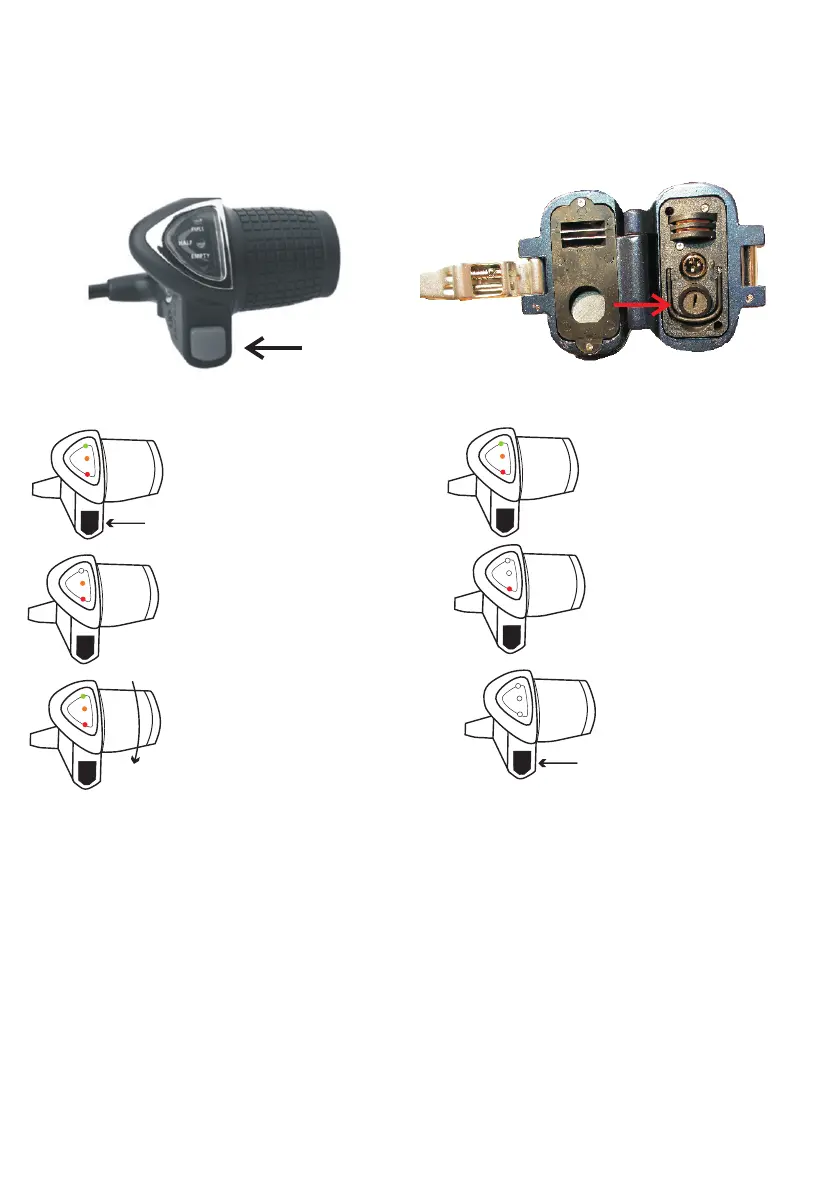
1) Press the power button to
turn the power on, the indicator
light(s) will show.
3) Two Lights = Battery capacity half full.
5) Slowly turn the grip and the bike will
start to accelerate. To stop, bring the
throttle back to the starting position or
release the twist grip and it will automatically
revert back to its original position.
Full
Half
Empty
Full
Half
Empty
1.
Full
Half
Empty
2.
Full
Half
Empty
3.
Full
Half
Empty
4.
5.
Full
Half
Empty
6.
2)Three Lights = Battery
capacity full.
4) One Light = Nearly flat,
recharge required.
6) To turn the power off press
the power button again.
No battery indicator lights
should be on.
How to Remove the Battery
1) Remove the safety plug, loosen the quick release.
2) Fold the bike in half.
3) Unlock the battery using the key.
4) Remove the battery from the frame
1) Push the battery into the frame.
2) Turn the key to lock the battery.
How to Replace the Battery
1) To turn the power ON and OFF
press the power button.
2) Use the key to lock or unlock the
battery from the frame.
.


 To Next Page