Function setting
① ILDA IN:ILDA Input ② ILDA OUT:ILDA Output
③ INTERLOCK:Remote control connection
④ MIN-MAX: Sound Sensitivity adjustment
⑤ Microphone:Sound signal IN
⑥ Indicator: light on under sound mode
⑦ IN: DMX signal input ⑧ OUT: DMX signal output
⑨ DMX ADDRESS: Binary format switch
⑩ POWER ON/OFF: Power Switch
⑾ F3AL 250V:Three core socket communication
Technical parameters
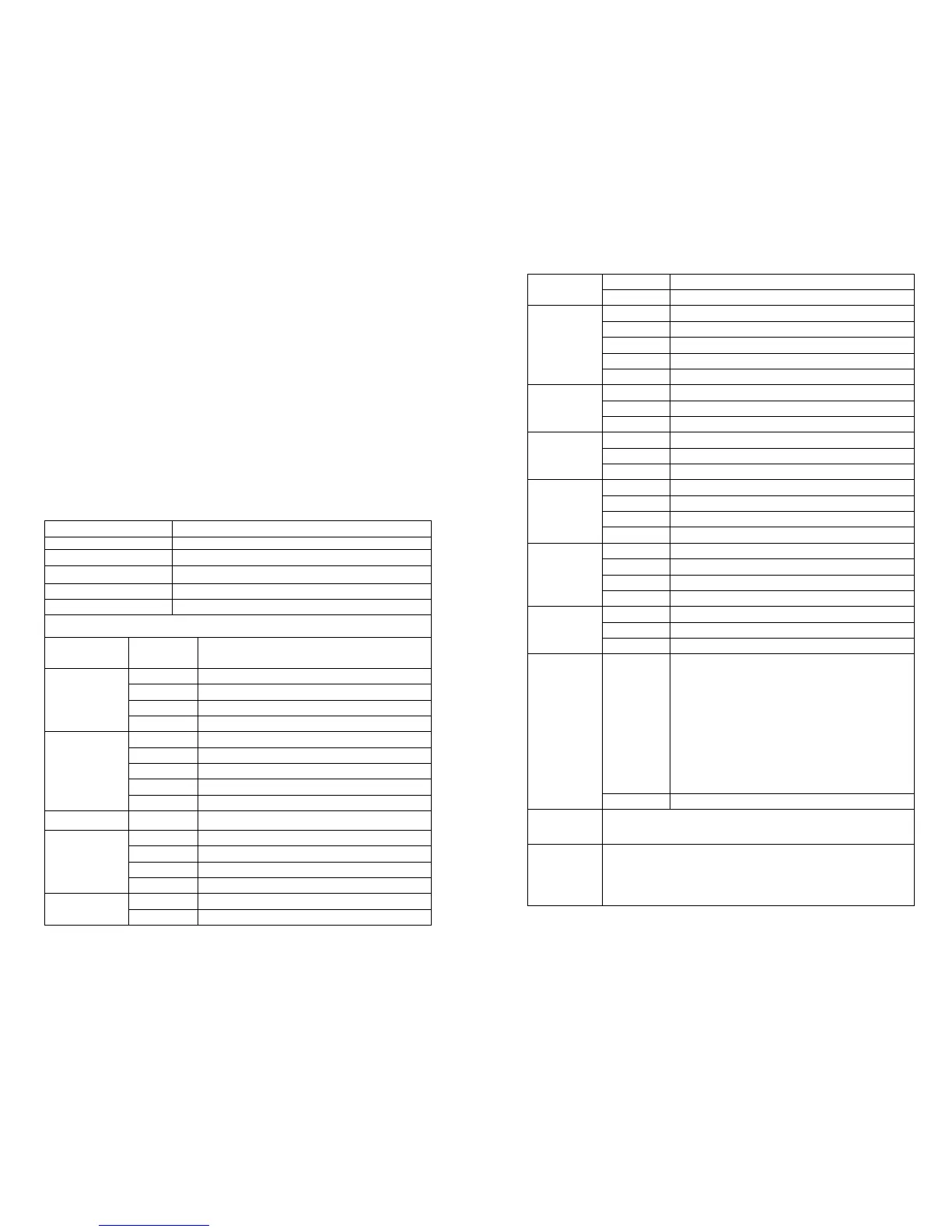
DMX512 Control Channel Settings
Channels
DMX512
numerical
Operating Mode
1-
PLAY MODE
0-63 Off
64-127 Auto-Sound Mode
2-Pattern
option
0-82 Static patterns
83-92 Characters, Seven Stars
93-95 Dancing animation
96-98 Love heart animation
3- strobe
0-255
8 levels adjustment(0-255)/30=(0-8)
4-Horizontal
move
168-188 Auto Right/Left
189-209 Auto Left/Right
210-255 Auto Bounce Right/Left
Page 4
Page 5
189-209 Auto Up/Down
210-255 Auto Bounce Up/Down
6-Zoom
mode
0-10 No zoom
155-204 Auto zooming in
205-255 Auto zooming
7-
Horizontal
tension
0 No stretch
1-150 Manual stretch
1-150 Manual stretch
151-255 Auto stretch
9- rotating
0 No rotating
Auto anti-clockwise rotation
10-
Display mode
0-63 Normal display
64-127 Dot-line display
128-191 Subsection display
201-255 Amplitude low /high
12- color
00-251
(each five
value one
color,47
color
optional)
White-red-green-blue-yellow-purple-
Cyan-Stimulation modulation color
→Subsection(RGB)→Subsection(PCY)→S
ubsection(RGPYBCW)→
Counterchange(RGB)→
Counterchange(PCY)→
Counterchange(WRGBPYC)→analogue
modulation color segmentation flow
252-255 Color flow/Sound Mode
Control mode
Sound control 、 Auto control ,DMX, Follow
Mode ,Compatible with PC software
Feature
1. Red and Blue can work in analogue modulation ,34
kinds of color can realize 47 changing colors in
DMX mode
2.Fantastic animation, beam effect


 To Previous Page
 Loading...