
 Need help?
Do you have a question about the BIGFUN BF-420 and is the answer not in the manual?
Use specified DC 5V adaptor, check for damage, and do not use if damaged.
Use original USB cables; inferior ones may cause noise or hazards.
Not for children under 3; avoid playing music too loud to protect hearing.
Avoid humid, dusty, hot, or interfering locations to prevent damage or shock.
Unplug adaptor before cleaning or long-term non-use.
Use a DC 5V, 1000mA+ adaptor with USB connector; avoid others.
Connect via computer USB (DC 5V, 1000mA+); avoid other computer USB ports.
Connect power, press the power button, and play keys to confirm functionality.
Keyboard enters sleep after 3 minutes inactivity; wake by pressing keys.
Instructions for playing demo songs via DEMO A and DEMO B.
Adjust volume using +/- buttons and tempo using +/- buttons.
Choose from 8 tones (T1-T8) and 8 rhythms (R1-R8).
Features 4 drum combinations and 4 animal sounds (dog, frog, duck, bird).
Record your playing using REC button; play back recorded music with PLAY button.
Record custom percussion sequences (16 percussions required for active program).
Press the STOP button to halt RHYTHM, PLAY, or DEMO modes.
Solutions for 'No sound' and 'Keyboard stops during playing' issues.
Avoid interference, use nearest socket, unplug when not in use, and do not modify.
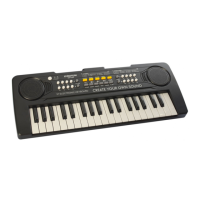
This document provides a comprehensive manual for the BIGFUN Electronic Keyboard, Model BF-420, outlining its functions, usage, and important safety and maintenance guidelines. Designed for users of various skill levels, this electronic keyboard offers a range of features for musical exploration and creativity.
The BIGFUN BF-420 Electronic Keyboard serves as a versatile musical instrument, allowing users to play melodies, experiment with different tones and rhythms, and even record their own compositions. Its core function is to produce musical sounds through a series of keys, mimicking a traditional piano while incorporating modern electronic capabilities.
The keyboard includes a power on/off button for easy activation and deactivation. Users can adjust the overall volume using dedicated "+" and "-" buttons, ensuring a comfortable listening experience. The tempo of musical pieces can also be controlled, allowing for variations in speed to suit different styles or learning paces.
A key feature of the BF-420 is its diverse sound palette. It offers a selection of 8 different tones, with the default setting being a piano sound. Users can easily switch between these tones (T1 to T8) to explore various instrument sounds. In addition to tones, the keyboard provides 8 distinct rhythms (R1 to R8), enabling users to play along with different musical backings.
For percussive elements, the keyboard includes a drum combination feature with 4 different percussion sounds accessible via dedicated buttons. A unique and engaging feature is the drum/animal sounds exchange, which allows users to switch between standard percussion sounds and 4 different animal sounds: dog, frog, duck, and bird. This adds a fun and interactive dimension to playing, especially for younger users or those looking to experiment with sound effects.
The BF-420 also boasts recording capabilities. Users can record their played music using the "REC" button and then play it back with the "PLAY" button. This feature is excellent for practicing, composing, or simply reviewing one's performance.
An advanced programming mode allows for custom percussion sequences. By pressing the "PROG" button, users can record up to 16 percussions of their own. This feature encourages creativity and allows for personalized rhythmic patterns. However, it's important to note that the program record will only activate if exactly 16 percussions are recorded. Once programmed, these custom sequences can be played back using the "PLAY" button.
The keyboard also comes with pre-loaded demo songs. "DEMO A" plays 11 demo songs in a sequential order, repeating once finished. "DEMO B" plays the same 11 demos but in a random order. These demos are useful for listening, learning, or simply enjoying the keyboard's capabilities. A "STOP" button is available to halt any ongoing rhythm, playback, or demo.
The BIGFUN BF-420 is designed for user-friendly operation, making it accessible for beginners while offering enough features for more experienced players.
Power Supply: The keyboard offers flexible power options. It can be powered by a DC adaptor with a USB connector, requiring a voltage output of DC 5V and electricity of 1000mA or above. Alternatively, it can be connected to a computer via a USB cable, provided the computer's USB port also supplies DC 5V and 1000mA or above. The manual strongly recommends using the original USB cable and adaptor from a mobile phone to avoid potential noise or hazards.
Turning On and Playing: To begin playing, users simply connect the USB cable to the keyboard and a suitable power source, then press the power on/off button. A successful startup is indicated by a piano sound when any white or black key is pressed.
Volume and Tempo Control: Adjusting the volume is straightforward with the "+" and "-" buttons. Similarly, the tempo can be increased or decreased using dedicated "+" or "-" buttons, allowing for dynamic control over the speed of rhythms and demos.
Tone and Rhythm Selection: Users can easily cycle through the 8 available tones by pressing the corresponding T1 to T8 buttons. The same applies to rhythms, with R1 to R8 buttons for selection.
Drum and Animal Sounds: The 4 percussion buttons allow for immediate access to drum sounds. To switch to animal sounds, a specific key needs to be pressed, which then transforms the percussion buttons into controls for dog, frog, duck, and bird sounds.
Recording and Playback: The "REC" button initiates recording, capturing the music played on the keyboard. Once recorded, the "PLAY" button allows for instant playback, making it easy to review and refine musical ideas.
Programming Percussions: The "PROG" button enters the programming mode, where users can create custom percussion sequences. This feature requires precise input of 16 percussions to activate the program, highlighting a detail-oriented aspect of its usage.
Sleep Function: To conserve energy, the keyboard includes an automatic sleep function. If left inactive for more than 3 minutes, it will enter sleep mode. It can be easily woken up by pressing any white or black key.
Proper maintenance is crucial for ensuring the longevity and optimal performance of the BIGFUN BF-420 Electronic Keyboard. The manual provides clear guidelines for care and troubleshooting.
The manual includes a helpful table for common problems and their solutions:
By following these guidelines, users can ensure a safe, enjoyable, and long-lasting experience with their BIGFUN BF-420 Electronic Keyboard.
 General
| Keyboard Type | Standard |
|---|---|
| Built-in Speakers | Yes |
| Rhythms | 100 |
| Tones | 100 |
| Recording Function | Yes |
| Headphone Jack | Yes |
| Microphone Input | Yes |
| Power Source | DC 6V adapter (included) or 4 x AA batteries (not included) |

 To Next Page