
 Need help?
Do you have a question about the BIGTREETECH MINI12864 V2.0 and is the answer not in the manual?
Key features include EXP1/EXP2 communication, RGB backlight, and FPC connector.
Technical specifications including dimensions, input voltage, and interfaces.
Detailed physical dimensions and mounting information for the display.
Visual representation of the display's connector ports.
Detailed pin assignments for EXP1, EXP2, and Display interfaces.
Instructions and examples for connecting via EXP1 and EXP2 ports.
Instructions and examples for connecting using the FPC cable.
Guidance on configuring Marlin firmware for the display.
Configuration details for using the display with Klipper firmware.
The BIGTREETECH MINI12864 V2.0 is a compact and versatile display module designed for 3D printing applications, developed by Shenzhen Big Tree Technology Co., Ltd. This user manual provides comprehensive instructions for its installation, configuration, and general use, ensuring that users can effectively integrate it into their 3D printing setups. The device serves as a primary interface for controlling and monitoring 3D printers, offering a clear visual output and intuitive navigation for various functions.
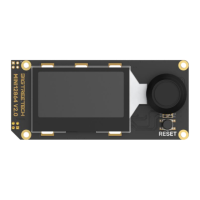
At its core, the MINI12864 V2.0 is a medium-sized screen featuring an RGB backlight, which enhances visibility and adds a customizable aesthetic touch to the 3D printer. The RGB backlight is a significant feature, allowing users to personalize their display with a range of colors, making the interface not only functional but also visually appealing. This customization can be particularly useful for status indicators or simply to match the overall theme of the printer setup.
One of the key aspects of the MINI12864 V2.0 is its flexible connectivity options. It is designed to communicate with the motherboard primarily via EXP1 and EXP2 connectors. These standard interfaces ensure broad compatibility with a variety of 3D printer motherboards, making it a versatile choice for many users. In addition to the EXP1 and EXP2 connections, the module also incorporates an FPC (Flexible Printed Circuit) connector. This thoughtful design allows users to choose their preferred connection method, providing greater flexibility during installation and setup. The FPC option can be particularly advantageous in setups where space is limited or where a more streamlined cable management solution is desired.
The display module is equipped with an onboard buzzer, which serves as an auditory feedback mechanism. This buzzer can be used to signal various events, such as the completion of a print, errors, or user input confirmations, enhancing the overall user experience by providing immediate audible alerts. Alongside the buzzer, the module also features an RGB light and an RGB-LCD screen, further emphasizing its commitment to visual feedback and customization. The combination of these elements creates a dynamic and informative display that keeps users well-informed about their printer's status.
For interaction, the MINI12864 V2.0 includes an encoder, which is a common and effective method for navigating menus and adjusting settings on 3D printer displays. The encoder allows for precise control, enabling users to scroll through options and make selections with ease. This tactile input method is generally preferred for its responsiveness and accuracy, especially when fine-tuning printer parameters.
The device also supports an SD card, which is crucial for loading print files and firmware updates directly onto the printer. The SD card logic voltage is designed to be compatible with both 3.3V and 5V systems, ensuring higher compatibility with motherboards that support MEGA2560 MCUs. This wide voltage compatibility minimizes potential issues when integrating the display with different motherboard architectures, making it a more robust and user-friendly component.
In terms of usage, the manual provides detailed instructions for connecting the MINI12864 V2.0 to various motherboards. For instance, it illustrates how to connect the display to an SKR3 motherboard using the EXP1+EXP2 method, as well as to an Octopus MAX EZ V1.0 motherboard using the FPC connection. These examples are invaluable for users, offering clear visual guides and ensuring a smooth installation process. The pinout diagrams for both EXP1 and EXP2, as well as the FPC-18Pin, are clearly laid out, helping users to correctly identify and connect the necessary pins.
Firmware instruction is a critical part of setting up the MINI12864 V2.0. The manual covers configuration for popular 3D printer firmware such as Marlin and Klipper. For Marlin users, the instructions detail how to uncomment specific lines in the Configuration.h file, such as BTT_MINI_12864_V1 and NEOPIXEL_LED, to enable the display and its RGB backlight features. It also advises on initializing the EEPROM with "M502" and "M500" commands if the screen does not display content initially, which helps in applying new contrast settings. This guidance is essential for ensuring the display functions correctly with the chosen firmware.
For Klipper firmware, the manual provides a configuration snippet that users can add to their Klipper configuration file. This snippet includes settings for the lcd_type, cs_pin, a0_pin, rst_pin, contrast, encoder_pins, and click_pin, along with options for spi_bus and spi_software_miso_pin, spi_software_mosi_pin, and spi_software_sclk_pin for micro-controller boards that may require them. Additionally, it includes a configuration for the beeper output pin and the neopixel btt_mini12864 settings, covering the pin, chain count, color order, and initial RGB values. These detailed firmware instructions empower users to fully utilize all features of the MINI12864 V2.0 within their Klipper-based setups.
Maintenance features are primarily focused on ensuring correct installation and preventing damage. The manual strongly emphasizes the importance of turning off the power before wiring. This caution is crucial to prevent damage to both the motherboard and the display module due to incorrect wiring or short circuits. Users are advised to double-check all cable connections and driver installations before powering on the device. This preventative measure helps avoid unnecessary costs associated with repairing or replacing burnt components.
The overall design of the MINI12864 V2.0 is geared towards user-friendliness and adaptability. Its ability to integrate with different motherboards and firmware, coupled with its customizable RGB backlight and clear display, makes it a valuable upgrade or component for any 3D printer. The inclusion of an SD card slot further enhances its utility, providing a convenient way to manage print jobs and firmware updates. The onboard buzzer and RGB light provide additional layers of feedback, making the printing process more interactive and informative.
In summary, the BIGTREETECH MINI12864 V2.0 is a well-designed display module that offers a rich set of features for 3D printer users. Its RGB backlight, flexible connectivity options (EXP1+EXP2 and FPC), SD card support, onboard buzzer, and compatibility with popular firmware like Marlin and Klipper make it a comprehensive solution for controlling and monitoring 3D printers. The detailed user manual ensures that users have all the necessary information to install, configure, and troubleshoot the device, promoting a smooth and efficient 3D printing experience. The emphasis on careful wiring and power management also highlights the manufacturer's commitment to product longevity and user safety.
 General
| Display Type | LCD |
|---|---|
| Resolution | 128 x 64 |
| Interface | SPI |
| Operating Voltage | 5V |
| Encoder | Yes |
| Compatible Firmware | Marlin, Repetier |

 To Next Page