15/20
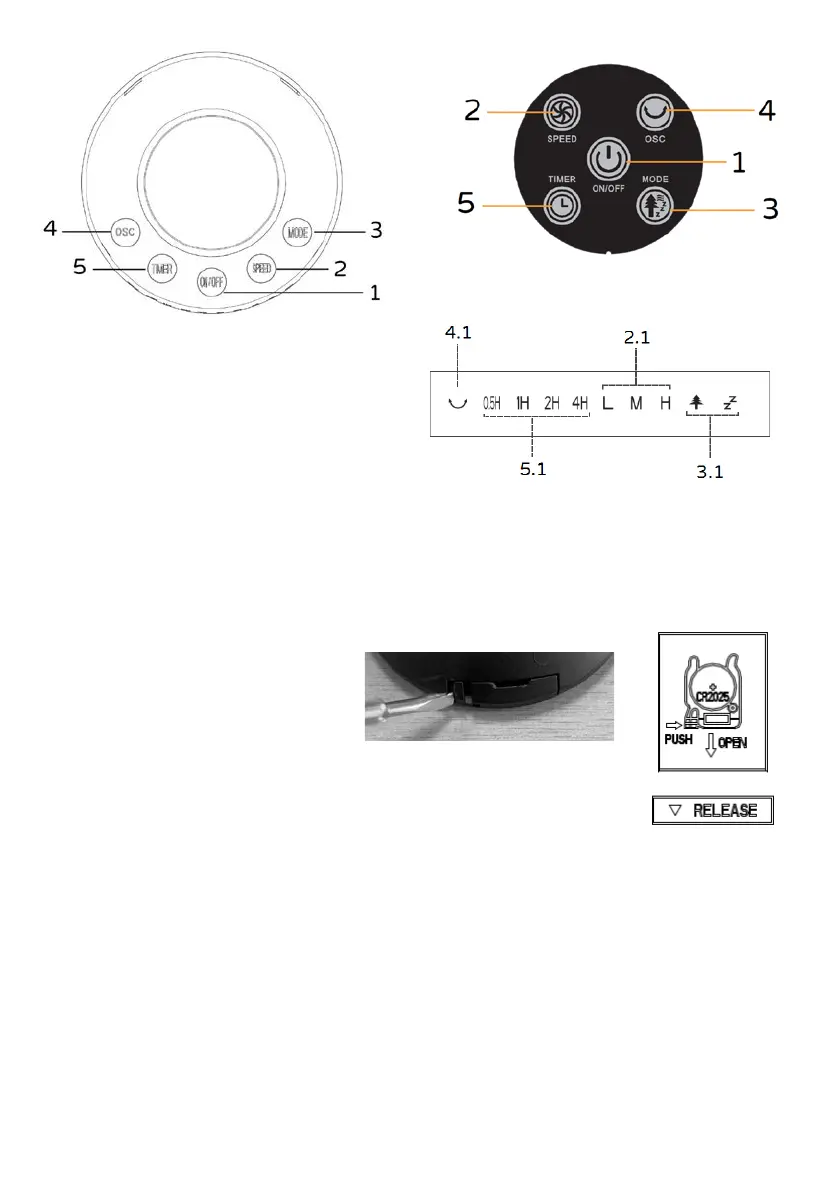
2. Speed button
3. Mode button: normal, natural, sleep
4. Swing functionbutton
5. Timer button
Before each use, verify that the unit is in good condition, the electric cord is not damaged, if the power
cord is damaged, it must be replaced by the manufacturer or a competent qualified electrician or a
person with similar qualifications, in order to avoid any risk.
The functions of this appliance can be started using they keyboard of the control panel or the remote
control which has to be pointed in the correct direction (at a max distance of 4m).
Do not allow children to insert and replace
battery.
Insert n.1 battery type: CR2025: 3V of
the remote control (not included in the
package), move the plastic tab to the
right
(→ PUSH) and simultaneously
remove the battery slot
(↓ OPEN). Insert
the battery (following the right polarity:
+/-) and close the battery slot.
Should the remote control not be used for long periods of time remove the battery.
Plug the fan into the power outlet, you will hear a "beep" that indicates that the appliance is in stand-
by mode.


 To Next Page