925-0270 Rev G 22
I/O Assignment
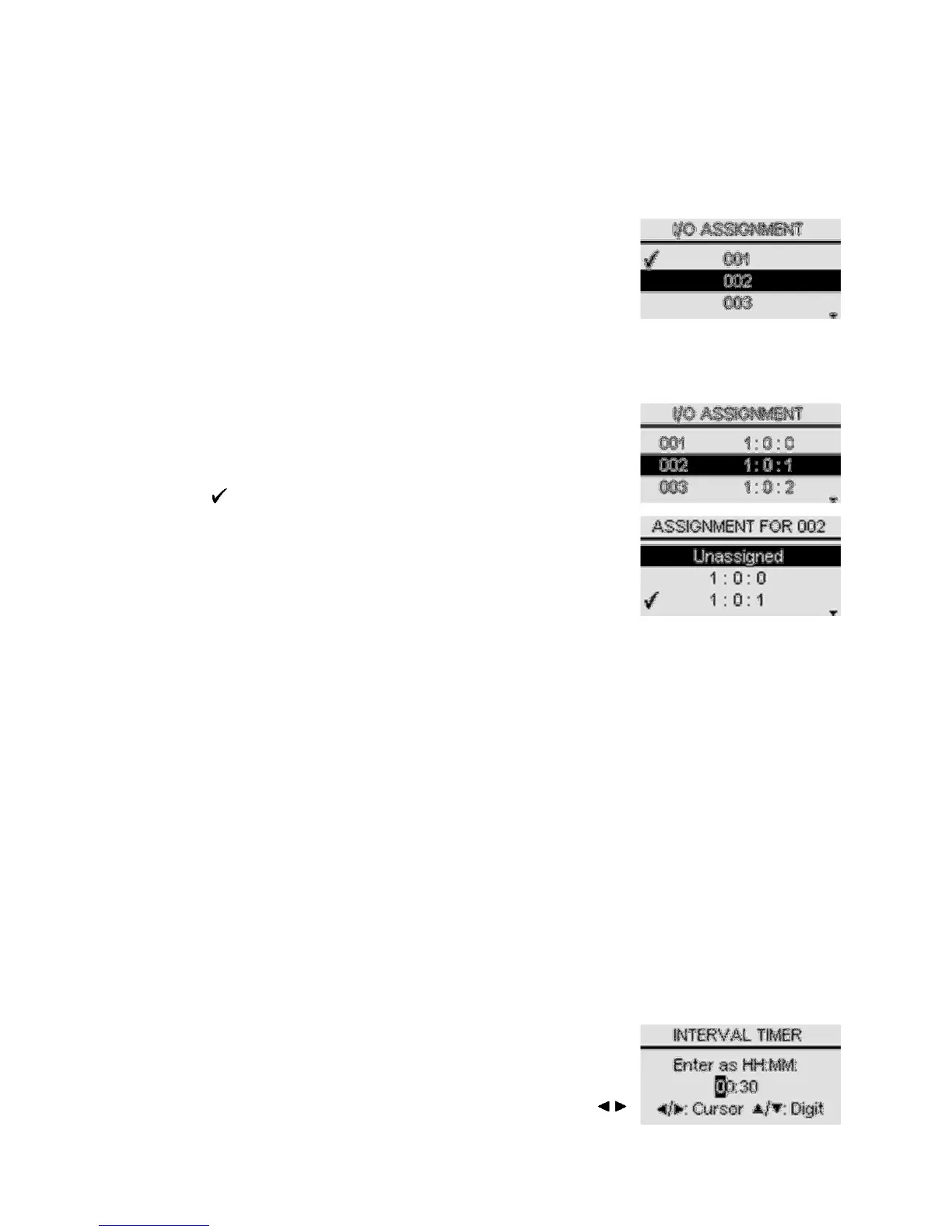
This is a menu for assigning SmartBob sensors to I/O ports. The operator must use Add/Remove
or Auto Add/Remove prior to using this menu. This menu will differ depending on whether the C-
50 Setup was enabled or disabled.
If C-50 setup is disabled, then this menu will be for assigning any
single SmartBob sensor to the C-100’s onboard I/O (External Start
input and 4-20mA output). The operator simply selects the
address of any single SmartBob sensor in this list, but it defaults to
the first address available in the list.
If C-50 setup is enabled, then the operator will use this menu for viewing the current assignments
between multiple SmartBob sensors and multiple I/O ports located on the C-50 network. On the
left is the address of the SmartBob sensor and to its right is the I/O port that is assigned to it. The
I/O port is displayed in the format c:s:p, where c is the expansion console’s address (1 to 5), s is
the slot/card position (0 to 5) and p is the slot/card’s port (0 to 3).
For additional information on addressing, slots/cards and ports,
please refer to the Model C-50 Operators Manual. To reassign
the I/O port of a particular SmartBob sensor, position the selection
bar on the address of that SmartBob sensor to be changed and
press . This will display another menu for assigning a different
I/O port to that SmartBob sensor. The operator can choose to
unassign a SmartBob address or reassign to any I/O port listed in
this menu; however, only I/O ports that are currently available and
unassigned will be listed. To swap the assignments of two
SmartBob sensors already assigned to I/O ports, you must first
unassign one of them, then reassign the second one and finally go
back and reassign the first one.
4-20mA Output
This is a menu for setting what the 4-20mA Output will represent; the operator can choose
between Product and Headroom. The default setting is Product.
When weight calculations are disabled, this output is a percentage of the headroom height or
product height. When weight calculations are enabled, this output is a percentage of the
headroom weight or product weight.
4-20mA Error
This is a menu for setting what the 4-20mA output error level will be, the operator can choose
between 2mA and 22mA. This error level will be programmed to the output whenever the last
measurement produced an error condition such as a communications error or Bob is stuck. The
default setting is 22mA.
Interval Timer
The interval timer allows the operator to enable and configure the console to take multiple
automatic timed measurements. The selections are On/Set and Off. The default setting is Off.
After selection of On/Set, a setup screen appears for entering the
timer value in hours and minutes. Enter any amount of time from
0 minutes (continuous) to 49 hours and 59 minutes in the format:
HH:MM. One minute would be 00:01 and 24 hours would be
24:00. The timer is adjusted one digit at a time. Use the /


 To Next Page