EasyManua.ls Logo

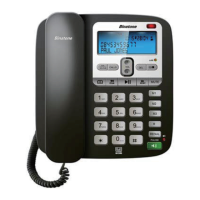
Binatone Acura 3000 Call Blocker - User Manual

Binatone Acura 3000 Call Blocker
43 pages
Print Icon
To Next Page IconTo Next Page
Loading...
1
Acura 3000 Call Blocker
Or visit our website:
www.binatoneglobal.com
Unpacking your Acura 3000 Call Blocker
RECEIVE ONLY
CALLS THAT
MATTER
Eectively Blocks
Withheld Numbers
Unavailable Numbers
All International or
Payphone Numbers
Numbers
(Blacklisted)
Base Unit
Handset
Coiled Handset cord
Mains power adaptor
for Base Unit
Telephone line cord
for Base Unit
User manual
Wall mount bracket
Binatone Helpline (for UK only)
Monday to Friday from 8.00am to 8:00pm
Saturday from 8.30am to 2.00pm
Tel: 0844 557 9677
Calls cost up to 5p per minute from
a BT landline, but other providers and
mobile operators may charge more.
Question and Answer IconNeed help?

Do you have a question about the Binatone Acura 3000 Call Blocker and is the answer not in the manual?

Summary

1. Where to Find It

2. Installation

Base Unit Setup and Connections

Step-by-step instructions for installing the phone, including connecting handset, line, and power cords.

3. Wall Mount Installation

4. Setting Up Your Call Blocker

Setting Up Your Call Blocker (Continued)

Remote Access Code Setup

Instructions for setting up the remote access code for checking messages.

Managing the Black List

Instructions on how to view and manage the list of blocked numbers.

Adding Records to the Black List

Details two methods for adding numbers to the black list via direct entry or call lists.

Configuring Block Modes

How to set different call blocking conditions and modes like BLOCK ALL or ALLOW WHITE LIST.

Call Type Blocking Options

How to block specific types of calls like Withheld, Unavailable, or Payphone calls.

Setting Up White List Entries

Instructions on how to add entries to the white list for calls that should always ring.

5. Telephone Operation

Making, Answering, and Ending Calls

Covers initiating, receiving, and terminating calls, including volume adjustment.

6. One Touch Memory

Storing and Dialing Numbers with One Touch Memory

Instructions for storing phone numbers in memory and making calls using these stored numbers.

7. Outgoing Call Record

Managing Outgoing Call Records

Details how to view, redial, and delete entries from the outgoing call history.

8. Phonebook Function

9. Caller Display Operation

Understanding Caller ID Information and List Management

Explains caller display data, list storage, and how to view/manage received calls.

10. Answering Machine System

Outgoing Messages (OGM) and Recording OGM 1

Explains outgoing messages and provides instructions for recording the first outgoing message.

Answering Machine System (Continued)

Recording OGM 2 and Switching OGMs

Instructions for recording the second outgoing message and switching between messages.

11. Remote Operation

Accessing Remote Features: Code and Message Retrieval

How to check the remote access code and retrieve messages remotely from another phone.
12. Operational Notes

13. Troubleshooting

14. Guarantee and Service

15. Technical Details

Connection and Conditions for Use

Binatone Acura 3000 Call Blocker Specifications

General IconGeneral
BrandBinatone
ModelAcura 3000 Call Blocker
CategoryIP Phone
LanguageEnglish

Related product manuals