EasyManua.ls Logo

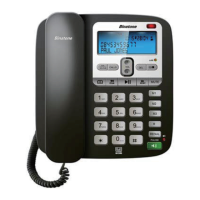
Binatone CAPRICE 500 - User Manual

Binatone CAPRICE 500
26 pages
Print Icon
To Next Page IconTo Next Page
Loading...
1
5
M
1
M
2
M
3
IN
U
SE
STO
R
E
D
E
L
ETE
BO
O
K
D
IA
L
R
E
C
AL
L
/ESC
MEN
U

Other manuals for Binatone CAPRICE 500

Question and Answer IconNeed help?

Do you have a question about the Binatone CAPRICE 500 and is the answer not in the manual?

Summary

Unpacking your Caprice 500

Where to find it

Display messages and symbols

Installation

Locating the Base unit

Proper placement of the telephone base unit for optimal performance and safety.

Installing Backup batteries

Guide for inserting backup batteries to ensure continued functionality during power outages.

Desk;Wall mount installation

Desk Mount

Instructions for setting up the telephone on a desk surface using the provided stand.

Wall Mount

Instructions for mounting the telephone securely on a wall.

Setting up your phone

Set Language and LCD Contrast

Configure the phone's display language and contrast settings for user preference.

Set Time and Date

Manually set the current date and time for accurate call logging and display.

Set Flash Time

Adjust the recall/flash time setting for compatibility with telephone networks.

Telephone Operation

Ringer volume

Adjusting the volume level of the incoming call alert.

Outgoing call record

Last Number Redial

Functionality to redial the last dialed number quickly.

View Outgoing Calls

Accessing and reviewing the history of outgoing telephone calls.

Make Call from Record

Initiating a call directly from the saved outgoing call records.

Delete Outgoing Record

Removing specific entries from the outgoing call history.

Phonebook function

View Phonebook Records

Accessing and browsing stored contact information and numbers.

Add New Phonebook Record

Storing new names and telephone numbers in the phone's memory.

Make Call from Phonebook

Dialing numbers directly from the stored phonebook entries.

Edit Phonebook Record

Modifying existing contact details or telephone numbers.

Delete Phonebook Record

Removing specific contacts from the phonebook memory.

Caller Display operation

Caller Display List

Viewing incoming call information, including caller number and name.

View Caller Display List

Navigating through the history of received calls with caller ID.

Return a Call from Display

Dialing a number directly from the caller display history.

Delete Caller Display Record

Removing individual entries from the incoming call log.

Delete All Caller Display Records

Clearing the entire history of incoming calls.

Store Caller Display to Phonebook

Saving incoming caller information into the phonebook.

Operational notes

Troubleshooting

Product Guarantee

Technical details

Declaration of Conformity

Statement of compliance with relevant safety and EMC directives and standards.
Summary

Unpacking your Caprice 500

Where to find it

Display messages and symbols

Installation

Locating the Base unit

Proper placement of the telephone base unit for optimal performance and safety.

Installing Backup batteries

Guide for inserting backup batteries to ensure continued functionality during power outages.

Desk;Wall mount installation

Desk Mount

Instructions for setting up the telephone on a desk surface using the provided stand.

Wall Mount

Instructions for mounting the telephone securely on a wall.

Setting up your phone

Set Language and LCD Contrast

Configure the phone's display language and contrast settings for user preference.

Set Time and Date

Manually set the current date and time for accurate call logging and display.

Set Flash Time

Adjust the recall/flash time setting for compatibility with telephone networks.

Telephone Operation

Ringer volume

Adjusting the volume level of the incoming call alert.

Outgoing call record

Last Number Redial

Functionality to redial the last dialed number quickly.

View Outgoing Calls

Accessing and reviewing the history of outgoing telephone calls.

Make Call from Record

Initiating a call directly from the saved outgoing call records.

Delete Outgoing Record

Removing specific entries from the outgoing call history.

Phonebook function

View Phonebook Records

Accessing and browsing stored contact information and numbers.

Add New Phonebook Record

Storing new names and telephone numbers in the phone's memory.

Make Call from Phonebook

Dialing numbers directly from the stored phonebook entries.

Edit Phonebook Record

Modifying existing contact details or telephone numbers.

Delete Phonebook Record

Removing specific contacts from the phonebook memory.

Caller Display operation

Caller Display List

Viewing incoming call information, including caller number and name.

View Caller Display List

Navigating through the history of received calls with caller ID.

Return a Call from Display

Dialing a number directly from the caller display history.

Delete Caller Display Record

Removing individual entries from the incoming call log.

Delete All Caller Display Records

Clearing the entire history of incoming calls.

Store Caller Display to Phonebook

Saving incoming caller information into the phonebook.

Operational notes

Troubleshooting

Product Guarantee

Technical details

Declaration of Conformity

Statement of compliance with relevant safety and EMC directives and standards.

Binatone CAPRICE 500 Specifications

General IconGeneral
BrandBinatone
ModelCAPRICE 500
CategoryIP Phone
LanguageEnglish

Related product manuals