2. Installation
1. Locating the Base unit
The Base unit should be placed on a level surface, in a position where:
the telephone line cable will reach your telephone line socket or extension socket.
it is not close to a sink, bath or shower, or anywhere else where it might get wet.
it is not close to other electrical equipment - fridges, washing machines,
microwave ovens, TVs, fluorescent lights, etc.
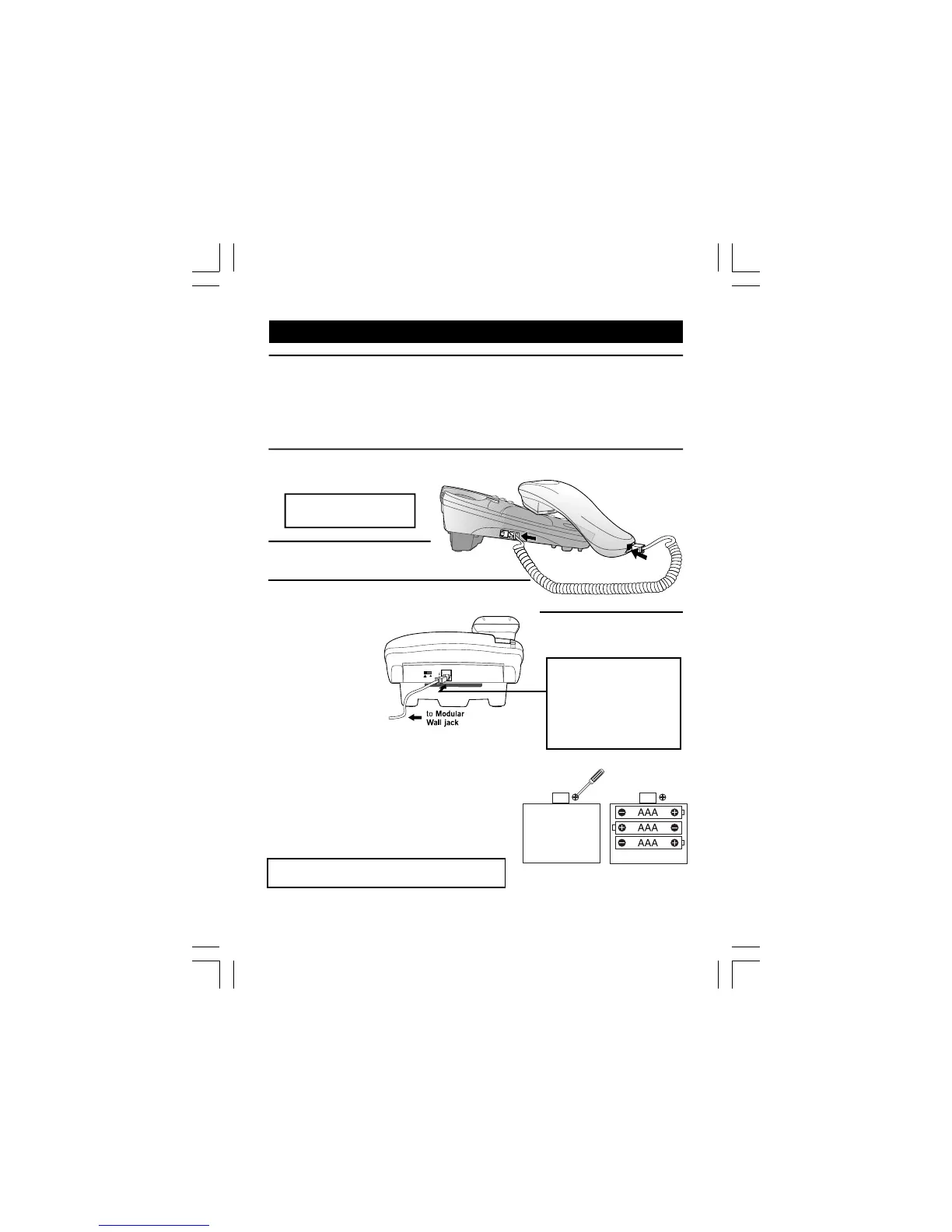
2. Plug the coiled handset cord into the Handset. Plug the other end into
the jack on the left side of
the Base unit.
3
.
Place the Handset in
4
.
Plug the telephone line cord into the PHONE
LINE jack at the back of the Base unit.
Plug the other end into a
modular wall jack.
5. Lift the Handset and
check for Dial tone
in the earpiece.
4
Note: The Base unit does
not require a battery.
Make sure the plugs click
into place.
the Base unit.
Always use the telephone
line cord supplied with
your Caprice
5
00. Other
line cords may not work.
Installing Backup
batteries
1. Remove the Battery cover and insert
3 X 1.5V AAA size alkaline batteries (not
included) into the battery compartment
paying attention to the polarity marking
as shown inside the compartment.
WARNING: Please do NOT use
Rechargeable batteries in this phone.
2. Replace the battery cover until it
clicks into place.
Note: The caller display, speakerphone and on-hook display and
Warning: Disconnect the telephone from the
telephone line before changing the batteries.
set-up functions will not work without the batteries installed.
telephone line cords may
not work.
q2EE6CJ 4@>A2CE>6?E 4@G6C g A4Db *dgcppp p=<2=:?6 32EE6C:6D
z2DE 4@>A2CE>6?E 92D ?@ FD6


 To Next Page