Need help?
Do you have a question about the Binatone CONCEPT COMBO 2310 and is the answer not in the manual?
Crucial information regarding emergency call functionality during power outages.
Contact information and support resources for user assistance.
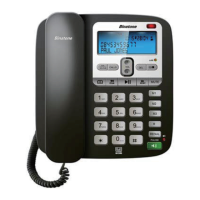
Identifies the function of each button on the phone unit for user operation.
Explains the information shown on the phone's LCD screen.
Defines the meaning of icons and indicators displayed on the phone.
Guidance on choosing an optimal location, connecting power, and broadband line considerations.
Step-by-step guide for connecting the base unit to power and the phone line.
Instructions for attaching the stand for desktop or wall placement.
Procedure for configuring the phone's date and time settings.
Details on initiating calls from keypad, redial, and Caller Display lists.
Procedure for receiving incoming calls using the handset or speakerphone.
How to mute the microphone and adjust earpiece/speakerphone volume during a call.
Instructions for making emergency calls when AC power is disconnected.
Guide to inputting text and understanding the phone's keypad character mapping.
Procedures for creating, editing, deleting, and storing contacts in the phonebook.
How to initiate calls using stored phonebook entries.
Information on how to view the used capacity of the phonebook memory.
Information on how new incoming calls are displayed and logged.
Steps to view, delete, or store caller ID information.
Instructions for adjusting ringer volume and selecting different ringtones.
How to conduct internal calls, transfer calls, and set up three-way conferences.
Procedures for paging, registering, and finding misplaced handsets.
Initial configuration of the TAM, including switching on/off and selecting modes.
Guide to recording memos and managing recorded messages on the TAM.
How the SOS call feature works, termination, and programming numbers/prompts.
Customizing key press tones, recall time, and dialling method (Tone/Pulse).
Restoring base settings to default and changing the security PIN code.
Guidance on initial checks and resolving problems with making or receiving calls.
Solutions for issues related to display, phone ringing, and intercom functionality.
Steps to diagnose and resolve ongoing issues, including line and adapter checks.
Recommendations for maintenance, and statements of conformity to standards.
 General
| Type | IP Phone |
|---|---|
| Display | LCD |
| Connectivity | Ethernet |
| Protocols | SIP |
| Ethernet Ports | 2 |
| Caller ID | Yes |
| Handset | Yes |
| Redial | Yes |
| Intercom | Yes |
| Audio Codec | G.711, G.729 |
| Power Supply | AC Adapter |
| Features | Call Hold, Call Transfer, Speakerphone |
| Power Source | AC Adapter |

 To Next Page