Binatone Help Line : 0845 345 9677 1
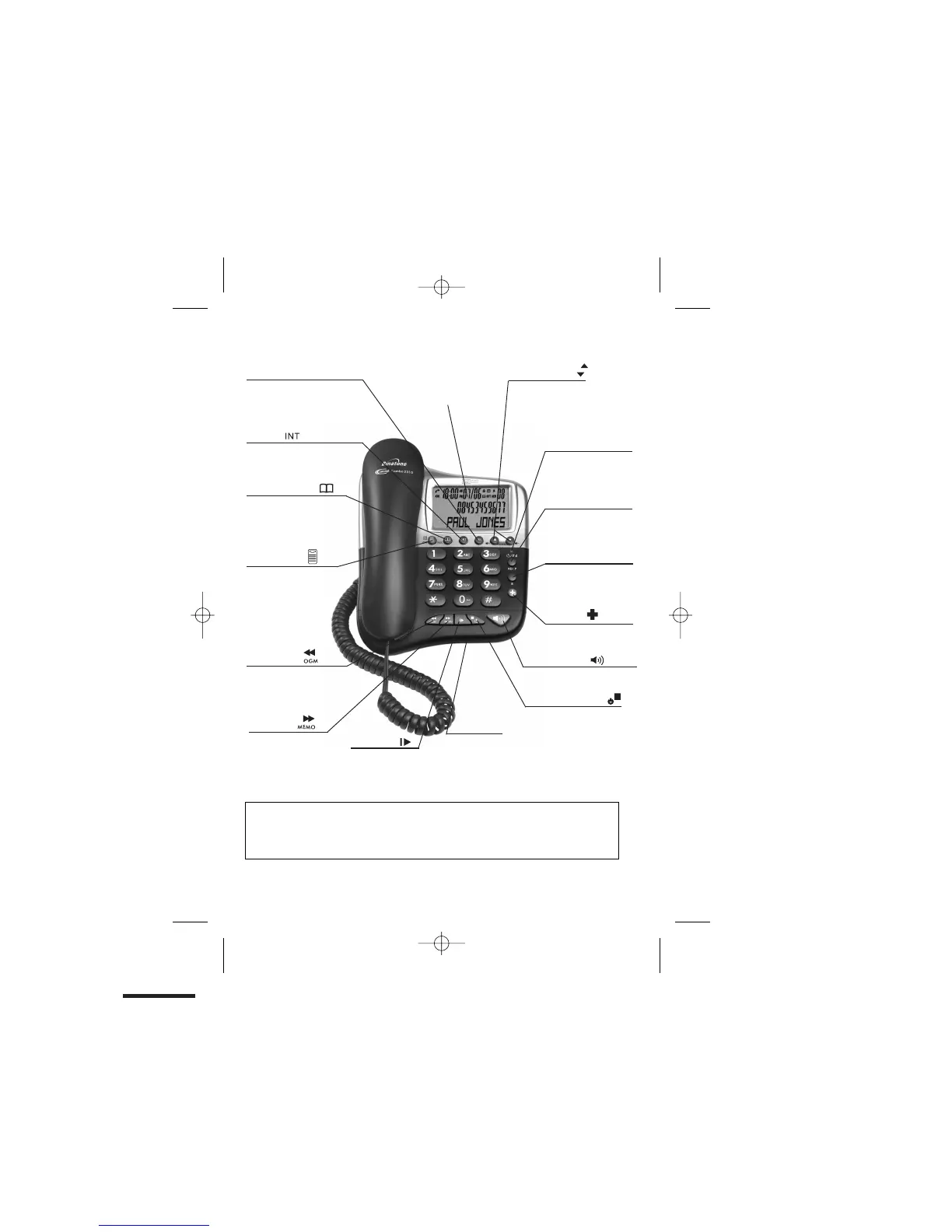
LCD Display
Menu/Ok/Mute /OK
Press to access menu
P
ress as “OK” key to
confirm your operation
P
ress to mute/un-mute
microphone during a call
Phonebook/Back
/C
Press to access phonebook
records
Press to exit present menu
R(Recall)
You may need this function
if your phone is connected
to a PBX, or if you use BT
Stop/Answer on/off
Press to stop recording
or playback.
Press & hold to switch
the answering machine
ON or OFF.
With TAM ON in standby
mode, press to select
OGM1 & OGM2
Message Light
Turns ON when the TAM
is ON.
Flashes when you have
new TAM messages.
SOS Call
Press and hold for 5 seconds
to activate the SOS call
Speakerphone
Press to call or answer a call
by using the speakerphone.
Microphone
For speakerphone
and answering
Where to find it
Important:
When the instruction simply say ‘press’ a button, this means you should press it briefly then
release it.
When the instruction say ‘press and hold’ a button, this means you should keep it pressed
until the display changes or you hear a tone.
Pres
messages, memos,
stored numbers or
Call
Delete (DEL)
s to delete
er Display records.
Memo/Skip
Press and hold to
record a memo
Press during message
playback to go forward
to next message
Play/Pause
Press to playback
messages memos
Press to pause playing
of a memo or message
OGM/Rewind
Press and hold to record
OGM
Press to playback OGM
Press to go back to
previous message/s.
Intercom
Press to make an intercom
call or to transfer a call
Up-Down(CDS)
Press to access the
Caller display records
and scroll through them
Press to change earpiece
speakerphone volume
Press to scroll through the lists
the lists and menu options
RD/P
Press to redial the
last number
Press while dialing a
number to insert a pause
Calling Features.
machine recording.


 To Next Page