Binatone Help Line : 0845 345 9677 19
Ringer volume, melody
You can adjust the volume level of the intercom ringer (INT RING) and the external call
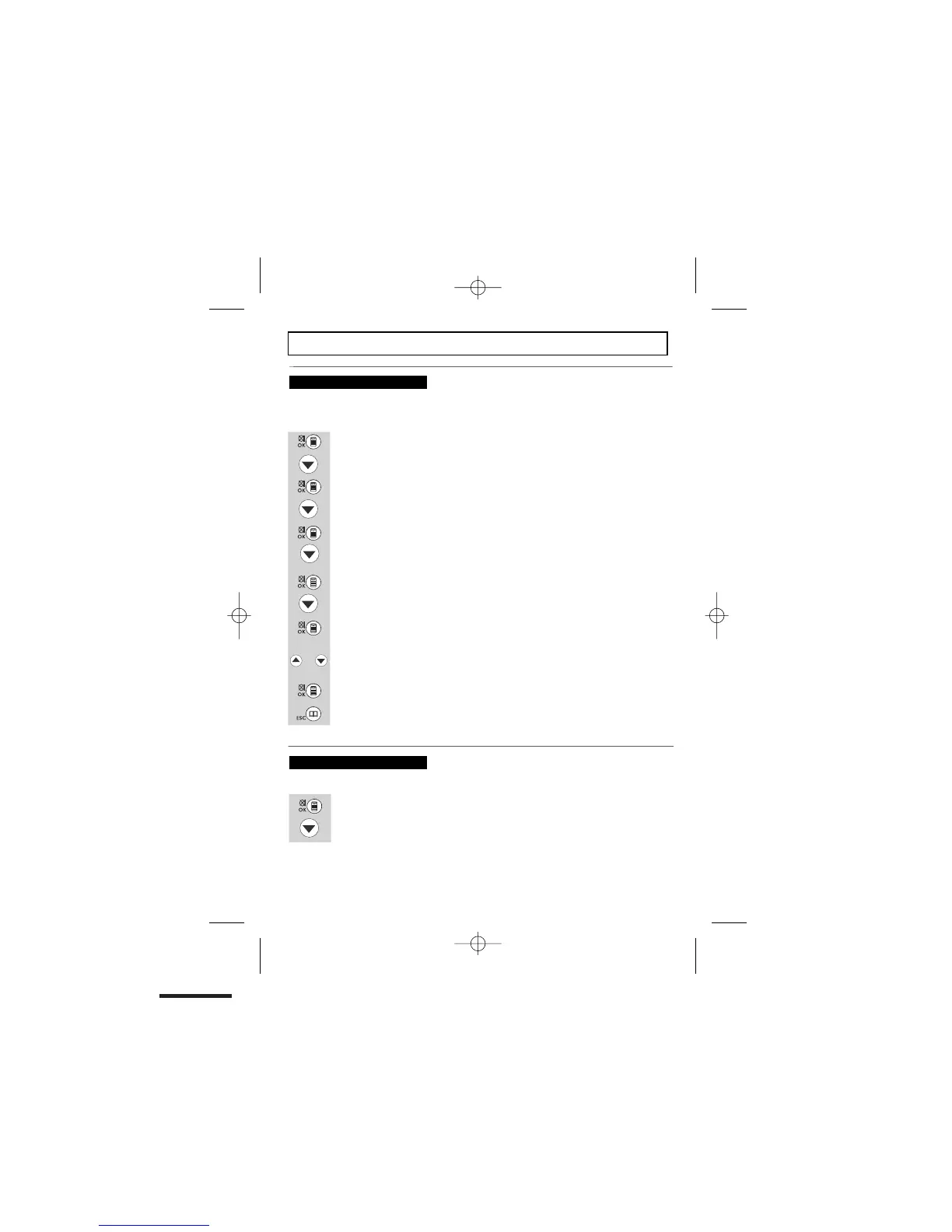
Press the
MENU/OK/MUTE
button.
Scroll
DOWN until you see
“SETTINGS”.
Then press
the MENU/OK/MUTE
button.
Scroll
DOWN until you see
“RING SETUP”.
Press the
MENU/OK/MUTE
button. Then it will display "INT RING"
or scroll DOWN
to select
“EXT RING”.
Press
the MENU/OK/MUTE
button. The display will show "MELODY".
Scroll
DOWN until you see “VOLUME”.
Then press
the MENU/OK/MUTE
button to select and the display will show
“VOLUME 2”.
Press the UP or DOWN button to scroll through the volume settings.
(from OFF, 1 to 5).
Then press the
MENU/OK/MUTE
button to confirm the setting
Press
the PHONEBOOK/BACK
button to return to the previous menu
To change ringer volume
ringer (EXT RING) independently, with settings from 1 (quietest) to 5 (loudest), or turned OFF.
There are 10 base ringer melodies from 1 to 10
To change ringer melody
Press the MENU/OK/MUTE button.
Scroll
DOWN until you see
“SETTINGS”.
or


 To Next Page