Binatone Help Line : 0845 345 9677 2
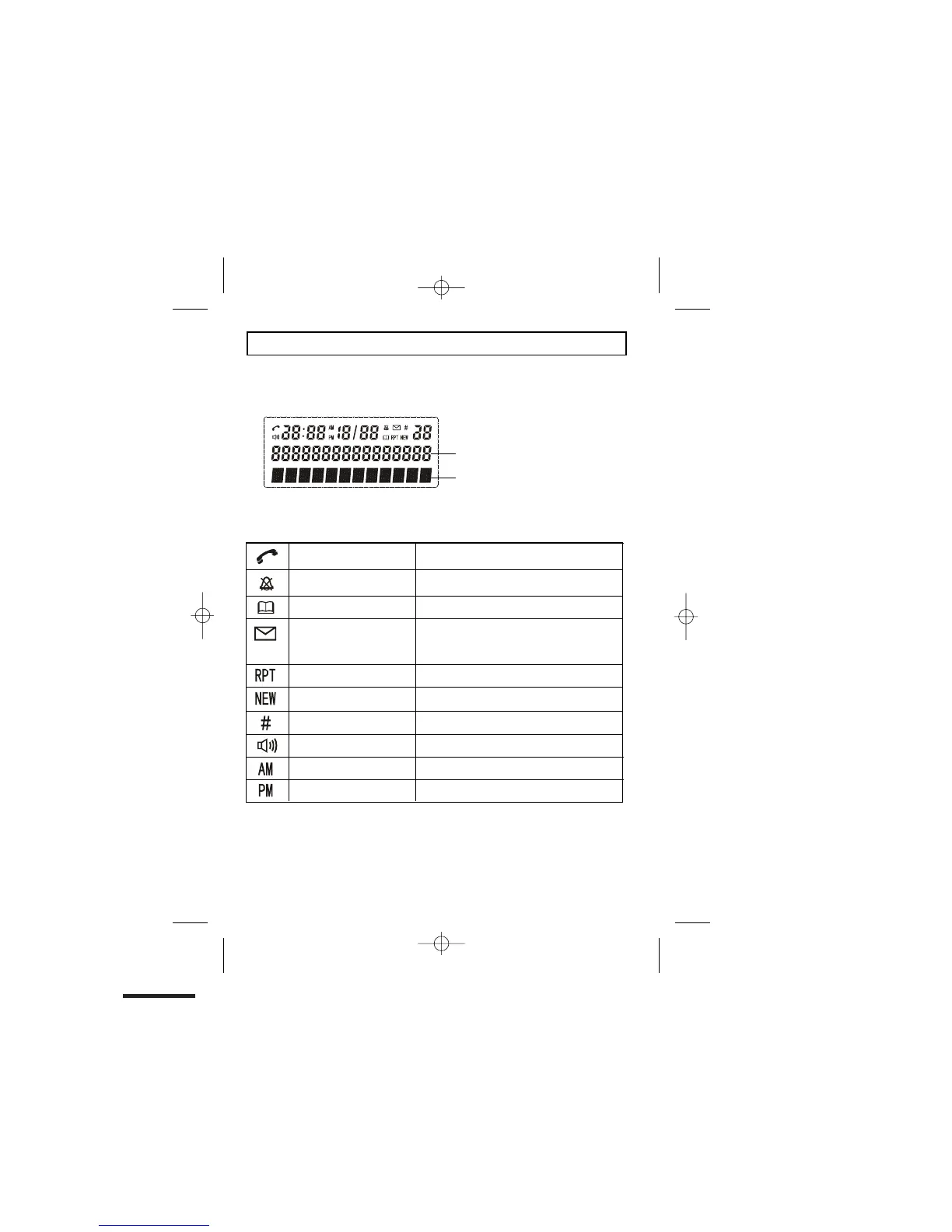
What's on the display?
What do the symbols mean?
Talk
x
This will display when the user picks up the
handset
Ring Off
x
This will display when the ringer is set to
OFF
Phonebook
x This will display when you are in the
phonebook menu
Voicemail
x
Repeat CID
x This will display when the same caller has
called more than once
New CID
x
This will display when there is a new CID
entry or if one is being viewed
Sequence
x Indicates the sequence number of the CID
record
Hands free/speakerphone
x
This will display when the speakerphone is
in use
A.M.
x This will display if it is A.M., in the 12 hour
clock mode
P.M.
x
This is display if it is P.M., in the 12 hour
clock mode
Number field: shows the telephone
numbers
Character field: shows the Menu,
name and status of a call
The display of your telephone contains one line with the Time/Date and Icons, one line
of numbers and one line of text.
This will display when you have a new Voice
Mail message. (This is a caller id service and
is not usually available from UK network
providers.)


 To Next Page